0 ratings

Item #:
16867534
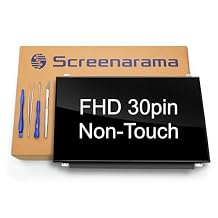
SCREENARAMA New Screen Replacement for NV156FHM-N42 V8.1, FHD 1920x1080, 120Hz Upgrade, Matte, LCD LED Display with Tools
Item #:
16867534
BHD 54
Price Details
Excluding Shipping & Custom charges ( Shipping and custom charges will be calculated on checkout )
*All items will import from US
0 ratings
Write a review
In stock
 Imported from USA store
QTY:
Order now and get it around Wednesday, July 15
Secured transaction
Ubuy works hard to protect your security and privacy. Our advanced payment security system ensures confidentiality by encrypting your information during transmission using AES (Advanced Encryption Standards) and SSL (Secure Socket Layer) protocols. Your payment details are 100% secure as we do not share your payment details with third party sellers.
Our Top Logistics Partners


Designed for DIY installation with included tools.

Fast
Shipping

Free
Return*

Secure Packaging

100% Original Products

PCI DSS Compliance

ISO 27001 Certified


Note: Step Down Voltage Transformer required for using electronics products of US store (110-120). Recommended power converters Buy Now.


What Stands Out
High Resolution
Enjoy breathtaking visuals with a Full HD 1920x1080 display, providing crisp images and vibrant colors for an enhanced viewing experience, ideal for gamers and multimedia enthusiasts.
IPS Technology
Experience wide viewing angles and accurate color reproduction thanks to IPS technology, ensuring that every detail looks stunning from any position, perfect for collaborative work or presentations.
Complete Toolkit Included
Effortlessly replace your screen with the included tools, making installation easy and straightforward for users of all skill levels, saving time and enhancing value for those tackling repairs.
Product Details
| Item Weight | 1.5 lbs (680 grams) |
Who Should Buy?

-
DIY Enthusiasts
Ideal for users who enjoy repairing their own devices and have basic technical skills for installation.
-
Frequent Travelers
Great for those who travel frequently and require a reliable, portable laptop screen in case of damage.
-
Budget-Conscious Users
Perfect for individuals looking to save money by replacing a broken screen instead of purchasing a new laptop.

-
Non-Technical Users
Not suitable for individuals who lack technical skills or confidence in performing installation themselves.
-
High-End Gamers
May not meet the requirements of high-end gamers seeking advanced features or faster refresh rates.
-
Large Corporate Users
Not ideal for businesses needing bulk replacements or specific customization options for their devices.
Product Description
SCREENARAMA New Screen Replacement for NV156FHM-N42 V8.1, FHD 1920x1080, 120Hz Upgrade, Matte, LCD LED Display with Tools
Have any Query? Chat with us
Customer Questions & Answers
-
Question:
What are the key specifications of the SCREENARAMA New Screen Replacement?
Answer: The SCREENARAMA New Screen Replacement features a Full HD resolution of 1920x1080, utilizing IPS technology for superior color accuracy and wide viewing angles. It has a matte finish that minimizes glare, making it ideal for environments with bright lighting. This screen is specifically designed to replace the NV156FHM-N42 model, ensuring a perfect fit for compatible laptops or devices. Whether you're gaming or working on graphic design, this screen provides clear and vibrant visuals that enhance your overall experience. -
Question:
Is the SCREENARAMA screen compatible with other laptop models?
Answer: The SCREENARAMA screen replacement is specifically designed for the NV156FHM-N42 model, ensuring precise compatibility. While some specifications like resolution and size may match with other models, using this screen for different laptops might not yield optimal performance or ideal fitting. Thus, it is recommended to verify the original model number of your existing screen before purchase. If you need to replace an NV156FHM-N42, this screen is an excellent choice for maintaining the visual quality of your device. -
Question:
What tools are included with the SCREENARAMA screen replacement?
Answer: The SCREENARAMA screen replacement comes with necessary tools to assist in the installation process. Typically, this includes screwdrivers and other essential tools that facilitate the safe removal of the old screen and the installation of the new one. By providing these tools, the package aims to simplify the DIY process for users who may not have experience in screen replacements, thereby reducing the need for professional assistance and ensuring that you can confidently handle your laptop repairs. -
Question:
How does the matte finish of the SCREENARAMA screen benefit users?
Answer: The matte finish of the SCREENARAMA screen reduces reflections and glare, making it an excellent choice for users who often work in well-lit environments. This feature enhances visibility by minimizing distracting light reflections on the screen surface, enhancing your ability to view content clearly and comfortably. For professionals and students spending long hours in front of their laptops for reading, editing, or even gaming, having a matte display contributes to a better overall viewing experience and reduces eye strain. -
Question:
Can I install the SCREENARAMA screen replacement myself?
Answer: Yes, you can install the SCREENARAMA screen replacement yourself, especially since the product comes with the necessary tools and straightforward instructions. Many users opt for DIY installation to save costs and discover that with a little patience, it is manageable. Ideal for tech-savvy individuals or anyone willing to learn, the process involves carefully removing the existing screen and securing the new one. Various online video tutorials can further assist you, ensuring that you can replace your screen confidently and effectively. -
Question:
What is the difference between IPS and other display technologies?
Answer: IPS (In-Plane Switching) technology differs from other display technologies, like TN (Twisted Nematic), primarily in color reproduction and viewing angles. IPS displays provide vibrant colors and maintain consistency across a broader range of angles, making them preferable for graphics work or media consumption. On the contrary, TN panels may have faster response times but can sacrifice color accuracy and viewing angles. By choosing the SCREENARAMA screen, you benefit from superior image quality, which is essential for an immersive visual experience. -
Question:
How do I clean the new SCREENARAMA screen replacement?
Answer: To clean your new SCREENARAMA screen, use a soft, lint-free microfiber cloth and a cleaning solution specifically designed for electronics. Avoid using chemical cleaners, paper towels, or rough materials, as these can scratch or damage the screen. Gently wipe the surface in circular motions to remove smudges or dust without applying excessive pressure. Regular cleaning maintains clarity and extends the lifespan of your display, providing a consistently pleasing view whether you're working, browsing, or gaming. -
Question:
Does the SCREENARAMA screen replacement come with any instructions?
Answer: Yes, the SCREENARAMA screen replacement typically includes instructions that guide users through the installation process. These instructions are designed to be clear and easy to follow, ensuring that individuals can successfully replace their screens without prior technical expertise. For those who want additional guidance, several online resources, including video tutorials, provide step-by-step walkthroughs. This makes it accessible for anyone looking to enhance their laptop's visual performance without needing professional repair services. -
Question:
What should I do if the SCREENARAMA screen replacement does not work after installation?
Answer: If the SCREENARAMA screen replacement doesn’t work post-installation, ensure all connections are secure and that the display cable is properly attached to both the screen and motherboard. Sometimes, reattaching or reseating the cable can solve the issue. If the problem persists, refer to any included troubleshooting tips in the instruction manual. For unresolved issues, contacting customer support provides access to further assistance and ensures that you have the support needed to resolve any complications. -
Question:
Where can I buy SCREENARAMA New Screen Replacement for NV156FHM-N42 in Bahrain?
Answer: You can purchase the SCREENARAMA New Screen Replacement for NV156FHM-N42 at Ubuy. They offer a straightforward online shopping experience and a diverse selection of electronic components. By visiting Ubuy, you can easily find the exact screen replacement alongside helpful customer service and support, making it a reliable option for your shopping needs.
SCREENARAMA Replacement Screens Editorial Review
No editorial reviews found
Customer Reviews & Ratings
1 customers ratings
-
5 Star
100%
-
4 Star
0%
-
3 Star
0%
-
2 Star
0%
-
1 Star
0%
Review this product
Share your thoughts with other customers
Product Price History
Important information
- Limitations : For products shipped internationally, please note that any manufacturer warranty may not be valid; manufacturer service options may not be available; product manuals, instructions, and safety warnings may not be in destination country languages; the products (and accompanying materials) may not be designed in accordance with destination country standards, specifications, and labeling requirements; and the products may not conform to destination country voltage and other electrical standards (requiring use of an adapter or converter if appropriate). The recipient is responsible for assuring that the product can be lawfully imported to the destination country. When ordering from Ubuy or its affiliates, the recipient is the importer of record and must comply with all laws and regulations of the destination country.
- Not all the products listed on Ubuy are for sale, as Ubuy is a global search engine. Products are subject to export/trade regulations.
BHD 54
Order now and get it around Wednesday, July 15
This item is not restrict in my country.(Please click on above link if this item is not restrict in your country, So our team will review and allow.)
QTY:
Secured transaction
Ubuy works hard to protect your security and privacy. Our advanced payment security system ensures confidentiality by encrypting your information during transmission using AES (Advanced Encryption Standards) and SSL (Secure Socket Layer) protocols. Your payment details are 100% secure as we do not share your payment details with third party sellers.
Our Top Logistics Partners
Fastest cross-border delivery
Features & Benefits
- Easy DIY installation with all necessary tools included.
- IPS Wide View Matte finish for reduced glare and improved viewing angles.
- Compatible with 1920x1080 FHD resolution for crisp visuals.
- Features a convenient 30-pin connector.
- Specifically designed for Non-Touch laptops.
- Ensure your original screen matches the specifications before buying.