0 ratings






Item #:
146996136
Microsoft Surface USB4 Dock for Business
Item #:
146996136
BHD 88
Price Details
Excluding Shipping & Custom charges ( Shipping and custom charges will be calculated on checkout )
*All items will import from US
10%
0 ratings
Write a review
In stock
 Imported from USA store
QTY:
Only 2 items left in stock.
Order now and get it around Thursday, August 13
Secured transaction
Ubuy works hard to protect your security and privacy. Our advanced payment security system ensures confidentiality by encrypting your information during transmission using AES (Advanced Encryption Standards) and SSL (Secure Socket Layer) protocols. Your payment details are 100% secure as we do not share your payment details with third party sellers.
Our Top Logistics Partners


Charge your Surface device and accessories, keeping them powered all day, with up to 65 W of power passthrough.

Fast
Shipping

Free
Return*

Secure Packaging

100% Original Products

PCI DSS Compliance

ISO 27001 Certified


Note: Step Down Voltage Transformer required for using electronics products of US store (110-120). Recommended power converters Buy Now.


What Stands Out
Versatile Connectivity
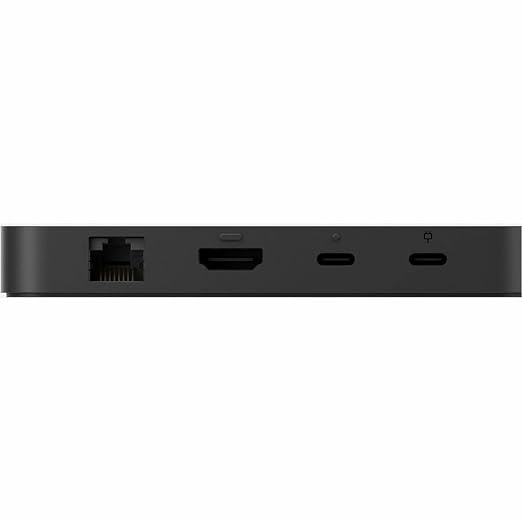
Offers multiple ports including USB4, HDMI, and Ethernet, enabling seamless connections to various devices, enhancing productivity in business environments.
Fast Charging
Delivers up to 100W power delivery capabilities, allowing for rapid device charging while simultaneously connecting multiple peripherals, keeping your workspace organized and efficient.
Compact Design
Designed with a sleek and portable form factor, this dock easily fits into any workspace, offering convenience for professionals who travel or work remotely.
Product Details
- Wired connectivity technology provides a high-powered and dependable connection
- Charging capability provides a safer and more convenient charging experience
- USB4 host interface allows quick transmission of data at a higher rate for your convenience
- Docking Station provides a dependable and fast charging solution for your notebook with maximum productivity
- 5 GB/s maximum data transfer rate for fast, dependable data transfer with added productivity
- Power Delivery Pass-through feature for maximum usage efficiency and convenience
- Desktop form factor for your docking station provides better focus with maximum productivity
- Gigabit Ethernet Ethernet technology for a reliable, convenient way of communication and connectivity
- Power Supply power source type for your docking station provides maximum energy feasibility and added surveillance productivity
- Enjoy HD quality videos on your HDTV with the HDMI port facility
| Hardware Interface | Ethernet, HDMI, USB, USB Docking Station, USB Type C |
| Compatible Devices | Monitor, Notebook, Surface Laptop 5 for Business, Surface Laptop 6 for Business, Surface Laptop for Business, Copilot+ PC | Intel, Surface Laptop for Business, Copilot+ PC | Snapdragon, Surface Pro 10 for Business, Surface Pro 8 for Business, Surface Pro 9 for Business (Intel/WiFi), Surface Pro for Business, Copilot+ PC | Intel, Surface Pro for Business, Copilot+ PC | Snapdragon |
| Total Usb Ports | 5 |
| Number of Ports | 4 |
| Total Number of HDMI Ports | 1 |
| Wattage | 100 |
| Item Dimensions L x W x H | 0.59"L x 2.36"W x 4.72"H (1.5 x 6 x 12 cm) |
| Item Weight | 7.2 ounces (204.12 grams) |
| Color | Black |
| Brand | Microsoft |
| Unit Count | 1 Count |
| UPC | 196388442874 |
| Manufacturer | Microsoft Corporation |
| Model Number | EP2-19863 |
| Mfr Part Number | EP2-19863 |
Who Should Buy?

-
Business Professionals
Ideal for professionals needing reliable connectivity with multiple peripherals and high-speed data transfer in the workplace.
-
Remote Workers
Great for remote employees requiring seamless connections for external monitors and devices while working from home.
-
Creative Designers
Beneficial for designers using high-resolution displays and needing fast data transfer for large files and projects.

-
Casual Users
Not tailored for casual users who may not need extensive connectivity or high data transfer speeds for basic tasks.
Product Description
Have any Query? Chat with us
Customer Questions & Answers
-
Question:
What are the main features of the Microsoft Surface USB4 Dock for Business?
Answer: The Microsoft Surface USB4 Dock for Business features a versatile connectivity hub designed to enhance productivity. It includes multiple ports such as USB-C, USB-A, DisplayPort, and Ethernet, allowing you to connect various devices seamlessly. This dock supports dual 4K monitor setups, enabling expansive workspace capabilities. Additionally, it offers fast data transfer speeds and power delivery to charge your devices. Ideal for professionals needing to connect laptops to external displays, this dock suits executive setups, remote workstations, or any environment where efficient connectivity is essential. -
Question:
Is the Microsoft Surface USB4 Dock compatible with all Surface devices?
Answer: Yes, the Microsoft Surface USB4 Dock is designed specifically for compatibility with Surface devices equipped with USB-C or Thunderbolt 4 ports. This ensures optimal performance by utilizing the full capabilities of the dock. For example, if you are using a Surface Laptop 4 or Surface Pro 8, the dock offers a seamless integration for charging, data transfer, and display output. It’s perfect for users wanting to maximize their Surface devices' potential in an office setup or while working from home. -
Question:
How do I set up the Microsoft Surface USB4 Dock for Business?
Answer: Setting up the Microsoft Surface USB4 Dock is straightforward. Simply connect the dock to your Surface device using the USB-C cable provided. Once attached, plug in additional peripherals such as monitors, keyboards, or mice. The dock automatically configures to communicate with your device, requiring minimal effort for setup. This makes it an excellent choice for anyone looking to establish a quick workstation, whether at a permanent office or as part of a mobile work setup. -
Question:
Can I use the Microsoft Surface USB4 Dock for Business with non-Surface laptops?
Answer: While the Microsoft Surface USB4 Dock is optimized for Surface devices, it can work with other laptops that have USB-C or Thunderbolt 4 ports. However, some features may vary, and it’s essential to check the compatibility of your specific laptop model. For example, if you’re using a high-end laptop that supports Thunderbolt, you can take advantage of rapid data transfers and multi-display support. This versatility makes the dock a great investment for users with multiple devices across different brands. -
Question:
What type of connectivity options does the Microsoft Surface USB4 Dock offer?
Answer: The Microsoft Surface USB4 Dock for Business comes equipped with a range of connectivity options. It features multiple USB-A and USB-C ports, DisplayPort for monitors, and an Ethernet port for wired networking. This variety allows users to connect multiple peripherals at once, creating an efficient desktop setup. For example, you can connect a printer via USB, a high-resolution monitor through DisplayPort, and maintain a stable internet connection all at the same time, facilitating a productive workflow. -
Question:
Does the Microsoft Surface USB4 Dock support charging?
Answer: Yes, the Microsoft Surface USB4 Dock supports power delivery and can charge compatible Surface devices while in use. This feature allows users to keep their devices charged without needing an additional power adapter. For example, if you're using the Surface dock with the Surface Book 3, you can charge the device while simultaneously using external displays and peripherals, which is ideal for maintaining productivity without interruptions. -
Question:
What resolutions can I achieve with the Microsoft Surface USB4 Dock?
Answer: The Microsoft Surface USB4 Dock for Business can support dual 4K displays at 60Hz, making it an excellent choice for graphical work or multitasking environments. Whether you’re a designer needing high-resolution displays for detailed work or a business professional who uses multiple applications simultaneously, the dock enhances your visual experience. This is particularly beneficial in scenarios where screen real estate is crucial, allowing for smoother workflows and increased efficiency. -
Question:
What is the importance of using a dock like the Microsoft Surface USB4 Dock?
Answer: Using a dock like the Microsoft Surface USB4 Dock enhances connectivity and productivity. It consolidates multiple ports into one solution, reducing cable clutter and streamlining your workspace. This is particularly useful for professionals or creatives who require quick access to various devices. By utilizing a dock, you can quickly connect or disconnect your workstation, making it easier to switch between home and office environments or when traveling. -
Question:
What type of users will benefit most from the Microsoft Surface USB4 Dock?
Answer: The Microsoft Surface USB4 Dock is an ideal accessory for professionals, designers, and remote workers who require a flexible workspace. Its robust connectivity options make it suitable for office environments where multiple devices and monitors are common. For instance, if you are a graphic designer working with high-resolution files, this dock allows you to connect multiple displays for enhanced visuals, reducing the need for frequent tab switching and improving overall efficiency. -
Question:
Where can I buy Microsoft Surface USB4 Dock for Business in Bahrain?
Answer: You can buy the Microsoft Surface USB4 Dock for Business in Bahrain at Ubuy. They offer a convenient online shopping platform that provides various electronic products, including the latest technology accessories like this dock. Ubuy is recognized for its seamless purchasing experience and reliable customer support, ensuring you get the product you need quickly and efficiently.
Microsoft Docking Stations EP2-19863 Editorial Review
No editorial reviews found
Customer Reviews & Ratings
4 customers ratings
-
5 Star
28%
-
4 Star
22%
-
3 Star
32%
-
2 Star
0%
-
1 Star
18%
Review this product
Share your thoughts with other customers
Pros
- Multiple ports available
- Compact design
- Easy to set up
- Compatible with various devices
Cons
- Limited overall performance.
Platform Trust & Buyer Confidence

MB
Maryam
Verified buyer
“The order arrived fast and in perfect condition”
2 June 2026 · via Trustpilot
T
trusttaker
Verified buyer
“I loved it. That was my second order, and I am already thinking of placing a third order.”
16-Jul-26 · via Trustpilot
HA
Haitham
Verified buyer
“Trusted merchant”
11 July 2026 · via Trustpilot
MA
Mohammad
Verified buyer
“Excellent quality and very fast delivery, I really appreciate your service, when you work good I will appreciate that, I am very satisfied , thank you”
13 June 2026 · via Trustpilot
LA
Lulwa
Verified buyer
“I like the package arrived safely”
17 June 2026 · via Trustpilot
Secure Checkout
Global Delivery
Easy Returns
Genuine Products
Product Price History
Important information
- Limitations : For products shipped internationally, please note that any manufacturer warranty may not be valid; manufacturer service options may not be available; product manuals, instructions, and safety warnings may not be in destination country languages; the products (and accompanying materials) may not be designed in accordance with destination country standards, specifications, and labeling requirements; and the products may not conform to destination country voltage and other electrical standards (requiring use of an adapter or converter if appropriate). The recipient is responsible for assuring that the product can be lawfully imported to the destination country. When ordering from Ubuy or its affiliates, the recipient is the importer of record and must comply with all laws and regulations of the destination country.
- Not all the products listed on Ubuy are for sale, as Ubuy is a global search engine. Products are subject to export/trade regulations.
BHD 88
Order now and get it around Thursday, August 13
This item is not restrict in my country.(Please click on above link if this item is not restrict in your country, So our team will review and allow.)
QTY:
Only 2 items left in stock.
Secured transaction
PCI DSS compliant and ISO 27001:2022 certified, with encrypted payments and full buyer protection on every order.
Our Top Logistics Partners
Fastest cross-border delivery
Features & Benefits
- Up to 65 W power passthrough keeps devices charged.
- High-speed data transfer at up to 40 Gbps with USB4 technology.
- Multiple ports including USB-C, USB-A, HDMI, and Ethernet for all accessories.
- Supports dual 4K monitors or a single 8K monitor for expanded setups.
- Compact design for a neat and organized workspace.
- Automatic firmware updates ensure optimal performance.
Ubuy Assurance
Experience worry-free shopping with 100% original products, PCI DSS-compliant payment security, ISO 27001-certified data protection, the fastest cross-border delivery, free returns *, and secure packaging on every order.