- Home Page /
- Electronics /
- Computer Accessories /
- Computer Accessories & Peripherals /
- Cables & Accessories /
- Cables & Interconnects /
- USB Cables /
- Console Cable RJ45 to USB, Console Cable,USB ...
0 ratings

Item #:
88953996
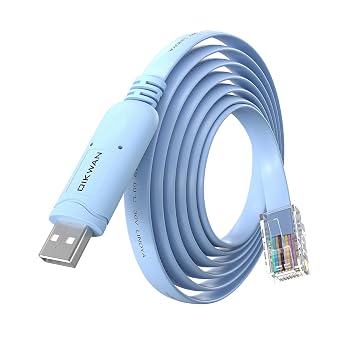
Console Cable RJ45 to USB, Console Cable,USB Console Cable with FT232 Chip Compatible with Cisco,HP,NETGEAR,Huawei,RoutersSwitches for Laptop in
Item #:
88953996
BHD 12
Price Details
Excluding Shipping & Custom charges ( Shipping and custom charges will be calculated on checkout )
*All items will import from US
0 ratings
Write a review
In stock
 Imported from USA store
QTY:
Order now and get it around Sunday, July 05
Secured transaction
Ubuy works hard to protect your security and privacy. Our advanced payment security system ensures confidentiality by encrypting your information during transmission using AES (Advanced Encryption Standards) and SSL (Secure Socket Layer) protocols. Your payment details are 100% secure as we do not share your payment details with third party sellers.
Our Top Logistics Partners


This USB-C Cisco Console Cable is the exact cable to solve your connectivity issues with Cisco devices, guaranteeing seamless access to your network.

Fast
Shipping

Free
Return*

Secure Packaging

100% Original Products

PCI DSS Compliance

ISO 27001 Certified


Note: Step Down Voltage Transformer required for using electronics products of US store (110-120). Recommended power converters Buy Now.


What Stands Out
Versatile Compatibility
Designed to connect various devices like Cisco routers and switches, this cable ensures seamless compatibility across Windows, Mac OS, and Linux systems for versatile networking solutions.
Dual Pack Value
The two-pack offering provides excellent value, ensuring you have a backup for critical networking tasks or the ability to connect multiple devices simultaneously, enhancing efficiency.
High-Speed Data Transfer
Designed for fast and reliable data transmission, this USB-C to RJ45 cable offers enhanced performance for network management, minimizing downtime and ensuring smoother connections for IT professionals.
Product Details
| Country of Origin | This item will be imported from US |
| Item Weight | 0.5 lbs (230 grams) |
| What is in the box | Console Cable RJ45 to... For more details, please check description/product details |
Who Should Buy?

-
Network Administrators
Essential for managing Cisco devices efficiently, ensuring reliable connections for setups and troubleshooting.
-
IT Professionals
Ideal for professionals who require quick access and control over network equipment using modern USB-C enabled devices.
-
Tech Enthusiasts
Perfect for hobbyists and developers working with routers or switches, wishing to gain deeper networking insights.

-
Casual Users
Not suitable for everyday users who do not require direct access or configuration of networking devices.
-
Non-Technical Users
Unsuitable for individuals unfamiliar with networking concepts or who do not need advanced configuration capabilities.
-
Wireless-Only Users
Not ideal for users who only rely on wireless connections and do not use wired configurations for their devices.
Product Description
Console Cable RJ45 to USB, Console Cable,USB Console Cable with FT232 Chip Compatible with Cisco,HP,NETGEAR,Huawei,RoutersSwitches for Laptop in Linux,Windows, Mac
Have any Query? Chat with us
Customer Questions & Answers
-
Question:
What is a Console Cable RJ45 to USB and what is it used for?
Answer: A Console Cable RJ45 to USB is a specialized cable that enables you to connect networking devices, such as routers and switches, to your computer via USB. This allows for direct access to the console interface of devices from brands like Cisco, HP, NETGEAR, and Huawei. It's particularly useful for network configuration, troubleshooting, and administering network devices that may not have a graphical interface. By facilitating a direct connection, it enables you to issue commands and monitor device statuses efficiently. -
Question:
Is the Console Cable compatible with all operating systems?
Answer: Yes, this Console Cable RJ45 to USB is compatible with major operating systems including Linux, Windows, and Mac. It utilizes the FT232 chip, which is widely recognized for its reliable performance across different platforms. This ensures that no matter your computer's OS, you'll be able to establish a quick and effective connection to your network devices. This versatility comes in handy for network professionals who use multiple OS environments for managing network infrastructure. -
Question:
Can I use this cable with both routers and switches?
Answer: Absolutely! The Console Cable RJ45 to USB is designed to work with both routers and switches from various manufacturers like Cisco, HP, NETGEAR, and Huawei. This makes it a versatile tool in network management as it allows you to connect to different types of devices without needing multiple cables. Whether you are setting up a new router or configuring a switch in a data center, this cable serves as an essential link for console access. -
Question:
What is the FT232 chip and why is it important?
Answer: The FT232 chip is a USB to serial interface converter that plays a crucial role in ensuring the smooth communication between your computer and network devices. It converts USB signals to serial communication, which most routers and switches use for console access. The reliability of the FT232 chip means fewer connectivity issues and better performance, making it a great choice for administrators who need to manage their devices efficiently. -
Question:
How do I install drivers for the Console Cable?
Answer: To install the necessary drivers for the Console Cable RJ45 to USB, you'll first need to identify your operating system. Visit the manufacturer’s website for the FTDI drivers. For Windows, the installation is typically straightforward; you may simply run the installer. On Linux, drivers are usually included in the kernel, allowing plug-and-play functionality. For Mac, you may need to download drivers from FTDI's official site to ensure compatibility. This will allow your computer to recognize the console cable, enabling effective communication. -
Question:
Can this cable be used for programming network devices?
Answer: Yes, the Console Cable RJ45 to USB is perfect for programming network devices. Whether you’re implementing initial configurations, updates, or changes to the device settings, the cable allows direct access to the device's command line interface. This is especially vital for network engineers who frequently need to make adjustments directly via console commands. Its versatility makes it an invaluable resource for any IT professional. -
Question:
How do I determine if my device is compatible with this console cable?
Answer: To determine if your device is compatible with this Console Cable RJ45 to USB, check the product specifications on your device manuals or the manufacturer's website. Primarily, ensure that your device has a dedicated console port (usually RJ45) and is one of the supported brands like Cisco, HP, NETGEAR, or Huawei. Compatibility is generally guaranteed if the device accepts serial console connections, making it suitable for configuration tasks. -
Question:
What if I encounter connection problems while using the console cable?
Answer: If you face connection problems while using the Console Cable RJ45 to USB, first ensure that the cable is securely connected to both the computer and the networking device. Check for proper driver installation on your computer. You may also want to verify the correct COM port settings in your terminal software. Common terminal programs like PuTTY or Tera Term should be configured with the right baud rate (usually 9600) for optimal performance. Troubleshooting these aspects often resolves connectivity issues swiftly. -
Question:
Can I use this cable with a USB hub?
Answer: Yes, you can use the Console Cable RJ45 to USB with a USB hub. However, it is recommended to connect it directly to a USB port on your computer for optimal speed and performance. In case of any issues, unplugging the cable from the USB hub and connecting it directly can often resolve connectivity problems. Keeping a direct connection ensures that any power or data transmission issues associated with hubs are minimized. -
Question:
Where can I buy the Console Cable RJ45 to USB?
Answer: You can buy the Console Cable RJ45 to USB at Ubuy, which offers a wide range of tech gadgets including high-quality console cables compatible with Cisco, HP, NETGEAR, and Huawei devices. Ubuy provides a user-friendly shopping experience and reliable service, ensuring that you receive a product that meets your networking needs seamlessly. Don't forget to check their site for any ongoing promotions or discounts!
OIKWAN USB Cables Editorial Review
No editorial reviews found
Customer Reviews & Ratings
1 customers ratings
-
5 Star
100%
-
4 Star
0%
-
3 Star
0%
-
2 Star
0%
-
1 Star
0%
Review this product
Share your thoughts with other customers
Product Price History
Important information
- Limitations : For products shipped internationally, please note that any manufacturer warranty may not be valid; manufacturer service options may not be available; product manuals, instructions, and safety warnings may not be in destination country languages; the products (and accompanying materials) may not be designed in accordance with destination country standards, specifications, and labeling requirements; and the products may not conform to destination country voltage and other electrical standards (requiring use of an adapter or converter if appropriate). The recipient is responsible for assuring that the product can be lawfully imported to the destination country. When ordering from Ubuy or its affiliates, the recipient is the importer of record and must comply with all laws and regulations of the destination country.
- Not all the products listed on Ubuy are for sale, as Ubuy is a global search engine. Products are subject to export/trade regulations.
BHD 12
Order now and get it around Sunday, July 05
This item is not restrict in my country.(Please click on above link if this item is not restrict in your country, So our team will review and allow.)
QTY:
Secured transaction
Ubuy works hard to protect your security and privacy. Our advanced payment security system ensures confidentiality by encrypting your information during transmission using AES (Advanced Encryption Standards) and SSL (Secure Socket Layer) protocols. Your payment details are 100% secure as we do not share your payment details with third party sellers.
Our Top Logistics Partners
Fastest cross-border delivery
Features & Benefits
- Essential accessory for Cisco, NETGEAR, Ubiquity, LINKSYS, and TP-Link devices.
- 6ft cable length provides convenience for connection.
- Compatible with any laptop/PC featuring a USB-C port.
- FTDI FT232R chip ensures reliable performance.
- No CD required, drivers included with Windows OS.
- Manual driver installation needed for MAC and mobile devices.