0 ratings


Item #:
164176757
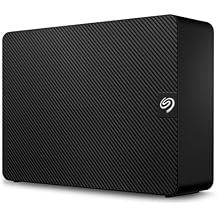
Seagate Expansion Desktop 10TB, External Hard Drive, USB 3.0, Data Rescue Services (STKP10000400)
Item #:
164176757
BHD 132
Price Details
Excluding Shipping & Custom charges ( Shipping and custom charges will be calculated on checkout )
*All items will import from US
0 ratings
Write a review
In stock
 Imported from USA store
QTY:
Order now and get it around Saturday, June 27
Secured transaction
Ubuy works hard to protect your security and privacy. Our advanced payment security system ensures confidentiality by encrypting your information during transmission using AES (Advanced Encryption Standards) and SSL (Secure Socket Layer) protocols. Your payment details are 100% secure as we do not share your payment details with third party sellers.
Our Top Logistics Partners


Easy-to-use desktop hard drive—simply plug in and start saving.

Fast
Shipping

Free
Return*

Secure Packaging

100% Original Products

PCI DSS Compliance

ISO 27001 Certified


Note: Step Down Voltage Transformer required for using electronics products of US store (110-120). Recommended power converters Buy Now.


What Stands Out
Massive Storage
With 10TB capacity, it offers ample space for storing large files, making it ideal for gamers, photographers, and media professionals who need to keep their data organized and accessible.
Fast Connectivity
USB 3.0 technology provides quick file transfers, reducing wait times and enhancing productivity, perfect for users who require efficiency in handling large data volumes.
Data Rescue Services
Includes data recovery services, providing peace of mind by safeguarding valuable information against potential loss, setting it apart as a valuable investment for those fearing data mishaps.
Product Details
| Item Weight | 3.5 lbs (1.59 kg) |
Who Should Buy?

-
Content Creators
Photographers and videographers can securely store large files without worrying about space limitations and data loss.
-
Home Users
Families looking to backup photos, videos, and documents can benefit from ample storage in a reliable external drive.
-
Small Businesses
Companies needing an affordable solution for data backup and easy access to large datasets will find this hard drive useful.

-
Frequent Travelers
Individuals who travel often may find this large external hard drive cumbersome to carry and less portable.
-
Heavy Gamers
Gamers requiring high-speed read/write performance may find the USB 3.0 connection limits compared to SSDs.
-
Tech Minimalists
Users preferring minimalist setups may consider the size and additional features excessive for their storage needs.
Product Description
Seagate Expansion Desktop 10TB, External Hard Drive, USB 3.0, Data Rescue Services (STKP10000400)
Have any Query? Chat with us
Customer Questions & Answers
-
Question:
What is the storage capacity of the Seagate Expansion Desktop external hard drive?
Answer: The Seagate Expansion Desktop external hard drive offers a robust storage capacity of 10TB. This significant amount of space allows users to store a vast array of data, from large video files and high-resolution images to extensive document libraries. Whether you’re backing up your home computer or storing multimedia projects, this hard drive provides ample room for all your important files, making it an ideal choice for both personal and professional use. -
Question:
What type of connectivity does the Seagate Expansion Desktop hard drive use?
Answer: The Seagate Expansion Desktop hard drive utilizes USB 3.0 connectivity, which ensures faster data transfer speeds compared to previous USB versions. This allows users to quickly transfer large files, enabling efficient workflows for tasks like video editing or data backup. For those still using USB 2.0 devices, the hard drive is backward compatible, allowing seamless use across different systems. -
Question:
Is the Seagate Expansion Desktop 10TB hard drive portable?
Answer: No, the Seagate Expansion Desktop is designed primarily as a stationary external hard drive. Its larger size and need for AC power make it more suitable for use in a home or office setting rather than as a portable storage solution. Users who require a hard drive for traveling may consider a smaller, portable version from Seagate’s lineup. -
Question:
What types of data is the Seagate Expansion Desktop suitable for?
Answer: The Seagate Expansion Desktop is versatile enough to handle various types of data, such as documents, photos, music, videos, and game files. Its large storage capacity makes it particularly beneficial for professionals who deal with heavy media files, such as photographers, videographers, or graphic designers, allowing for easy access and organization of extensive projects. -
Question:
Does the Seagate Expansion Desktop come with data rescue services?
Answer: Yes, the Seagate Expansion Desktop includes Data Rescue Services, providing a safety net in case of accidental file deletion or data loss. This service offers users peace of mind, knowing that there are options for data recovery should unforeseen issues arise. It's especially valuable for businesses and professionals who cannot afford to lose critical information. -
Question:
How do I set up the Seagate Expansion Desktop hard drive?
Answer: Setting up the Seagate Expansion Desktop hard drive is straightforward. Simply connect the hard drive to your computer using the provided USB cable and plug it into a power outlet. The drive will be automatically recognized by most operating systems, allowing for immediate access to start transferring and organizing your data. This plug-and-play functionality makes it accessible for users of all tech skill levels. -
Question:
What file systems does the Seagate Expansion Desktop support?
Answer: The Seagate Expansion Desktop is formatted in NTFS by default, which is compatible with Windows operating systems. For users who need to utilize the drive with macOS, reformatting may be necessary. Users can do this through their operating system's disk management utilities to ensure full compatibility, allowing flexibility depending on the devices being used. -
Question:
Can I use the Seagate Expansion Desktop for gaming?
Answer: Yes, the Seagate Expansion Desktop is suitable for gaming, providing ample storage for game installations, downloadable content, and saved game data. Its USB 3.0 connectivity offers fast load times, enhancing the gaming experience. Gamers looking for extra storage can utilize this hard drive to optimize their console or PC without worrying about running out of space quickly. -
Question:
How does the Seagate Expansion Desktop handle power consumption?
Answer: The Seagate Expansion Desktop is designed with energy efficiency in mind. It features an automatic sleep mode that activates during periods of inactivity, reducing power consumption without requiring manual intervention. This not only contributes to lower energy bills but also prolongs the lifespan of the hard drive, making it a practical choice for long-term use. -
Question:
Where can I buy the Seagate Expansion Desktop 10TB, External Hard Drive, USB 3.0, Data Rescue Services STKP10000400?
Answer: You can purchase the Seagate Expansion Desktop 10TB external hard drive on Ubuy in Bahrain. Ubuy offers a user-friendly shopping experience, ensuring you get the product delivered conveniently to your location. With a streamlined buying process, you can easily find and purchase this reliable storage solution, along with other tech accessories.
Seagate External Hard Drives Editorial Review
The Seagate Expansion Desktop 10TB external hard drive has garnered a mixed reception from users, with a blend of positive feedback regarding its storage capacity and overall value, contrasted with varying issues related to performance and reliability. Customers appreciate the extensive 10TB storage option, making it an attractive choice for backing up important files such as pictures and videos. The ability to continuously back up new data is also highlighted as a beneficial feature provided by the accompanying software. While many users cite their long-standing trust in the Seagate brand, having used their products for over a decade, others encountered significant performance troubles. Issues include delays in accessing the drive, freezing File Explorer for an extended period, which greatly affects user experience, particularly for those with powerful setups. Moreover, some users reported defects, including a complete failure after a short period of use, demonstrating potential quality control problems. In terms of installation, users noted the necessity of downloading additional software from the Seagate website if it does not come pre-installed, which may require some technical effort for less experienced users. Overall, while the Seagate Expansion Desktop holds appeal for its large storage capacity and value, the performance hiccups and reliability concerns may prompt potential buyers to Consider alternatives before making a purchase. **
Customer Reviews & Ratings
1 customers ratings
-
5 Star
100%
-
4 Star
0%
-
3 Star
0%
-
2 Star
0%
-
1 Star
0%
Review this product
Share your thoughts with other customers
Pros
- Large 10TB storage capacity ideal for backups
- Good value for the price
- Continuous backup functionality
- Established brand reputation for reliability
Cons
- Delays in accessing data, causing File Explorer to freeze
Product Price History
Important information
- Limitations : For products shipped internationally, please note that any manufacturer warranty may not be valid; manufacturer service options may not be available; product manuals, instructions, and safety warnings may not be in destination country languages; the products (and accompanying materials) may not be designed in accordance with destination country standards, specifications, and labeling requirements; and the products may not conform to destination country voltage and other electrical standards (requiring use of an adapter or converter if appropriate). The recipient is responsible for assuring that the product can be lawfully imported to the destination country. When ordering from Ubuy or its affiliates, the recipient is the importer of record and must comply with all laws and regulations of the destination country.
- Not all the products listed on Ubuy are for sale, as Ubuy is a global search engine. Products are subject to export/trade regulations.
BHD 132
Order now and get it around Saturday, June 27
This item is not restrict in my country.(Please click on above link if this item is not restrict in your country, So our team will review and allow.)
QTY:
Secured transaction
Ubuy works hard to protect your security and privacy. Our advanced payment security system ensures confidentiality by encrypting your information during transmission using AES (Advanced Encryption Standards) and SSL (Secure Socket Layer) protocols. Your payment details are 100% secure as we do not share your payment details with third party sellers.
Our Top Logistics Partners
Fastest cross-border delivery
Features & Benefits
- 10TB capacity for vast storage needs.
- Plug-and-play setup with minimal effort.
- Fast file transfers via USB 3.0.
- Drag-and-drop functionality for convenient use.
- Automatic recognition for Windows and Mac systems.
- Reformatting needed for Time Machine compatibility.