0 ratings

Item #:
102622690
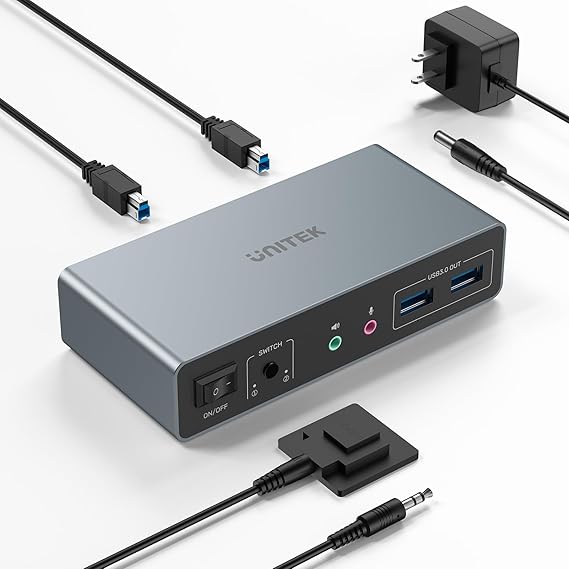
Unitek KVM Switch 2 Monitors 2 Computers 4K@60Hz HDMI+Displayport Dual Monitor KVM Switches 3 USB Ports for Sharing Keyboard Mouse Hard Drives Mic
Item #:
102622690
BHD 37
Price Details
Excluding Shipping & Custom charges ( Shipping and custom charges will be calculated on checkout )
*All items will import from US
0 ratings
Write a review
In stock
 Imported from USA store
QTY:
Order now and get it around Wednesday, July 08
Secured transaction
Ubuy works hard to protect your security and privacy. Our advanced payment security system ensures confidentiality by encrypting your information during transmission using AES (Advanced Encryption Standards) and SSL (Secure Socket Layer) protocols. Your payment details are 100% secure as we do not share your payment details with third party sellers.
Our Top Logistics Partners


Easily switch between two computers with the one-button switch or the desktop controller, helping you save desk space while sharing your monitor, keyboard, and mouse.

Fast
Shipping

Free
Return*

Secure Packaging

100% Original Products

PCI DSS Compliance

ISO 27001 Certified


Note: Step Down Voltage Transformer required for using electronics products of US store (110-120). Recommended power converters Buy Now.


What Stands Out
Dual Monitor Support
Seamlessly connect two computers to dual monitors, maximizing your workspace and productivity while delivering crystal-clear 4K@60Hz resolution for enhanced visual experiences.
Multiple Device Compatibility
Equipped with HDMI and DisplayPort ports, this KVM switch supports a wide range of devices, ensuring versatility for various setups including professional and gaming environments.
Easy Peripheral Sharing
Three USB ports enable effortless sharing of keyboard, mouse, and other peripherals between computers, streamlining workflows and eliminating clutter without the hassle of constant re-plugging.
Product Details
| Item Weight | 2.95 lbs (1.34 kg) |
Who Should Buy?

-
Dual Monitor Setup
Ideal for users who need to manage two computers simultaneously using two monitors for enhanced productivity.
-
Gamers and Streamers
Great for gamers who require high-resolution output and seamless control over multiple systems during gameplay.
-
Professional Workstations
Perfect for professionals needing to switch between computers without the hassle of unplugging and replugging devices.

-
Single Monitor Users
Not suitable for those using only one monitor as the dual monitor feature will be unnecessary.
-
Limited Budget
May not be suitable for users with a strict budget as it could be considered a premium-priced equipment.
-
Casual Users
Less ideal for casual users who do not frequently switch between computers or use extensive peripherals.
Product Description
Unitek KVM Switch 2 Monitors 2 Computers 4K@60Hz HDMI+Displayport Dual Monitor KVM Switches 3 USB Ports for Sharing Keyboard Mouse Hard Drives Mic Headset 2 USB-B Cable DC 5V Adapter Controller
Have any Query? Chat with us
Customer Questions & Answers
-
Question:
What is the resolution supported by the Unitek KVM Switch?
Answer: The Unitek KVM Switch supports a stunning resolution of 4K at 60Hz, providing exceptional clarity and detail for your dual monitor setup. This high resolution is essential for tasks that require precise visuals, such as graphic design, video editing, or gaming. By utilizing HDMI or DisplayPort connections, it ensures a seamless experience, making it ideal for professionals who need to operate multiple computers without sacrificing display quality. -
Question:
How does the Unitek KVM Switch enable monitor and computer sharing?
Answer: The Unitek KVM Switch allows you to control two computers using one keyboard and mouse while connecting two monitors, enabling a smooth workflow. By simply toggling between the two computers, users can streamline their tasks without the hassle of switching cables or hardware. This is particularly beneficial for users who work with different operating systems or applications simultaneously, making it a versatile tool for multitasking. -
Question:
What USB ports are available on the Unitek KVM Switch?
Answer: The Unitek KVM Switch is equipped with three USB ports that allow users to share peripherals like a keyboard, mouse, or even external hard drives between two connected computers. This facilitates a clutter-free workspace, as you don’t need multiple devices for each computer. Ideal for individuals with limited desk space, this feature significantly enhances productivity by simplifying device management while ensuring high-speed data transfer. -
Question:
Is the Unitek KVM Switch compatible with both HDMI and DisplayPort?
Answer: Yes, the Unitek KVM Switch is designed to be compatible with HDMI and DisplayPort connections, providing flexibility based on your setup. This dual compatibility ensures that it can be integrated into various environments, whether you're using modern monitors or older equipment. Users can easily switch between the two types of connections, allowing for maximum versatility in connecting different displays and systems. -
Question:
Can the Unitek KVM Switch handle audio input?
Answer: The Unitek KVM Switch also facilitates audio input through the connected microphone and can output sound to monitors that support audio over HDMI or DisplayPort. This means you can effectively manage both your video and audio needs with a single device. It’s particularly useful for video conferencing or when creating content, as you can control audio without needing separate devices, streamlining your workflow. -
Question:
What are the ideal use cases for the Unitek KVM Switch?
Answer: The Unitek KVM Switch is ideal for professionals who require a dual monitor setup for tasks like graphic design, programming, or extensive data analysis. It caters to gamers who wish to utilize two systems simultaneously or streamers who interact with viewers while gaming. Furthermore, it is perfect for office environments where multiple devices need to be controlled from a single workstation, enhancing productivity and efficiency. -
Question:
How does switching between computers work with the Unitek KVM Switch?
Answer: Switching between the two connected computers on the Unitek KVM Switch is straightforward. Users can toggle the switch using a button on the device or a keyboard shortcut, depending on the configuration. This quick switching capability allows for uninterrupted multitasking and fast transitions between work projects or entertainment systems, making it highly valuable for tech-savvy users who demand efficiency. -
Question:
What types of devices can be connected to the Unitek KVM Switch?
Answer: The Unitek KVM Switch supports a variety of devices, including PCs, laptops, and gaming consoles, that utilize HDMI or DisplayPort outputs. With its compatibility with different operating systems and hardware, users can easily integrate it into their existing setups. This extensive compatibility makes it a versatile choice, allowing you to connect personal devices and office equipment efficiently. -
Question:
Is installation of the Unitek KVM Switch complicated?
Answer: Installation of the Unitek KVM Switch is generally straightforward and does not require complicated steps. Users just need to connect their monitors, computers, and USB devices as per the manual instructions. This user-friendly approach is ideal for individuals who may not be tech-savvy but want to enhance their workspace without elaborate configurations. Once set up, users can immediately start enjoying the benefits of the KVM switch. -
Question:
Where can I buy the Unitek KVM Switch?
Answer: You can buy the Unitek KVM Switch from Ubuy in Bahrain, where it is available for customers seeking efficient dual monitor setups. Ubuy offers access to a variety of electronic products and provides a reliable shopping experience. By purchasing through Ubuy, you can enjoy the convenience of online shopping and ensure that you're getting a quality product for your needs.
Unitek KVM Switches Editorial Review
No editorial reviews found
Customer Reviews & Ratings
1 customers ratings
-
5 Star
100%
-
4 Star
0%
-
3 Star
0%
-
2 Star
0%
-
1 Star
0%
Review this product
Share your thoughts with other customers
Top selling KVM Switch in Bahrain


Last Updated on June 29, 2026
Product Price History
Important information
- Limitations : For products shipped internationally, please note that any manufacturer warranty may not be valid; manufacturer service options may not be available; product manuals, instructions, and safety warnings may not be in destination country languages; the products (and accompanying materials) may not be designed in accordance with destination country standards, specifications, and labeling requirements; and the products may not conform to destination country voltage and other electrical standards (requiring use of an adapter or converter if appropriate). The recipient is responsible for assuring that the product can be lawfully imported to the destination country. When ordering from Ubuy or its affiliates, the recipient is the importer of record and must comply with all laws and regulations of the destination country.
- Not all the products listed on Ubuy are for sale, as Ubuy is a global search engine. Products are subject to export/trade regulations.
BHD 37
Order now and get it around Wednesday, July 08
This item is not restrict in my country.(Please click on above link if this item is not restrict in your country, So our team will review and allow.)
QTY:
Secured transaction
Ubuy works hard to protect your security and privacy. Our advanced payment security system ensures confidentiality by encrypting your information during transmission using AES (Advanced Encryption Standards) and SSL (Secure Socket Layer) protocols. Your payment details are 100% secure as we do not share your payment details with third party sellers.
Our Top Logistics Partners
Fastest cross-border delivery
Features & Benefits
- Connect two computers to dual monitors and 3 USB 3.0 devices.
- Supports 4K@60Hz resolution for stunning visuals.
- Convenient one-button switching or remote controller for easy operation.
- Lightning-fast data transfer up to 5Gbps with USB 3.0 ports.
- Plug and play installation with no driver required.
- Includes power adapter and necessary cables for stable performance.