0 ratings

Item #:
96805598
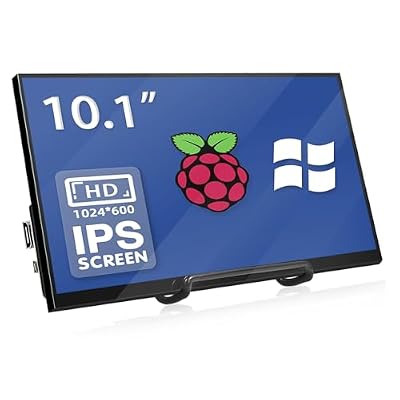
HAMTYSAN 10.1 Inch Raspberry Pi Screen 1024x600 HDMI Monitor IPS Screen Display Secondary Monitor Extend Monitor for Raspberry Pi 5432ZeroBB
Item #:
96805598
BHD 29
Price Details
Excluding Shipping & Custom charges ( Shipping and custom charges will be calculated on checkout )
*All items will import from US
0 ratings
Write a review
In stock
 Imported from USA store
QTY:
Order now and get it around Wednesday, July 08
Secured transaction
Ubuy works hard to protect your security and privacy. Our advanced payment security system ensures confidentiality by encrypting your information during transmission using AES (Advanced Encryption Standards) and SSL (Secure Socket Layer) protocols. Your payment details are 100% secure as we do not share your payment details with third party sellers.
Our Top Logistics Partners


The HAMTYSAN 10.1-inch monitor provides brighter, clearer, and smoother images with superb compatibility for all your devices.

Fast
Shipping

Free
Return*

Secure Packaging

100% Original Products

PCI DSS Compliance

ISO 27001 Certified


Note: Step Down Voltage Transformer required for using electronics products of US store (110-120). Recommended power converters Buy Now.


What Stands Out
High Resolution
With a 1024x600 resolution, this monitor delivers clear and sharp visuals, making it ideal for coding, graphic design, or multimedia tasks on Raspberry Pi.
Wide Compatibility
Designed to work seamlessly with Raspberry Pi models 5, 4, 3, 2, Zero, and various Windows operating systems, ensuring versatile usage across different platforms.
Driver Free
No drivers required for setup allows for quick and hassle-free installation, making it user-friendly even for beginners in the Raspberry Pi community.
Product Details
| Item Weight | 25 lbs (11.34 kg) |
Who Should Buy?

-
Raspberry Pi Users
Ideal for those building projects with Raspberry Pi, needing an additional display for coding or monitoring applications.
-
Portable Setup
Perfect for users wanting a lightweight, portable monitor for mobile applications or outdoor projects with Raspberry Pi.
-
Budget Users
Great for budget-conscious users who need a basic display without touch functionality or high-end features.

-
Touchscreen Needs
Not suitable for users specifically requiring touch functionality for interactive applications or user interfaces.
-
High-Resolution Tasks
Unsuitable for graphic designers or video editors needing high resolution and color accuracy in display quality.
-
Gaming Enthusiasts
Not the best choice for gamers requiring high refresh rates and low latency for an immersive gaming experience.
Product Description
HAMTYSAN 10.1 Inch Raspberry Pi Screen 1024x600 HDMI Monitor IPS Screen Display Secondary Monitor Extend Monitor for Raspberry Pi 5432ZeroBB Win111087, Non-Touch, Driver Free
Have any Query? Chat with us
Customer Questions & Answers
-
Question:
What are the main features of a 101 inch HDMI monitor for laptop?
Answer: A 101 inch HDMI monitor for a laptop typically features a high resolution display that offers clear, vibrant visuals. These monitors often support HDMI inputs, making them compatible with most laptops. They may include additional features like adjustable brightness, multiple connectivity options (like USB-C), and built-in speakers. This makes them ideal for presentations, gaming, or watching movies. The large screen size enhances productivity, especially for multitasking professionals who require more visual space. -
Question:
Can I connect my laptop to a 101 inch HDMI monitor wirelessly?
Answer: While many monitors mainly offer HDMI connectivity, some models support wireless connections via Wi-Fi or Bluetooth. If you're looking to connect without cables, ensure your 101 inch HDMI monitor is equipped with technologies such as MiraCast or AirPlay. This allows for screen mirroring or extending your laptop's display wirelessly, perfect for a clutter-free workspace or showcasing presentations. Always check your laptop's compatibility to make the most out of this feature. -
Question:
Is a 101 inch HDMI monitor suitable for gaming?
Answer: Yes, a 101 inch HDMI monitor can be excellent for gaming, especially if it has a high refresh rate and low response time. A large screen offers an immersive gaming experience, allowing you to see every detail clearly. Many monitors also boast features such as adaptive sync technology to eliminate screen tearing. Gamers can enjoy an enhanced experience in both single-player and multiplayer modes, making it an ideal choice for gaming sessions. -
Question:
What types of resolutions can I expect from a 101 inch HDMI monitor?
Answer: 101 inch HDMI monitors generally support a range of resolutions, including Full HD (1920x1080), 4K (3840x2160), and even higher depending on the model. The resolution determines the clarity and detail of the visuals displayed. For tasks requiring intricate graphics work, a 4K resolution would be preferable, while Full HD is often sufficient for general use. This flexibility caters to different user needs, whether for professional graphic design or casual movie watching. -
Question:
Can a 101 inch HDMI monitor be used for presentations?
Answer: Absolutely, a 101 inch HDMI monitor is an ideal choice for presentations due to its large screen size that ensures visibility for all audience members. These monitors typically come with high resolution, enabling clear display of graphs, charts, and images. Additionally, when paired with the right features like built-in display or multimedia software, your presentations can become more engaging. This is particularly beneficial for educators or business professionals who frequently present in groups. -
Question:
What is the best way to mount a 101 inch HDMI monitor?
Answer: Mounting a 101 inch HDMI monitor typically requires a sturdy wall mount or stand designed for large screens. Ensure the mount supports the monitor's weight and is compatible with VESA standards for mounting. An optimal placement at eye level minimizes neck strain and enhances viewing comfort. This can be especially beneficial in home theaters or professional settings where the monitor will serve as a central display. Always follow installation instructions carefully for safety. -
Question:
How do I adjust the settings on my 101 inch HDMI monitor?
Answer: Adjusting the settings on a 101 inch HDMI monitor is usually done via the on-screen display (OSD) menu accessible through dedicated buttons on the monitor. Here, you can modify brightness, contrast, color mode, and input settings. Each monitor brand may have a slightly different interface, so consult the user manual for specific instructions. Proper adjustments can greatly enhance your viewing experience, whether for work, gaming, or recreational use. -
Question:
What precautions should I take while using a 101 inch HDMI monitor?
Answer: While using a 101 inch HDMI monitor, it's essential to maintain proper distance to reduce eye strain. Ensure good ventilation around the monitor to prevent overheating, and consider using anti-glare screens if you're in a brightly lit environment. Additionally, take regular breaks to rest your eyes. These precautions make your experience more comfortable, particularly during long hours of use, whether for work or leisure. -
Question:
Does a 101 inch HDMI monitor come with built-in speakers?
Answer: Many 101 inch HDMI monitors do come with built-in speakers, though the quality may vary among models. Integrated speakers provide a convenient option for casual use and reduce the need for additional audio equipment. However, for more immersive experiences, especially in gaming or movie watching, connecting external speakers or a soundbar is often recommended. This enhances audio quality, providing a better overall experience. -
Question:
Where can I buy a 101 inch HDMI monitor for laptop in Bahrain?
Answer: You can purchase a 101 inch HDMI monitor for laptop from Ubuy in Bahrain. Ubuy offers a vast selection of products, including various brands of monitors. They provide detailed product descriptions, customer reviews, and easy navigation to help you find the right monitor for your needs. Ubuy is a trusted platform known for its competitive pricing and good customer service, making it a smart choice for shopping for electronics.
HAMTYSAN Monitors Editorial Review
No editorial reviews found
Customer Reviews & Ratings
1 customers ratings
-
5 Star
100%
-
4 Star
0%
-
3 Star
0%
-
2 Star
0%
-
1 Star
0%
Review this product
Share your thoughts with other customers
Product Price History
Important information
- Limitations : For products shipped internationally, please note that any manufacturer warranty may not be valid; manufacturer service options may not be available; product manuals, instructions, and safety warnings may not be in destination country languages; the products (and accompanying materials) may not be designed in accordance with destination country standards, specifications, and labeling requirements; and the products may not conform to destination country voltage and other electrical standards (requiring use of an adapter or converter if appropriate). The recipient is responsible for assuring that the product can be lawfully imported to the destination country. When ordering from Ubuy or its affiliates, the recipient is the importer of record and must comply with all laws and regulations of the destination country.
- Not all the products listed on Ubuy are for sale, as Ubuy is a global search engine. Products are subject to export/trade regulations.
BHD 29
Order now and get it around Wednesday, July 08
This item is not restrict in my country.(Please click on above link if this item is not restrict in your country, So our team will review and allow.)
QTY:
Secured transaction
Ubuy works hard to protect your security and privacy. Our advanced payment security system ensures confidentiality by encrypting your information during transmission using AES (Advanced Encryption Standards) and SSL (Secure Socket Layer) protocols. Your payment details are 100% secure as we do not share your payment details with third party sellers.
Our Top Logistics Partners
Fastest cross-border delivery
Features & Benefits
- IPS FHD resolution up to 1920x1080 for high-quality visuals.
- Plug-n-Play functionality for easy installation without drivers.
- Compatible with all Raspberry Pi models and other devices.
- Use as a secondary monitor for PCs and laptops with various systems.
- Includes necessary accessories for quick setup.
- Outstanding customer service for a better user experience.