- Home Page /
- Electronics /
- Computer Accessories /
- Computer Accessories & Peripherals /
- Input Devices /
- Graphics Tablets /
- UGEE M708 Drawing Tablet,10 x 6 inch 16K Pres...
0 ratings

Item #:
5970613
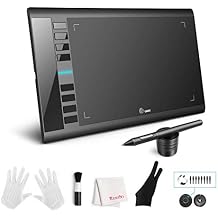
UGEE M708 Drawing Tablet,10 x 6 inch 16K Pressure Level Digital Graphics Tablet,Battery-Free Stylus,8 Hot Keys Compatible with
Item #:
5970613
BHD 20
Price Details
Excluding Shipping & Custom charges ( Shipping and custom charges will be calculated on checkout )
*All items will import from US
0 ratings
Write a review
In stock
 Imported from USA store
QTY:
Order now and get it around Thursday, July 09
Secured transaction
Ubuy works hard to protect your security and privacy. Our advanced payment security system ensures confidentiality by encrypting your information during transmission using AES (Advanced Encryption Standards) and SSL (Secure Socket Layer) protocols. Your payment details are 100% secure as we do not share your payment details with third party sellers.
Our Top Logistics Partners


With an impressive 8192 levels of pressure sensitivity, the UGEE M708 Drawing Tablet offers unparalleled precision and a smooth drawing experience for digital art creation.

Fast
Shipping

Free
Return*

Secure Packaging

100% Original Products

PCI DSS Compliance

ISO 27001 Certified


Note: Step Down Voltage Transformer required for using electronics products of US store (110-120). Recommended power converters Buy Now.


What Stands Out
Battery-Free Stylus
The UGEE M708 features a battery-free stylus, ensuring uninterrupted creativity without the need for charging, which enhances usability for artists and designers.
Customizable Hot Keys
With 8 customizable hot keys, users can streamline their workflow and improve efficiency, making it easier to switch between tools or functions during artistic processes.
Wide Compatibility
Compatible with Windows, Mac, and Chromebooks, the UGEE M708 is versatile for a range of users, including beginners and professionals, catering to various artistic and educational needs.
Product Details
- UGEE M708 V3 Drawing Tablet with 10 x 6 inch large active drawing space and papery texture surface for smooth digital artwork creation
- Battery-free precise pen stylus with 8192 pressure sensitivity for accurate lines and unique brush effects for photo retouching
- Compatible with Windows 11/10/8/7, Mac OS 10.10 or above, Chromebook, and popular creative software like Photoshop, Illustrator, and more
- 8 customizable express keys for shortcuts like eraser, zoom, scrolling, and undo to improve productivity and efficiency
- Ideal for distance education, web conferences, online teaching, photo editing, sketching, digital drawing, manga, animation, and more
- Suitable for beginners and professionals, offering natural no-lag sketching and painting experience
| Item Weight | 2 lbs (910 grams) |
Dangerous Goods
To avoid the delay in customs clearance process for Dangerous Goods, the shipment shall be opened at our warehouse facility to check the severity of hazardous components. Please see the list of Dangerous goods here.
Who Should Buy?

-
Aspiring Artists
Perfect for artists to create digital art with a responsive battery-free stylus and a spacious drawing area.
-
Online Educators
Ideal for teachers conducting online classes requiring drawing and annotation capabilities to explain concepts visually.
-
Graphic Designers
Great for designers needing a versatile tablet with customizable hot keys for smooth workflow and efficiency.

-
High-End Professionals
May not meet the needs of advanced users requiring high resolution and extensive features found in premium tablets.
-
Casual Users
Non-artists or casual users may find it excessive for their simple drawing or note-taking needs.
-
Mobile Users
Not suitable for on-the-go use as it lacks portability compared to smaller tablets and touchscreen devices.
Product Description
UGEE M708 Drawing Tablet,10 x 6 inch 16K Pressure Level Digital Graphics Tablet,Battery-Free Stylus,8 Hot Keys Compatible with Win,iOS,Android,Prefect for Artist,Designer,Beginner Online Teaching
Have any Query? Chat with us
Customer Questions & Answers
-
Question:
What devices are compatible with the UGEE M708 Drawing Tablet?
Answer: The UGEE M708 Drawing Tablet is compatible with a wide range of devices including Windows PCs, MacBooks, and Chromebooks. This flexibility allows users to connect their tablet to their preferred system, making it ideal for graphic designers, illustrators, and students alike. Whether you're creating digital art or taking notes, the M708 provides the versatility needed for various platforms. -
Question:
Does the UGEE M708 come with a stylus and what are its features?
Answer: Yes, the UGEE M708 Drawing Tablet comes with a battery-free stylus, which means you don’t need to worry about charging it. This stylus is designed for precise control and features 8192 levels of pressure sensitivity, allowing for natural drawing experiences. This feature is particularly useful for artists who require fine control over their strokes, making it suitable for detailed illustrations and shading. -
Question:
What size is the drawing area on the UGEE M708?
Answer: The UGEE M708 Drawing Tablet features a generous 10 x 6 inch active drawing area. This size provides ample space for artistic creation without being overly cumbersome. Ideal for both detailed artwork and larger sketches, the drawing area allows users to work comfortably while still being portable enough for travel. -
Question:
How many customizable hotkeys does the UGEE M708 have and how can they enhance productivity?
Answer: The UGEE M708 is equipped with 8 customizable hotkeys that can significantly enhance your productivity. Users can assign frequently used shortcuts, such as 'Undo' or 'Zoom', to these keys to streamline their workflow. This customization saves time during creative tasks, allowing artists to focus more on their work and less on navigating software menus. -
Question:
Can the UGEE M708 be used for online classes or presentations?
Answer: Absolutely! The UGEE M708 Drawing Tablet is ideal for online classes and presentations. Its smooth drawing capabilities and compatibility with various software make it easier to illustrate concepts or annotate on-screen materials in real-time. Teachers and students can benefit from visual aids, enhancing the learning experience in virtual environments. -
Question:
What software can I use with the UGEE M708 Drawing Tablet?
Answer: The UGEE M708 Drawing Tablet is compatible with numerous creative software applications, including Adobe Photoshop, Illustrator, Corel Painter, and various educational programs. This versatility allows users to create artworks, edit photos, or engage in digital simulations effortlessly. Depending on your creative focus, you can leverage the tablet's capabilities with your favorite software. -
Question:
Is the UGEE M708 suitable for beginner digital artists?
Answer: Yes, the UGEE M708 is an excellent choice for beginner digital artists. Its intuitive design and user-friendly features, such as the battery-free stylus and customizable hotkeys, make it easy to learn and adapt. Beginners can gradually develop their skills while benefiting from a reliable tool that grows with their artistic journey. -
Question:
What are the advantages of using a drawing tablet like the UGEE M708 over traditional drawing methods?
Answer: Using a drawing tablet like the UGEE M708 offers several advantages over traditional methods. Digital drawing allows for easy editing, multiple layer management, and the ability to undo mistakes with a single click. Additionally, users can experiment with different styles and colors without the need for physical materials. This makes the creative process more flexible and innovative. -
Question:
Can the UGEE M708 be used for photo editing?
Answer: Yes, the UGEE M708 Drawing Tablet is perfect for photo editing tasks. Its precision and sensitivity make it easy to perform detailed adjustments, such as retouching images or applying effects. During photo editing, users can enjoy the advantage of a more natural hand movement compared to using a mouse, resulting in enhanced control and a more satisfying editing experience. -
Question:
Where can I buy the UGEE M708 Drawing Tablet?
Answer: You can purchase the UGEE M708 Drawing Tablet from Ubuy in Bahrain. Ubuy offers a variety of digital drawing tablets including the M708, ensuring a reliable shopping experience for your creative needs. Whether you're an artist, student, or hobbyist, Ubuy has you covered with convenient access to this tablet.
UGEE Graphics Tablets Editorial Review
The UGEE M708 Drawing Tablet is a great product for beginners. The tablet has a durable and simple design. It comes with a desktop app that is easy to download and configure. After a few years of use, the tablet may lose track of the pen, but that's easy to fix by lifting the pen off the tablet and putting it back on. The only limitation to the product is the power of the PC or laptop used with it. If working with a decent computer, the tablet will almost never give any issues. Overall, it's an excellent deal for the price and includes all that you need.
Customer Reviews & Ratings
1 customers ratings
-
5 Star
100%
-
4 Star
0%
-
3 Star
0%
-
2 Star
0%
-
1 Star
0%
Review this product
Share your thoughts with other customers
Pros
- Simple and durable design
- Easy to use desktop app
- Great for beginners
- Affordable
Cons
- May lose track of the pen after a few years of use
Product Price History
Important information
- Limitations : For products shipped internationally, please note that any manufacturer warranty may not be valid; manufacturer service options may not be available; product manuals, instructions, and safety warnings may not be in destination country languages; the products (and accompanying materials) may not be designed in accordance with destination country standards, specifications, and labeling requirements; and the products may not conform to destination country voltage and other electrical standards (requiring use of an adapter or converter if appropriate). The recipient is responsible for assuring that the product can be lawfully imported to the destination country. When ordering from Ubuy or its affiliates, the recipient is the importer of record and must comply with all laws and regulations of the destination country.
- Not all the products listed on Ubuy are for sale, as Ubuy is a global search engine. Products are subject to export/trade regulations.
BHD 20
Order now and get it around Thursday, July 09
This item is not restrict in my country.(Please click on above link if this item is not restrict in your country, So our team will review and allow.)
QTY:
Secured transaction
Ubuy works hard to protect your security and privacy. Our advanced payment security system ensures confidentiality by encrypting your information during transmission using AES (Advanced Encryption Standards) and SSL (Secure Socket Layer) protocols. Your payment details are 100% secure as we do not share your payment details with third party sellers.
Our Top Logistics Partners
Fastest cross-border delivery
Features & Benefits
- 8192 levels of pressure sensitivity for precise and varied line thickness.
- 8 customizable shortcuts to enhance productivity.
- Large 10x6 inch drawing area for comfortable and extensive artwork.
- Battery-free pen with quick responsiveness.
- Supports multi-compatible creative software on Windows and Mac OS.
- Right and left-handed mode for user-friendly operation.