- Home Page /
- Electronics /
- Computer Accessories /
- Networking Products /
- Routers /
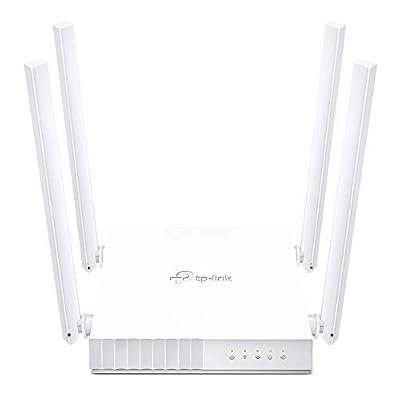
- Router Tp-link Wirelessac750 4 Porte 802.11ac...
0 ratings

Item #:
98179879
Router Tp-link Wirelessac750 4 Porte 802.11ac Dual Band
Item #:
98179879
BHD 40
Price Details
Excluding Shipping & Custom charges ( Shipping and custom charges will be calculated on checkout )
*All items will import from US
0 ratings
Write a review
In stock
 Imported from USA store
QTY:
Order now and get it around Thursday, June 25
Secured transaction
Ubuy works hard to protect your security and privacy. Our advanced payment security system ensures confidentiality by encrypting your information during transmission using AES (Advanced Encryption Standards) and SSL (Secure Socket Layer) protocols. Your payment details are 100% secure as we do not share your payment details with third party sellers.
Our Top Logistics Partners


Experience high-speed Wi-Fi with AC750 dual-band, perfect for HD video streaming and high-speed downloading.

Fast
Shipping

Free
Return*

Secure Packaging

100% Original Products

PCI DSS Compliance

ISO 27001 Certified


Note: Step Down Voltage Transformer required for using electronics products of US store (110-120). Recommended power converters Buy Now.


What Stands Out
Triple Functionality
This all-in-one device serves as a router, access point, and range extender, providing versatile solutions to enhance your home network without the need for multiple devices.
Parental Controls
Equipped with robust parental controls, this router helps manage children's online activities, ensuring a safer browsing experience tailored to your family's needs.
Dual-Band Performance
Supporting dual-band Wi-Fi 5 technology, enjoy smoother streaming and gaming experiences with speeds up to 750 Mbps while minimizing interference from other devices.
Product Details
| Item Weight | 1.1 lbs (500 grams) |
Who Should Buy?

-
Small Households
Ideal for families needing reliable internet for basic streaming, browsing, and online activities without excessive speed requirements.
-
Light Gamers
Suitable for casual gamers who play online but do not demand high-speed connections for competitive gaming experiences.
-
Parental Control Users
Perfect for parents wanting to manage screen time and internet access for children with built-in parental controls.

-
Heavy Streamers
Not ideal for users who regularly stream 4K content, requiring faster speeds and more robust performance.
-
Extensive Gaming
May not meet the needs of hardcore gamers requiring low latency and ultra-high-speed internet connections.
-
Large Areas
Less effective in large homes or offices, where stronger routers or meshes might be necessary for complete coverage.
Product Description
Router Tp-link Wirelessac750 4 Porte 802.11ac Dual Band
Have any Query? Chat with us
Customer Questions & Answers
-
Question:
What is the TP-Link Archer C24’s maximum speed?
Answer: The TP-Link Archer C24 supports a maximum speed of AC750 Mbps, which is divided between the 2.4 GHz and 5 GHz bands. The 2.4 GHz band can deliver speeds of up to 300 Mbps, while the 5 GHz band offers up to 433 Mbps. This dual-band capability allows users to multitask smoothly, stream HD videos, and engage in online gaming with minimal buffering. Whether you're in a small apartment or a larger home, the Archer C24 ensures strong signals across various applications. -
Question:
What are the parental control features in the TP-Link Archer C24?
Answer: The TP-Link Archer C24 includes robust parental controls that allow users to manage internet access for connected devices. With features such as content filtering and time management, you can set limitations on internet usage based on device or profile. This is particularly beneficial for families, enabling parents to restrict access to certain websites or ensure that children do not spend excessive time online. These controls help create a safer online environment, promoting responsible internet use. -
Question:
What modes can the TP-Link Archer C24 operate in?
Answer: The TP-Link Archer C24 offers versatile operation modes including Router, Access Point, and Range Extender modes. In Router mode, it connects directly to your internet provider and creates a home network. The Access Point mode converts a wired network to a wireless one, useful in extending connectivity in larger spaces. The Range Extender mode amplifies existing Wi-Fi signals to extend coverage in hard-to-reach areas. This flexibility makes the Archer C24 suitable for various networking needs and home layouts. -
Question:
How does the TP-Link Archer C24 perform with multiple devices?
Answer: The TP-Link Archer C24 is designed to efficiently handle multiple connected devices simultaneously without significant performance drops. Thanks to its dual-band functionality and advanced technologies, users can browse, stream, and game at high speeds concurrently. This makes it a suitable choice for households with several smart devices, laptops, and mobile phones, ensuring that all users experience a reliable internet connection. -
Question:
Is the TP-Link Archer C24 compatible with other TP-Link devices?
Answer: Yes, the TP-Link Archer C24 is compatible with other TP-Link networking products, enabling seamless integration into your existing network setup. This compatibility allows for easy expansion of your home network using additional TP-Link devices like extenders or switches, ensuring a unified system. For instance, pairing the Archer C24 with a TP-Link range extender can enhance Wi-Fi coverage in large households or offices. -
Question:
What security features does the TP-Link Archer C24 provide?
Answer: The TP-Link Archer C24 comes with multiple security features to protect your network. These include WPA/WPA2 encryption, a built-in firewall, and the ability to create a secure guest network. With WPA/WPA2 encryption, personal data is safeguarded from unauthorized access. The guest network feature allows visitors to connect to the internet without accessing your main network, enhancing privacy and security for both the host and guests. -
Question:
How do I set up the TP-Link Archer C24?
Answer: Setting up the TP-Link Archer C24 is straightforward. Start by connecting the router to your modem using an Ethernet cable. Then, power on the router and connect to its default Wi-Fi network using your device. Access the web interface through a browser by entering the provided IP address, and follow the setup wizard to configure your internet connection, Wi-Fi settings, and parental controls. This method makes installation manageable, even for those unfamiliar with router setup. -
Question:
Can I use the TP-Link Archer C24 for gaming?
Answer: Absolutely! The TP-Link Archer C24 is a great choice for gaming. Its dual-band features minimize lag by allowing devices to connect to the fastest available band. Moreover, with the capacity to efficiently handle numerous connections, it can support online gaming sessions while other devices simultaneously stream content or download files. This performance is ideal for both casual gamers wanting smooth play and competitive players seeking low latency. -
Question:
How far can the TP-Link Archer C24 signal reach?
Answer: The TP-Link Archer C24 is designed to provide broad coverage, with an effective range of up to 1,000 square feet indoors, depending on various factors such as walls and interference. This makes it suitable for small to medium-sized homes. For optimal performance, positioning the router in a central location can help ensure that Wi-Fi signals reach every corner of your living space, supporting seamless internet access for all household members. -
Question:
Where can I buy TP-Link Archer C24, AC750 Mbps, Parental Controls, All-in-one Router, Access Point, Range Extender Modes, Dual-Band Wi-Fi 5 Router?
Answer: You can purchase the TP-Link Archer C24 through Ubuy, a reliable e-commerce platform that offers a variety of tech products, including networking equipment. Ubuy provides a straightforward online shopping experience and often features exclusive deals and discounts specifically for tech devices. You can easily explore the product listing, compare specifications, and make an informed decision on your purchase.
TP-Link Routers Editorial Review
No editorial reviews found
Customer Reviews & Ratings
1 customers ratings
-
5 Star
0%
-
4 Star
100%
-
3 Star
0%
-
2 Star
0%
-
1 Star
0%
Review this product
Share your thoughts with other customers
Pros
- Fast dual-band connectivity
- Multiple modes available
- User-friendly parental controls
- Compact and easy to set up
- Stable connection over distance
Cons
- Limited advanced features for techies.
Product Price History
Important information
- Limitations : For products shipped internationally, please note that any manufacturer warranty may not be valid; manufacturer service options may not be available; product manuals, instructions, and safety warnings may not be in destination country languages; the products (and accompanying materials) may not be designed in accordance with destination country standards, specifications, and labeling requirements; and the products may not conform to destination country voltage and other electrical standards (requiring use of an adapter or converter if appropriate). The recipient is responsible for assuring that the product can be lawfully imported to the destination country. When ordering from Ubuy or its affiliates, the recipient is the importer of record and must comply with all laws and regulations of the destination country.
- Not all the products listed on Ubuy are for sale, as Ubuy is a global search engine. Products are subject to export/trade regulations.
BHD 40
Order now and get it around Thursday, June 25
This item is not restrict in my country.(Please click on above link if this item is not restrict in your country, So our team will review and allow.)
QTY:
Secured transaction
Ubuy works hard to protect your security and privacy. Our advanced payment security system ensures confidentiality by encrypting your information during transmission using AES (Advanced Encryption Standards) and SSL (Secure Socket Layer) protocols. Your payment details are 100% secure as we do not share your payment details with third party sellers.
Our Top Logistics Partners
Fastest cross-border delivery
Features & Benefits
- AC750 dual-band for faster 5GHz and stable 2.4GHz connections.
- Four cross-distributed antennas for enhanced coverage.
- Ideal for HD video streaming and high-speed downloads.
- 3-in-1 mode: Router, Access Point, and Range Extender.
- Includes parental controls for managing internet access.
- Features a guest network for secure separate access.