0 ratings





Item #:
94502719
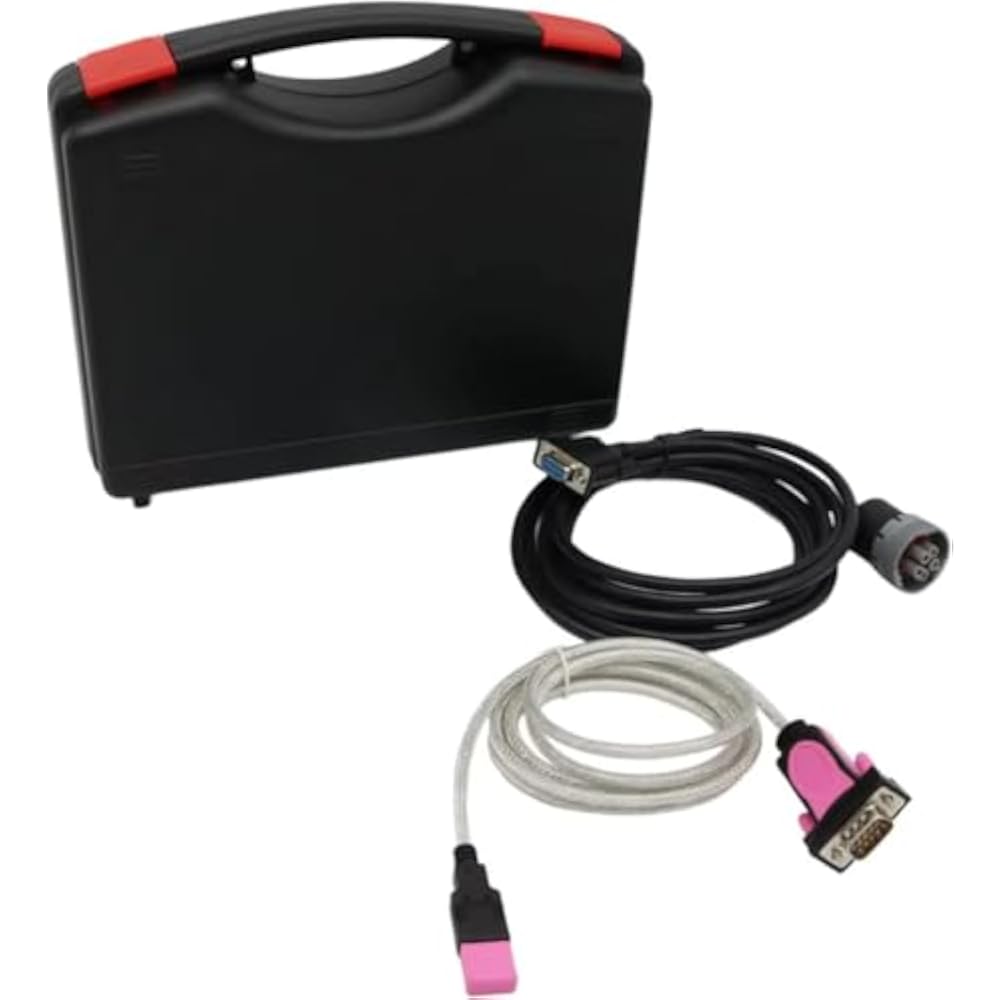
for Z-TEK FTDI chip USB Connector for Wintrac Thermo King Diagnostic Tool with V5.7 Software Diagnostic Cable Auto Scanner (Adapter with Software)
Item #:
94502719
BHD 104
Price Details
Excluding Shipping & Custom charges ( Shipping and custom charges will be calculated on checkout )
*All items will import from US
In stock
 Imported from USA store
QTY:
Order now and get it around Wednesday, July 08
Secured transaction
Ubuy works hard to protect your security and privacy. Our advanced payment security system ensures confidentiality by encrypting your information during transmission using AES (Advanced Encryption Standards) and SSL (Secure Socket Layer) protocols. Your payment details are 100% secure as we do not share your payment details with third party sellers.
Our Top Logistics Partners


WinTrac software is the easiest way to manage your data storage and display requirements for Thermo King data logging units.

Fast
Shipping

Free
Return*

Secure Packaging

100% Original Products

PCI DSS Compliance

ISO 27001 Certified


Note: Step Down Voltage Transformer required for using electronics products of US store (110-120). Recommended power converters Buy Now.


What Stands Out
Comprehensive Compatibility
Designed specifically for the Wintrac Thermo King systems, ensuring seamless integration and reliable diagnostics across various models, making it an invaluable tool for technicians.
User-Friendly Software
Includes V5.7 software for intuitive navigation and straightforward diagnostics, empowering users to quickly troubleshoot issues without the steep learning curve.
Durable Construction
Built with high-quality materials and the reliable FTDI chip, this adapter promises longevity and consistent performance, minimizing downtime and repair costs.
Product Details
Note: All computers have been used, but the performance and function are intact, which is basically the same as the new computer, and there is no problem when used in machine diagnosis.
Instructions for purchasing software separately: We only successfully install the software once for you. The software can only be installed remotely by sending a link. Please contact us after purchasing and we will install it at the appropriate time.
for Z-TEK FTDI chip USB Connector Wintrac Thermo King Diagnostic Tool with V5.7 Software Diagnostic Cable Auto Scanner
- Support added for "Battery He-alth Monitor" with Ala-rm 159. Support added for SR2 C040, SR3 D030 and HMI 7580, SR3 D026 and HMI 6513.
- Added support for flashload of new 8 MB HMI (using 7570 software). Updated HMI Mix and Match Language selection capability. Added support for D006 (Rail Ready) and D010 SR-3 software.
- Updated to enable use of USB Flashload Device (UFD) on SR3 platform. Updated to address the release of: D005 controller software and 6560 HMI software support for new SR3 controller platform, D000 controller software and 6550 HMI software.
| Automotive Fit Type | Universal Fit |
| Brand Name | HZpof |
| Manufacturer | HZpof |
| Model Number | Tool |
| Manufacturer Part Number | Z-TEK |
| Brand | HZpof |
| Number of Items | 1 |
| Item Weight | 0.5 lbs (230 grams) |
Who Should Buy?

-
Fleet Managers
Ideal for fleet managers needing reliable diagnostics for Thermo King units to enhance maintenance schedules and efficiency.
-
Mechanics
A great tool for mechanics requiring specific Thermal King diagnostic capabilities alongside software for comprehensive troubleshooting.
-
Truck Owners
Beneficial for individual truck owners who need to manage and troubleshoot their Thermo King refrigeration units independently.

-
Casual Users
Not suitable for casual users wanting basic functionality without in-depth diagnostic needs or Thermo King specifics.
-
Non-Tech Savvy
May confuse users lacking technical knowledge; the software and usage require some understanding of diagnostics and features.
-
Alternative Brands
Incompatible with non-Thermo King diagnostic systems, limiting its utility for users managing other equipment brands.
Product Description
Have any Query? Chat with us
Customer Questions & Answers
-
Question:
What is the Z-TEK FTDI chip USB Connector used for?
Answer: The Z-TEK FTDI chip USB Connector is designed specifically for connecting your diagnostic tool to a computer for the Thermo King Wintrac system. This allows users to perform advanced vehicle diagnostics and access crucial data related to their Thermo King units. It's ideal for automotive technicians and fleet managers who require an effective way to monitor the performance and troubleshoot issues in their vehicles for optimal efficiency. -
Question:
Does the Z-TEK FTDI chip USB Connector support multiple operating systems?
Answer: Yes, the Z-TEK FTDI chip USB Connector supports multiple versions of Windows, ensuring compatibility with a variety of systems. Specifically, it works seamlessly with Windows 7, 8, and 10. This flexibility allows users to utilize the tool across different machines without the need for specialized hardware, making it versatile for those who may be using various devices in their workshop or field operations. -
Question:
Can I use the Z-TEK USB Connector to update my Thermo King software?
Answer: Absolutely, the Z-TEK USB Connector can be used to update and maintain your Thermo King software. By connecting your diagnostic tool to a computer, you can access the latest updates that improve functionality and fix bugs. This capability is crucial for users who regularly service Thermo King systems and need to ensure they are equipped with the most current diagnostics tools and protocols for different models. -
Question:
What makes the Z-TEK USB Diagnostic Cable beneficial for auto scanning?
Answer: The Z-TEK USB Diagnostic Cable incorporates an FTDI chip which enhances data transfer reliability during auto scanning. This allows for a stable and faster connection between your computer and the diagnostic tool. Users find it beneficial as it minimizes disconnections and data loss, leading to a more efficient diagnostic process, thus saving time and enhancing productivity in troubleshooting. -
Question:
Is specific software needed to operate the Z-TEK FTDI chip USB Connector?
Answer: Yes, the Z-TEK FTDI chip USB Connector comes with V5.7 software that is necessary for operation. This software is tailored for the Wintrac Thermo King system, enabling users to perform comprehensive diagnostics and repairs. It’s important for users to install this software properly to unlock the full capabilities of the connector, ensuring smooth user experience and detailed vehicle reporting. -
Question:
What vehicles are compatible with the Z-TEK FTDI chip USB Connector?
Answer: The Z-TEK FTDI chip USB Connector is primarily designed for Thermo King units, which are widely used in transportation, refrigeration, and heating applications. It is ideal for mechanics and technicians working on commercial and fleet vehicles equipped with Thermo King systems, allowing for precise diagnostics and maintenance workflows tailored to those vehicles. -
Question:
How can I troubleshoot common issues with the Z-TEK USB Connector?
Answer: Common issues with the Z-TEK USB Connector can be troubleshot by ensuring proper driver installation and verifying USB port functionality. If troubles arise, restart your device and ensure the connector is securely plugged in. Often, checking for software updates can resolve connectivity problems. These steps can aid technicians in quickly resolving minor issues, allowing them to focus on diagnostics without prolonged downtime. -
Question:
Is the Z-TEK USB Connector durable for everyday use?
Answer: Indeed, the Z-TEK USB Connector is built with robust materials that ensure durability and withstand the rigors of daily use in various environments. Its sturdy design is suitable for both workshop settings and on-field diagnostics, making it ideal for technicians who need reliability and longevity from their diagnostic tools. This durability helps in minimizing the frequency of replacements, contributing to cost-effectiveness. -
Question:
Are there any special features of the Z-TEK FTDI chip USB Connector?
Answer: Yes, one standout feature of the Z-TEK FTDI chip USB Connector is its high-speed data transfer capability, which significantly enhances the diagnostic process. Additionally, its plug-and-play functionality means that setup is straightforward, saving time for professionals. Users appreciate these features, as they provide a more efficient workflow when diagnosing and repairing vehicles. -
Question:
Where can I buy the Z-TEK FTDI chip USB Connector in Bahrain?
Answer: You can conveniently purchase the Z-TEK FTDI chip USB Connector from Ubuy in Bahrain. Ubuy offers a wide selection of diagnostic tools and automotive accessories, ensuring you’ll find the right products for your needs. With Ubuy, you can easily navigate through various options and have your connector delivered to your address, making it a reliable choice for your shopping needs.
HZpof Code Readers & Scan Tools Tool Editorial Review
No editorial reviews found
Customer Reviews & Ratings
1 customers ratings
-
5 Star
0%
-
4 Star
100%
-
3 Star
0%
-
2 Star
0%
-
1 Star
0%
Review this product
Share your thoughts with other customers
Product Price History
Important information
- Limitations : For products shipped internationally, please note that any manufacturer warranty may not be valid; manufacturer service options may not be available; product manuals, instructions, and safety warnings may not be in destination country languages; the products (and accompanying materials) may not be designed in accordance with destination country standards, specifications, and labeling requirements; and the products may not conform to destination country voltage and other electrical standards (requiring use of an adapter or converter if appropriate). The recipient is responsible for assuring that the product can be lawfully imported to the destination country. When ordering from Ubuy or its affiliates, the recipient is the importer of record and must comply with all laws and regulations of the destination country.
- Not all the products listed on Ubuy are for sale, as Ubuy is a global search engine. Products are subject to export/trade regulations.
BHD 104
Order now and get it around Wednesday, July 08
This item is not restrict in my country.(Please click on above link if this item is not restrict in your country, So our team will review and allow.)
QTY:
Secured transaction
Ubuy works hard to protect your security and privacy. Our advanced payment security system ensures confidentiality by encrypting your information during transmission using AES (Advanced Encryption Standards) and SSL (Secure Socket Layer) protocols. Your payment details are 100% secure as we do not share your payment details with third party sellers.
Our Top Logistics Partners
Fastest cross-border delivery
Features & Benefits
- Easy to use WinTrac software for data management.
- Compatible with multiple Thermo King data loggers and controllers.
- Supports various advanced features including battery health monitoring.
- First software installation is free; additional installs incur fees.
- No-worry purchase with reliable customer service for support.
- Ensure optimal functioning with professional software installation.