- Home Page /
- Mobile Phone Accessories /
- Accessories /
- Stylus Pens /
- Stylus for HP Envy X360 Pavilion x360 Specter X360 Spec...
0 ratings

Item #:
84835585
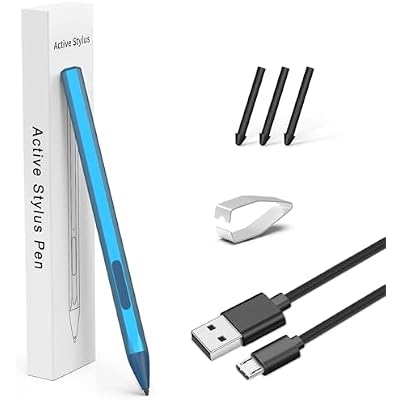
Stylus for HP Envy X360 Pavilion x360 Specter X360 Spectre x2 Envy x2 Touchscreen Laptop Rechargeable MPP 2.0 Tilt Pencil 4096 Pressure Sensitivity
Item #:
84835585
BHD 22
Price Details
Excluding Shipping & Custom charges ( Shipping and custom charges will be calculated on checkout )
*All items will import from US
0 ratings
Write a review
In stock
 Imported from USA store
QTY:
Order now and get it around Thursday, July 09
Secured transaction
Ubuy works hard to protect your security and privacy. Our advanced payment security system ensures confidentiality by encrypting your information during transmission using AES (Advanced Encryption Standards) and SSL (Secure Socket Layer) protocols. Your payment details are 100% secure as we do not share your payment details with third party sellers.
Our Top Logistics Partners


High Precision MPP 2.0 stylus pen offers precise and accurate stylus input for drawing, writing, and navigating on your HP device.

Fast
Shipping

Free
Return*

Secure Packaging

100% Original Products

PCI DSS Compliance

ISO 27001 Certified


Note: Step Down Voltage Transformer required for using electronics products of US store (110-120). Recommended power converters Buy Now.


What Stands Out
Advanced Pressure Sensitivity
With 4096 levels of pressure sensitivity, this stylus allows for precise and natural drawing, making it ideal for artists and designers seeking an authentic writing experience on their ASUS devices.
Rechargeable Convenience
The rechargeable battery offers extended use without frequent interruptions, ensuring users can sketch, write, or annotate whenever needed, adding significant value for productivity-focused users.
Tilt Functionality
The tilt capability enhances versatility for shading and intricate designs, making this stylus suitable for professionals and hobbyists looking to elevate their creative work on touchscreen devices.
Product Details
| Item Weight | 0.2 lbs (90 grams) |
Who Should Buy?

-
Digital Artists
Ideal for digital artists needing precision and sensitivity for creating detailed artwork on touchscreen devices.
-
Students
Perfect for students who take handwritten notes or annotate documents, enhancing their learning experience.
-
Professionals
Great for professionals using touch-enabled laptops for presentations, design work, or note-taking during meetings.

-
Casual Users
Not suitable for casual users who only use their devices for basic functions, such as browsing or email.
-
Gaming Enthusiasts
Gamers may find traditional gaming controllers or mice more effective than a stylus for gameplay.
-
Non-Graphical Work
Users who do not require precision input for tasks like writing documents or spreadsheets may not need a stylus.
Product Description
Stylus for HP Envy X360 Pavilion x360 Specter X360 Spectre x2 Envy x2 Touchscreen Laptop Rechargeable MPP 2.0 Tilt Pencil 4096 Pressure Sensitivity Using The Microsoft MPP Protocol, Blue
Have any Query? Chat with us
Customer Questions & Answers
-
Question:
What devices is the ASUS Stylus Pen compatible with?
Answer: The ASUS Stylus Pen is specifically designed for various models, including the ASUS Transformer, ASUS Zenbook, ASUS Vivobook Flip, and ASUS Notebook Touchscreen laptops and tablets. Its compatibility with the Microsoft MPP 2.0 protocol ensures seamless integration with these devices, allowing for precise input and drawing capabilities. Users often utilize it for note-taking, drawing, or annotating documents, making it a perfect tool for students and professionals alike. -
Question:
How does the 4096 pressure sensitivity feature work?
Answer: The 4096 pressure sensitivity of the ASUS Stylus Pen allows for varying line thicknesses and opacity based on how hard you press down. This feature is crucial for digital artists and designers who require precision in their work. With this level of sensitivity, users can create everything from fine lines to bold strokes, providing an immersive drawing experience. This versatility is especially useful for tasks like sketching, painting, or detailed graphing. -
Question:
Is the ASUS Stylus Pen rechargeable?
Answer: Yes, the ASUS Stylus Pen is rechargeable, which means it eliminates the need for constant battery replacements. This rechargeable feature is not only eco-friendly but also ensures that you’re always prepared, especially during long work or study sessions. Simply connect it to a compatible charger, and you can continue your tasks without interruption. Many users find it convenient for digital note-taking, sketching, and other applications that require consistent performance. -
Question:
What is the MPP 2.0 protocol, and why is it important?
Answer: MPP 2.0, or Microsoft Pen Protocol, is a communication protocol that enhances the functionality of stylus pens with compatible devices. It allows for advanced features such as tilt support, pressure sensitivity, and palm rejection. This protocol is essential for artists and note-takers who need a responsive and accurate brush or pen experience. By using the MPP 2.0, this stylus pen provides a more natural feel when drawing or writing on touchscreen devices. -
Question:
How can I make the most of the tilt feature on the stylus?
Answer: The tilt feature on the ASUS Stylus Pen allows users to modify the angle of their strokes, mimicking the behavior of traditional art tools like brushes or calligraphy pens. To maximize this function, practice varying your grip and tilt angle while drawing or writing. Artists often utilize this feature for shading and thickness variations in their digital creations, making it easier to create rich, textured effects that enhance overall visual appeal. -
Question:
Can I use the ASUS Stylus Pen for handwriting recognition?
Answer: Absolutely! The ASUS Stylus Pen is particularly effective for handwriting recognition applications, allowing users to write naturally on their touchscreen devices. This feature is beneficial for students taking notes in class or professionals who need to annotate documents seamlessly. By combining precision and responsive input, users can translate their handwritten notes into digital text efficiently, improving productivity and accessibility. -
Question:
Is the stylus suitable for digital art applications?
Answer: Yes, the ASUS Stylus Pen is ideal for digital art applications. Its high pressure sensitivity and tilt functionality make it a great choice for artists who need precision and control in their creative processes. The pen can be paired with various art software, making it versatile for tasks such as painting, creating detailed illustrations, or even animation. Many artists appreciate the natural feel of writing or drawing on screens, similar to traditional mediums. -
Question:
How do I maintain my ASUS Stylus Pen?
Answer: Maintaining your ASUS Stylus Pen is quite simple. Regularly keep the tip clean and avoid using the pen with excessive force to prolong its lifespan. Store it in a safe place when not in use to prevent any physical damage. Additionally, recharge the pen when the battery is low to ensure optimal performance. Proper care is invaluable, especially for users who rely on the stylus for work or creative endeavors. -
Question:
What kind of software can I use with the ASUS Stylus Pen?
Answer: The ASUS Stylus Pen works well with various software applications that support the Microsoft MPP protocol. Programs like Microsoft OneNote, Adobe Photoshop, Corel Painter, and various drawing apps on Windows and Android can enhance user experience. This allows for tasks like note-taking, sketching, and even comprehensive graphic design work. Users often find compatibility with these applications invaluable for maximizing their creative potential on touchscreen devices. -
Question:
Where can I buy the ASUS Stylus Pen?
Answer: You can purchase the ASUS Stylus Pen from Ubuy, an online shopping platform that offers a wide range of products including electronics and accessories. Ubuy provides a user-friendly interface and can help you find the right stylus for your ASUS devices. Being focused on customer satisfaction, Ubuy makes it easy to navigate and compare other products, ensuring you have a seamless shopping experience while purchasing your stylus pen.
YORUNOHOSHI Stylus Pens Editorial Review
No editorial reviews found
Customer Reviews & Ratings
1 customers ratings
-
5 Star
100%
-
4 Star
0%
-
3 Star
0%
-
2 Star
0%
-
1 Star
0%
Review this product
Share your thoughts with other customers
Platform Trust & Buyer Confidence

MA
Mohammad
Verified buyer
“Excellent quality and very fast delivery, I really appreciate your service, when you work good I will appreciate that, I am very satisfied, thank you”
13 June 2026 · via Trustpilot
MB
Maryam
Verified buyer
“The order arrived fast and in perfect condition”
2 June 2026 · via Trustpilot
MK
Mohd
Verified buyer
“Firstly the team who are very positive in response to any correction if something wrong. Secondly the quality and selection is exactly on what I ordered and which is perfect. Finally the time of delivery is very sufficient which made me comfortable. Overall is excellent.”
26 Feb 2026 · via Trustpilot
K
Khaled
Verified buyer
“Good quality of product, delivered in 2 weeks. I thought it would take more time.”
21 Feb 2026 · via Trustpilot
T
trusttaker
Verified buyer
“Everything was fine. You can order from multiple stores or countries—just be patient with the shipping. Given their business model, this was my first order from them. Thank you, Ubuy.”
20 Feb 2026 · via Trustpilot
Secure Checkout
Global Delivery
Easy Returns
Genuine Products
Product Price History
Important information
- Limitations : For products shipped internationally, please note that any manufacturer warranty may not be valid; manufacturer service options may not be available; product manuals, instructions, and safety warnings may not be in destination country languages; the products (and accompanying materials) may not be designed in accordance with destination country standards, specifications, and labeling requirements; and the products may not conform to destination country voltage and other electrical standards (requiring use of an adapter or converter if appropriate). The recipient is responsible for assuring that the product can be lawfully imported to the destination country. When ordering from Ubuy or its affiliates, the recipient is the importer of record and must comply with all laws and regulations of the destination country.
- Not all the products listed on Ubuy are for sale, as Ubuy is a global search engine. Products are subject to export/trade regulations.
BHD 22
Order now and get it around Thursday, July 09
This item is not restrict in my country.(Please click on above link if this item is not restrict in your country, So our team will review and allow.)
QTY:
Secured transaction
Ubuy works hard to protect your security and privacy. Our advanced payment security system ensures confidentiality by encrypting your information during transmission using AES (Advanced Encryption Standards) and SSL (Secure Socket Layer) protocols. Your payment details are 100% secure as we do not share your payment details with third party sellers.
Our Top Logistics Partners
Fastest cross-border delivery
Features & Benefits
- Perfect for drawing, writing, and navigating
- 4096 levels for varying line thickness and shading
- Lightweight and comfortable
- No additional setup required
- Versatile accessory for a wide range of HP devices