- Home Page /
- Electronics /
- Computer Accessories /
- Networking Products /
- Network Adapters /
- USB Network Adapters /
- USB to CAN Bus Converter Base on Open-Source ...
0 ratings




Item #:
83847810
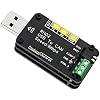
USB to CAN Bus Converter Base on Open-Source Hardware CANable Supports Multiple Firmware and Operating Modes
88% of respondents would recommend this to a friend
Item #:
83847810
BHD 11
Price Details
Excluding Shipping & Custom charges ( Shipping and custom charges will be calculated on checkout )
*All items will import from US
In stock
 Imported from USA store
QTY:
Order now and get it around Thursday, June 25
Secured transaction
Ubuy works hard to protect your security and privacy. Our advanced payment security system ensures confidentiality by encrypting your information during transmission using AES (Advanced Encryption Standards) and SSL (Secure Socket Layer) protocols. Your payment details are 100% secure as we do not share your payment details with third party sellers.
Our Top Logistics Partners


USB TO CAN adapter provides users with basic CAN bus monitoring and processing for automotive signal processing, servo motor debugging, and other scenarios.

Fast
Shipping

Free
Return*

Secure Packaging

100% Original Products

PCI DSS Compliance

ISO 27001 Certified


Note: Step Down Voltage Transformer required for using electronics products of US store (110-120). Recommended power converters Buy Now.


What Stands Out
Open-Source Design
Leveraging the open-source community, this converter allows users to customize and adapt firmware to meet unique project needs, fostering innovation and flexibility.
Multi-Firmware Support
Supports various firmware options, enabling users to switch between operating modes effortlessly for tailored applications across different automotive or industrial environments.
User-Friendly Interface
The intuitive design simplifies connection to CAN networks, making it accessible for both professionals and beginners, ensuring seamless integration into existing systems.
Product Details
- [Usb Canbus Adapter] USB TO CAN adapter provides users with basic CAN bus monitoring and processing for automotive signal processing, servo motor debugging and other scenarios.
- [Canable Project] Is derived from the Canable project in the Github platform. It provides high quality Canable hardware for automotive engineers, industrial robotics engineers, hobbyists and other CAN bus users. All technical information about this product is publicly available on Canable.IO and Github.
- [Can Bus Analyzer]RH-02 factory burns the default Candlelight firmware of Canable project, meanwhile, users can also get more featured firmware in Canable project in Github platform, and use RH-02 boot button with DfuSeDemo software to burn it.
- [High Compatibility]A variety of CAN bus software is available, and users can use the open source software to monitor and process CAN bus data. You can also burn other firmware to support BUSMASTER, PCAN, SLCAN and other CAN bus software.
| Compatible Devices | Laptop |
| Specific Uses For Product | Monitor |
| Connector Type | USB Type A |
| Number of Ports | 1 |
| Input Voltage | 5 Volts |
| Power Plug Type | No Plug |
| Smart Home Compatibility | Not Smart Home Compatible |
| Color | Black |
| Item Weight | 0.06 Kilograms |
| Package Quantity | 1 |
| Unit Count | 1.0 Count |
| Number of Items | 1 |
| Brand | Jhoinrch |
| Model Number | RH-02 |
| Manufacturer | Jhoinrch |
| Mfr Part Number | RH-02 |
| Built-In Media | USB to Canbus |
What's in the box
USB to Canbus
Who Should Buy?

-
Embedded Developers
Ideal for developers creating custom firmware for electronic projects involving CAN Bus communication.
-
Automotive Engineers
Engineers can utilize this for diagnostics and communication with vehicle CAN networks in development and testing phases.
-
Hobbyists
Perfect for tech enthusiasts and hobbyists experimenting with CAN Bus in their DIY electronics and robotics projects.

-
Casual Users
Not suitable for casual users without technical expertise or requirements for CAN Bus communication.
-
Non-Technical Environments
Businesses or settings requiring plug-and-play simplicity may find this device overly complex to set up.
-
Limited Budget Projects
Projects with strict budget constraints may find alternative simpler and cheaper solutions more suitable.
Product Description
Have any Query? Chat with us
Customer Questions & Answers
-
Question:
What is a USB to CAN Bus Converter?
Answer: A USB to CAN Bus Converter is a device that allows communication between a computer and various CAN Bus-enabled systems. It converts USB signals into CAN Bus signals, enabling the computer to send and receive messages on the CAN network. This is essential for applications in automotive diagnostics, industrial automation, and IoT systems. The flexibility of the CANable model, which is based on open-source hardware, means that it supports multiple firmware options, allowing users to customize functionality according to their specific needs. -
Question:
What operating modes does the CANable support?
Answer: The CANable supports multiple operating modes, including standard CAN, CAN FD, and more advanced setups depending on the firmware used. This versatility allows it to be utilized for a wide range of applications from automotive communication to industrial control systems. Users can switch between these modes as needed, making it a great tool for developers and engineers working in various fields, whether they are troubleshooting vehicle networks or developing embedded systems. -
Question:
Is the CANable compatible with all operating systems?
Answer: Yes, the CANable is designed to be compatible with a wide range of operating systems, including Windows, macOS, and Linux. This broad compatibility ensures that users can easily integrate the device into their preferred development environment. Whether you're running diagnostic software on a laptop or developing custom applications on a Raspberry Pi, the CANable provides the flexibility needed to work seamlessly with your system, enhancing its utility across different projects. -
Question:
Can I use the USB to CAN Bus Converter for automotive diagnostics?
Answer: Absolutely! The USB to CAN Bus Converter is ideal for automotive diagnostics, enabling users to interface with vehicle ECUs (engine control units) using specialized software. By connecting the converter to the vehicle’s CAN Bus, you can read fault codes, monitor sensor data, and even perform real-time diagnostics. This makes it a valuable tool for mechanics and automotive engineers who need to troubleshoot or tune vehicle performance effectively. -
Question:
What are the advantages of open-source hardware in the CANable?
Answer: The open-source hardware aspect of the CANable provides users with greater flexibility and customization options. Developers can modify the firmware to tailor it to their specific needs, fostering innovation and collaboration within the user community. This approach not only encourages learning and experimentation but also ensures that users can access updated features and improvements made by other contributors, enriching the overall functionality and experience. -
Question:
How do I set up the CANable for my project?
Answer: Setting up the CANable for your project typically involves installing any necessary drivers for your operating system, connecting the device to your computer via USB, and downloading compatible software that can communicate with CAN protocols. After installation, you'll configure the software settings according to the specific needs of your application. This straightforward setup process enables users, even those new to CAN communications, to get started quickly and effectively. -
Question:
What applications can benefit from using a USB to CAN Bus Converter?
Answer: A USB to CAN Bus Converter can be used in a variety of applications, such as automotive testing, embedded system development, and industrial automation. It helps developers validate communication between devices, monitor system data in real time, and perform diagnostics or data logging tasks. Its versatility makes it suitable for both hobbyists testing projects at home and professionals setting up complex industrial systems, leading to increased flexibility and improved efficiency. -
Question:
What type of cabling is recommended when using the CANable?
Answer: When using the CANable, it is recommended to utilize twisted pair cabling for optimal performance on the CAN Bus. This type of cable minimizes electromagnetic interference and ensures signal integrity over longer distances. For standard applications, an appropriate gauge wire is crucial to maintain communication quality. In scenarios where you need to extend the CAN network, it ensures that data transmission remains reliable and error-free. -
Question:
Where can I buy USB to CAN Bus Converter Base on Open-Source Hardware CANable in Bahrain?
Answer: You can purchase the USB to CAN Bus Converter based on Open-Source Hardware CANable from Ubuy in Bahrain. Ubuy offers a wide selection of electronic components and tools, making it easy to find the CANable that suits your needs. You can explore various options and enjoy the convenience of online shopping from the comfort of your home, enabling you to access the latest technology for your projects.
Jhoinrch USB Network Adapters RH-02 Editorial Review
The CANBus USB adapter has garnered positive feedback for its effective performance and user-friendly design, making it an excellent choice for CAN BUS projects. Users have reported that it is fully compatible with SocketCAN, providing a stable connection and seamless data transmission, which is crucial for developers and engineers working in this field. The flexibility of the device's firmware is another highlight; users can easily upgrade, downgrade, or modify it directly through the canable.io platform using their browser. Despite some challenges with compatibility on Windows 10 and Windows 11 systems, where the device struggles to be recognized outside of bootloader mode, users have managed to navigate these issues, often suggesting the use of older operating systems for a smoother experience. Furthermore, users appreciate the straightforward setup process and the wealth of documentation available, which aids in troubleshooting and enhances usability. The configuration of the adapter is also noteworthy; Constructed as a raw circuit board with clear labeling, it offers practicality coupled with functionality. In summary, this adapter stands out among its competitors for its reliable performance in both Linux and open-source systems, defying the trend of many cheaper alternatives that fail to provide genuine CAN interfacing. Customers commend the value it offers, making it a worthwhile investment for anyone engaging with CAN BUS communications. **
Customer Reviews & Ratings
126 customers ratings
-
5 Star
82%
-
4 Star
9%
-
3 Star
4%
-
2 Star
1%
-
1 Star
4%
Review this product
Share your thoughts with other customers
Pros
- Fully compatible with SocketCAN, offering stable and reliable connections
- User-friendly firmware upgrade/downgrade via canable.io
- Clear documentation and support available
- Recognized as a proper CAN device in Linux
- Good build quality and clear labeling
Cons
- Limited functionality outside of bootloader mode on these operating systems
Related Categories
Related Brands
Product Price History
Important information
- Limitations : For products shipped internationally, please note that any manufacturer warranty may not be valid; manufacturer service options may not be available; product manuals, instructions, and safety warnings may not be in destination country languages; the products (and accompanying materials) may not be designed in accordance with destination country standards, specifications, and labeling requirements; and the products may not conform to destination country voltage and other electrical standards (requiring use of an adapter or converter if appropriate). The recipient is responsible for assuring that the product can be lawfully imported to the destination country. When ordering from Ubuy or its affiliates, the recipient is the importer of record and must comply with all laws and regulations of the destination country.
- Not all the products listed on Ubuy are for sale, as Ubuy is a global search engine. Products are subject to export/trade regulations.
BHD 11
Order now and get it around Thursday, June 25
This item is not restrict in my country.(Please click on above link if this item is not restrict in your country, So our team will review and allow.)
QTY:
Secured transaction
Ubuy works hard to protect your security and privacy. Our advanced payment security system ensures confidentiality by encrypting your information during transmission using AES (Advanced Encryption Standards) and SSL (Secure Socket Layer) protocols. Your payment details are 100% secure as we do not share your payment details with third party sellers.
Our Top Logistics Partners
Fastest cross-border delivery