- Home Page /
- Office Products /
- Office Electronics /
- Office Calculator /
- Graphing /
- Texas Instruments TI-84 Plus Graphics Calcula...
0 ratings



Item #:
9768
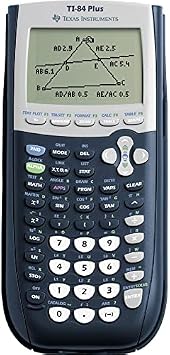
Texas Instruments TI-84 Plus Graphics Calculator, Black 320 x 240 pixels (2.8" diagonal) | All-purpose graphing; Preloaded apps; Exam-approved
87% of respondents would recommend this to a friend
Item #:
9768
BHD 55
Price Details
Excluding Shipping & Custom charges ( Shipping and custom charges will be calculated on checkout )
*All items will import from US
0 ratings
Write a review
In stock
 Imported from USA store
QTY:
Order now and get it around Tuesday, September 29
Secured transaction
Ubuy works hard to protect your security and privacy. Our advanced payment security system ensures confidentiality by encrypting your information during transmission using AES (Advanced Encryption Standards) and SSL (Secure Socket Layer) protocols. Your payment details are 100% secure as we do not share your payment details with third party sellers.
Our Top Logistics Partners


Texas Instruments TI-84 Plus Graphics Calculator is preloaded with Cabri Jr. interactive geometry software and has advanced functions accessed through pull-down display menus.

Fast
Shipping

Free
Return*

Secure Packaging

100% Original Products

PCI DSS Compliance

ISO 27001 Certified




Note: Step Down Voltage Transformer required for using electronics products of US store (110-120). Recommended power converters Buy Now.


What Stands Out
High-Resolution Display
The TI-84 Plus features a 320 x 240 pixel screen, providing crystal-clear graphics for visualizing complex functions and data, enhancing user understanding and engagement.
Extensive Functionality
Packed with powerful functions, this calculator supports advanced math and science applications, making it suitable for high school and college students tackling courses like calculus and physics.
User-Friendly Interface
Designed with intuitive buttons and menus, the TI-84 Plus ensures ease of navigation and quick calculations, allowing students to focus more on problem-solving rather than operating the device.
Product Details
- Preloaded with Cabri Jr. interactive geometry software
- Advanced functions accessible through pull-down display menus
- Horizontal and vertical split screen options
- Vibrant backlit color screen for clear visibility
- I/O port for communication with other TI products
- Seven different graph styles for visual differentiation
| Brand | Texas Instruments |
| Model Name | TI-84 Plus |
| UPC | 636123943414 724627205630 601000798678 638084872307 809394583126 801593400655 700580284264 640206715713 809302183929 033317192120 045555958536 823019814525 702658639518 163120465897 641438163464 617407488814 012951486529 012306100377 956259237318 012300773607 804904096394 151903615232 801947289806 096009716196 800011443748 707568282632 804067214130 001910644025 707283346237 898029702513 640024852553 631058298059 |
| Unit Count | 1 Count |
| Global Trade Identification Number | 00012306100377, 00033317192120 |
| Number of Packs | 1 |
| Manufacturer | Texas Instruments |
| Number of Items | 1 |
| Built-In Media | Calculator |
| Item Type Name | Graphing Calculator |
| Item Part Number | TI84PLUS |
| Model Number | 84PL/TBL/1L1/H |
| Mfr Part Number | 84PL/FC |
| Calculator Type | Graphing |
| Power Source | Battery Powered |
| Screen Size | 2.5 inches (6.4 cm) |
| Number of Batteries | 1 Lithium Metal batteries required. (included) |
| Compatible Devices | Laptop |
| Display Type | LCD |
| Color | Black |
| Enclosure Material | Metal, Plastic |
| Item Dimensions L x W | 7.5"L x 7.5"W (19.1 cm) |
| Package Weight | 1.95 Pound |
What's in the box
Calculator
Who Should Buy?

-
High School Students
Ideal for students needing advanced graphing functions for algebra, calculus, and statistics courses.
-
College Students
Perfect for those in STEM majors who require a reliable tool for complex calculations and graphing tasks.
-
Standardized Test Prep
Beneficial for preparing for exams like the SAT or ACT that allow graphing calculators for problem-solving.

-
Casual Users
Not suitable for casual users who require basic calculators for simple calculations and do not need advanced features.
Product Description
Have any Query? Chat with us
Product Buying Guide
The Texas Instruments TI84PLUS Graphing Calculator is a powerful tool that provides advanced functions and a vibrant backlit color screen, making it an ideal choice for students, professionals, and anyone in need of comprehensive graphing capabilities.
Product Specifications
- Includes Cabri Jr. interactive geometry software
- Advanced functions accessed through pull-down display menus
- Horizontal and vertical split screen options for enhanced viewing
- Seven different graph styles to differentiate the look of each drawn graph
- I/O port for communication with other TI products
Key Features
- Access complex numbers calculated with high accuracy and displayed comprehensively
- Vibrant display for clear visibility in various lighting conditions
- Equipped with Cabri Jr. interactive geometry software for added functionality and versatility
Usage Scenarios
- Ideal for students in high school, college, and beyond for math, science, and engineering courses
- Useful for professionals in various fields, such as finance, engineering, and statistics
- Suited for creating graphs, analyzing data, and visualizing functions in a variety of applications
Usage Scenarios
- Offers similar graphing functionality but lacks the preloaded software and backlit color screen
- Has comparable features, but does not include as many graph styles or the connectivity options
Some User Review
- The TI84PLUS has been an essential tool for my engineering studies, making complex calculations and graphing tasks much more manageable.
- The backlit color screen is a game-changer, especially when working on assignments in dimly lit environments. The preloaded software is a valuable addition as well.
Competitors
- Reasonably priced compared to its competitors, making it a cost-effective choice for its comprehensive features
Buying Considerations
- Consider how the advanced functions and preloaded software align with your specific needs or the curriculum requirements if purchasing for educational purposes.
- Evaluate the longevity and versatility of the calculator, taking into account the investment for future use and coursework requirements.
- Compare the features, price, and overall value with the identified competitors to make an informed purchasing decision.
Conclusion
The Texas Instruments TI84PLUS Graphing Calculator stands out as a reliable and feature-rich tool, offering advanced functions, a vibrant backlit color screen, and essential preloaded software for a wide range of applications, making it an excellent choice for both educational and professional use.
Customer Questions & Answers
-
Question:
How to Shop Texas Instruments TI-84 Plus Graphics Calculator, Online From Ubuy?
Answer: It’s easy to shop Texas Instruments TI-84 Plus Graphics Calculator, online from Ubuy. You just have to search for the product, choose your shipping method while checking out and get it delivered to your location. -
Question:
Is Texas Instruments TI-84 Plus Graphics Calculator, Available to Shop Online in Bahrain?
Answer: Yes, at Ubuy Bahrain this product is available for you to shop at a reasonable price. The Texas Instruments TI-84 Plus Graphics Calculator, is not available locally but you can trust us with our express shipping services. -
Question:
How Long Does It Take to Get Product After Placing the Order?
Answer: The delivery time of your ordered product varies as per what you've ordered and the shipping method that you've chosen. The estimated delivery time is mentioned during the checkout process, so be carefree while shopping.
Texas Instruments Graphing 84PL/TBL/1L1/H Editorial Review


Texas Instruments TI-84 Plus Graphics Calculator, Black 320 x 240 pixels (2.8" diagonal) | All-purpose graphing; Preloaded apps; Exam-approved; The TI-84 Plus is a highly regarded graphing calculator perfect for students tackling high school and some college math challenges. Its performance is backed by faster processing capabilities and greater memory compared to older models, such as the TI-83 Plus. With preloaded applications, including a Probability Simulator and Cabri Jr., users find it convenient for various calculations and geometry-related tasks. Many find it reliable for standardized tests such as the SAT and ACT, making it a solid investment for any academic setting. However, users have noted that the loading can sometimes be slow, which could be improved for a smoother experience.
Customer Reviews & Ratings
19274 customers ratings
-
5 Star
82%
-
4 Star
11%
-
3 Star
3%
-
2 Star
1%
-
1 Star
3%
Review this product
Share your thoughts with other customers
Pros
- Ideal for high school and college use
- Preloaded apps enhance functionality
- Fast processing speeds compared to TI-83
- Intuitive and simple interface for beginners
- Reliable for standardized testing
Cons
- Loading speed can occasionally be slow
Product Price History
Important information
- Limitations : For products shipped internationally, please note that any manufacturer warranty may not be valid; manufacturer service options may not be available; product manuals, instructions, and safety warnings may not be in destination country languages; the products (and accompanying materials) may not be designed in accordance with destination country standards, specifications, and labeling requirements; and the products may not conform to destination country voltage and other electrical standards (requiring use of an adapter or converter if appropriate). The recipient is responsible for assuring that the product can be lawfully imported to the destination country. When ordering from Ubuy or its affiliates, the recipient is the importer of record and must comply with all laws and regulations of the destination country.
- Not all the products listed on Ubuy are for sale, as Ubuy is a global search engine. Products are subject to export/trade regulations.
BHD 55
Order now and get it around Tuesday, September 29
This item is not restrict in my country.(Please click on above link if this item is not restrict in your country, So our team will review and allow.)
QTY:
Secured transaction
PCI DSS compliant and ISO 27001:2022 certified, with encrypted payments and full buyer protection on every order.
Our Top Logistics Partners
Fastest cross-border delivery
Features & Benefits
- Preloaded with Cabri Jr. interactive geometry software
- Has advanced functions accessed through pull-down display menus
- Up to ten graphing functions defined at one time
- Horizontal and vertical split screen options
- Vibrant backlit color screen
- I/o port for communication with other TI products
- Seven different graph styles
Ubuy Assurance
Experience worry-free shopping with 100% original products, PCI DSS-compliant payment security, ISO 27001-certified data protection, the fastest cross-border delivery, free returns *, and secure packaging on every order.