0 ratings





Item #:
73172692
TobenONE DisplayLink Docking Station 3 Monitors with 120W Power Adapter, Triple 4K Display for MacBook Pro/Air, Thunderbolt 4/3, USB-C Windows(3X
Item #:
73172692
BHD 91
Price Details
Excluding Shipping & Custom charges ( Shipping and custom charges will be calculated on checkout )
*All items will import from US
In stock
 Imported from USA store
QTY:
Order now and get it around Friday, July 10
Secured transaction
Ubuy works hard to protect your security and privacy. Our advanced payment security system ensures confidentiality by encrypting your information during transmission using AES (Advanced Encryption Standards) and SSL (Secure Socket Layer) protocols. Your payment details are 100% secure as we do not share your payment details with third party sellers.
Our Top Logistics Partners


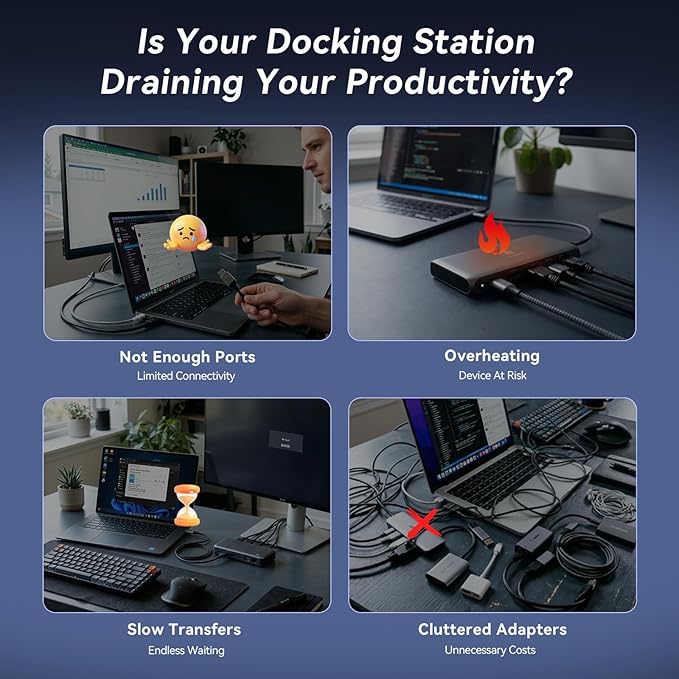
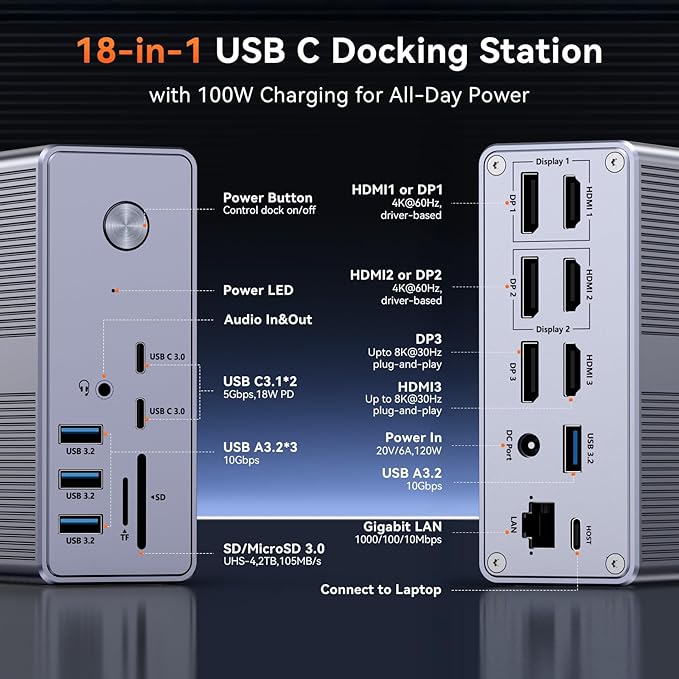
Empower Your Setup with 18 Powerful Port: TOBENONE's triple monitor docking station streamlines your connectivity needs by providing up to 18 ports with just one USB-C cable.

Fast
Shipping

Free
Return*

Secure Packaging

100% Original Products

PCI DSS Compliance

ISO 27001 Certified


Note: Step Down Voltage Transformer required for using electronics products of US store (110-120). Recommended power converters Buy Now.


What Stands Out
Triple 4K Support
Experience seamless multitasking with three 4K displays, enhancing productivity for designers and professionals by providing expansive screen real estate across devices.
Robust Power Supply
Equipped with a 120W power adapter, this docking station provides sufficient power to charge your MacBook Pro/Air while simultaneously connecting to multiple peripherals without sacrificing performance.
Versatile Connectivity
Featuring diverse ports including HDMI, DisplayPort, USB-C, and USB 3.2, this docking station ensures compatibility with various devices and peripherals, making it an ideal hub for modern workstations.
Product Details
- Empower your setup with 18 powerful ports in one USB-C cable
- Widely compatible with Thunderbolt 4, Thunderbolt 3, and full-featured USB-C laptops
- Supports triple/quad 4K extended display with 3x HDMI and 3x DisplayPort
- Includes a powerful 120W power adapter for laptop and dock charging
- Experience super-speed data transfer with 4x USB 3.1 and 2x Type-C ports
- Designed for professional office connectivity solutions
| Hardware Interface | 3.5mm Audio, DisplayPort, Ethernet, HDMI, MicroSD, USB 3.1 Type A, USB Type C |
| Compatible Devices | Apple M1/M2/M3/M4, MacBook Neo and Intel Macs (MacBook Pro, MacBook Air with macOS 10.14 or later), such as MacBook Air Retina 12" (2016, Intel chip), MacBook Air Retina 13" (2018/2019/2020, Intel chip), MacBook Pro 13" (2016/2017/2018/2019/2020, Intel chip), MacBook Pro 14" (2021, M1 Pro or M1 Max chip), MacBook Pro 14" (2023, M2 Pro or M2 Max chip), MacBook Pro 14" (2023, M3 Pro or M3 Max chip), MacBook Pro 14" (2024, M4 Pro or M4 Max chip), MacBook Air 13" (2025, M4 chip), MacBook Air 15" (2025, M4 chip), MacBook Pro 15" (2016/2017/2018/2019, Intel chip), MacBook Pro 16" (2019, Intel chip), MacBook Pro 16" (2021, M1 Pro or M1 Max chip), MacBook Pro 16" (2023, M2 Pro or M2 Max chip), MacBook Pro 16" (2023, M3 Pro or M3 Max chip), MacBook Pro 16" (2024, M4 Pro or M4 Max chip), MacBook Air 13" (2020/2021, M1 chip), MacBook Pro 13" (2020, M1 chip), MacBook Air 13" (2022/2023, M2 chip), MacBook Pro 13" (2022, M2 chip), MacBook Pro 14" (2023, M3 chip), MacBook Air 15" (2023, M2 chip), Can't watch Netflix., Please ensure that the laptop's USB-C port supports display, download the latest driver, Windows 10 / 11 & macOS 10.15.x and later, ChromeOS 100.x. Thunderbolt 5/ Thunderbolt 4/ Thunderbolt 3/ USB4.0/ full-featured USB-C Microsoft Surface line/HP Spectre x360 series, Dell XPS 13 / XPS 15 / Latitude series, Lenovo Thinkpad T series. Such as Microsoft Surface Book 2, Surface Go, Surface Laptop 3, Surface Pro 7; Dell XPS 13/XPS 15 9300/ 9310/ 9350/ 9360/ 9370/ 9380/ 9550/ 9560/ 9570/ 7390 +more) / Latitude 5310/ 5580/ 7490 +more); HP Spectre x360 13t, Specter x369, Elitebook 840 G5 series, Elitebook X2, Elitebook x360 1030 G3, Elitebook 745 G6, Elitebook 830 G6, 2018 HP Elite 800 G4, Envy x360 Laptop (15z-ds100), Zbook 17 G4; Lenovo Yoga 730/ Yoga 910/ Yoga 920/ Yoga 930, Yoga15 Thinkpad Ultrabook Pro, Thinkpad E590/ Thinkpad P72, Thinkpad T470/ T480/ T490; Thinkpad X1 Carbon; Legion Y530, Lenovo C930/ T480s; Huawei Macbook Mate10 or later; Google Slate (2019); Pixel book go 2019/2020, LG Gram, Samsung Galaxy TabPro S |
| Total Usb Ports | 6 |
| Number of Ports | 18 |
| Total Number of HDMI Ports | 3 |
| Wattage | 120 watts |
| Input Voltage | 120 Volts |
| Minimum Required Operating System Version | Windows 10 |
| Smart Home Compatibility | Not Smart Home Compatible |
| Item Dimensions L x W x H | 1.5"L x 4.26"W x 4.3"H (3.8 x 10.8 x 10.9 cm) |
| Item Weight | 17.6 Ounces (498.96 grams) |
| Brand | Tobenone |
| Manufacturer | Shenzhen KaiLiYuan Technology Co.,Ltd TOBENONE |
| Model Number | K1211-200600D |
| Mfr Part Number | UDS033 |
| Item Type Name | DisplayLink Docking Station |
| Color | Grey-120W power adapter |
| Compatible Devices | Apple M1/M2/M3/M4, MacBook Neo and Intel Macs (MacBook Pro, MacBook Air with macOS 10.14 or later), such as MacBook Air Retina 12" (2016, Intel chip), MacBook Air Retina 13" (2018/2019/2020, Intel chip), MacBook Pro 13" (2016/2017/2018/2019/2020, Intel chip), MacBook Pro 14" (2021, M1 Pro or M1 Max chip), MacBook Pro 14" (2023, M2 Pro or M2 Max chip), MacBook Pro 14" (2023, M3 Pro or M3 Max chip), MacBook Pro 14" (2024, M4 Pro or M4 Max chip), MacBook Air 13" (2025, M4 chip), MacBook Air 15" (2025, M4 chip), MacBook Pro 15" (2016/2017/2018/2019, Intel chip), MacBook Pro 16" (2019, Intel chip), MacBook Pro 16" (2021, M1 Pro or M1 Max chip), MacBook Pro 16" (2023, M2 Pro or M2 Max chip), MacBook Pro 16" (2023, M3 Pro or M3 Max chip), MacBook Pro 16" (2024, M4 Pro or M4 Max chip), MacBook Air 13" (2020/2021, M1 chip), MacBook Pro 13" (2020, M1 chip), MacBook Air 13" (2022/2023, M2 chip), MacBook Pro 13" (2022, M2 chip), MacBook Pro 14" (2023, M3 chip), MacBook Air 15" (2023, M2 chip), Can't watch Netflix., Please ensure that the laptop's USB-C port supports display, download the latest driver, Windows 10 / 11 & macOS 10.15.x and later, ChromeOS 100.x. Thunderbolt 5/ Thunderbolt 4/ Thunderbolt 3/ USB4.0/ full-featured USB-C Microsoft Surface line/HP Spectre x360 series, Dell XPS 13 / XPS 15 / Latitude series, Lenovo Thinkpad T series. Such as Microsoft Surface Book 2, Surface Go, Surface Laptop 3, Surface Pro 7; Dell XPS 13/XPS 15 9300/ 9310/ 9350/ 9360/ 9370/ 9380/ 9550/ 9560/ 9570/ 7390 +more) / Latitude 5310/ 5580/ 7490 +more); HP Spectre x360 13t, Specter x369, Elitebook 840 G5 series, Elitebook X2, Elitebook x360 1030 G3, Elitebook 745 G6, Elitebook 830 G6, 2018 HP Elite 800 G4, Envy x360 Laptop (15z-ds100), Zbook 17 G4; Lenovo Yoga 730/ Yoga 910/ Yoga 920/ Yoga 930, Yoga15 Thinkpad Ultrabook Pro, Thinkpad E590/ Thinkpad P72, Thinkpad T470/ T480/ T490; Thinkpad X1 Carbon; Legion Y530, Lenovo C930/ T480s; Huawei Macbook Mate10 or later; Google Slate (2019); Pixel book go 2019/2020, LG Gram, Samsung Galaxy TabPro S See more |
| Total USB Ports | 6 |
| Product Dimensions (L x W x H) | 1.5"L x 4.26"W x 4.3"H (3.8 x 10.8 x 10.9 cm) |
| Total HDMI Ports | 3 |
Who Should Buy?

-
Creative Professionals
Ideal for designers and video editors needing multiple 4K displays for enhanced productivity and workspace management.
-
Tech Enthusiasts
Great for users who want to leverage the latest Thunderbolt 4/3 capabilities and enjoy high-resolution multitasking.
-
Remote Workers
Perfect for remote professionals requiring a versatile docking solution to extend their workspace with maximum connectivity.

-
Casual Users
Not suitable for users who only need basic functionalities and do not require multiple high-resolution monitors.
-
Budget-Conscious Buyers
May not be ideal for those looking for an affordable docking solution without the need for advanced features.
-
Older Devices
Incompatible with older laptops lacking USB-C or Thunderbolt ports, limiting accessibility for some users.
Product Description
Have any Query? Chat with us
Customer Questions & Answers
-
Question:
What devices are compatible with the TobenONE DisplayLink Docking Station?
Answer: The TobenONE DisplayLink Docking Station is compatible with various devices, including MacBook Pro, MacBook Air, laptops with Thunderbolt 3 ports, and USB-C Windows PCs. It's designed to cater to both Mac and Windows users, delivering flexibility for diverse setups. This versatility allows you to connect multiple devices simultaneously, such as external monitors, keyboards, and mice, enhancing your productivity. Whether you’re a graphic designer needing multiple screens for your creative work or a professional wanting to set up a dual-monitor workspace, this docking station meets various needs. -
Question:
How does the TobenONE DisplayLink Docking Station enhance productivity?
Answer: The TobenONE Docking Station enhances productivity by allowing users to connect up to three 4K monitors simultaneously. This multi-display setup enables efficient multitasking, letting you run various applications side by side without the hassle of switching between windows. For example, a marketer can display analytics on one screen, create presentations on another, and communicate through video calls on a third, all at the same time. By eliminating the need for multiple adapters and offering seamless connectivity, this docking station streamlines your workspace. -
Question:
What is the maximum resolution supported by this docking station?
Answer: The TobenONE DisplayLink Docking Station supports a maximum resolution of up to 4K for three connected monitors. This high resolution ensures that visuals are sharp and crystal-clear, ideal for tasks such as video editing, graphic design, and gaming. Users will appreciate the clarity and detail provided by 4K displays, which allows for a more immersive experience. When working on high-definition content, having three 4K screens can significantly enhance your ability to review intricate details. -
Question:
What is DisplayLink technology, and how does it work?
Answer: DisplayLink technology allows you to connect multiple monitors through a single USB connection, using advanced compression technology to transfer video signals efficiently. It simplifies connecting additional displays without needing dedicated graphics ports. When using the TobenONE Docking Station, users can easily expand their visual workspace by plugging in their monitors and benefiting from a seamless experience. This is particularly advantageous for users needing multiple video outputs for presentations or multitasking in professional settings. -
Question:
Can I charge my laptop with the TobenONE Docking Station?
Answer: Yes, the TobenONE DisplayLink Docking Station includes a powerful 120W power adapter that can charge your laptops, such as MacBook Pro and MacBook Air, while connected. This feature eliminates the need for multiple chargers and keeps your workspace organized. Simply connect your laptop to the docking station, and it will provide power and connectivity simultaneously. This is particularly useful for professionals who are frequently on the go, ensuring their devices remain charged while they work. -
Question:
Is it easy to set up the TobenONE DisplayLink Docking Station?
Answer: Yes, setting up the TobenONE DisplayLink Docking Station is straightforward. Simply connect it to your laptop via USB-C or Thunderbolt 3, install the necessary DisplayLink drivers, and plug in your monitors. The user-friendly design is intended for quick installation without complex configurations. This ease of setup is beneficial for users, including students and remote workers, who require a hassle-free transition to a multi-monitor workflow. -
Question:
Does the docking station support audio output?
Answer: Yes, the TobenONE DisplayLink Docking Station supports audio output through connected monitors or speakers. This integration allows users to enjoy high-quality audio along with their video content without needing extra cables or devices. For instance, during video conferencing or media playback, audio will seamlessly transfer through your setup, ensuring a complete multimedia experience. This feature makes it perfect for home offices or creative studios. -
Question:
What lengths of USB-C cables work best with the docking station?
Answer: To ensure optimal performance, it is recommended to use USB-C cables that are no longer than six feet in length when connecting to the TobenONE DisplayLink Docking Station. Longer cables may cause signal degradation, impacting video quality. For setups where devices are placed further away, consider quality cables from reputable brands to maintain reliable performance. This is particularly crucial in office environments or while giving presentations. -
Question:
Can I use this docking station with gaming consoles?
Answer: The TobenONE DisplayLink Docking Station is primarily designed for laptops and may not support all gaming consoles. While it can theoretically connect to some consoles via HDMI, you may not get optimal performance or compatibility. It's best suited for laptops for tasks that require extensive multitasking and high display quality. For dedicated gaming setups, consider using dedicated gaming monitors directly connected to the console. -
Question:
Where can I buy the TobenONE DisplayLink Docking Station?
Answer: You can purchase the TobenONE DisplayLink Docking Station from Ubuy. Ubuy is a reliable online retailer that offers a wide selection of electronics, including this docking station. They provide detailed product descriptions, customer reviews, and various shipping options to ensure you have a smooth shopping experience. Whether you're looking for fast delivery or competitive pricing, Ubuy is a great choice for obtaining your tech needs.
Tobenone Docking Stations K1211-200600D Editorial Review


No editorial reviews found
Customer Reviews & Ratings
922 customers ratings
-
5 Star
74%
-
4 Star
13%
-
3 Star
4%
-
2 Star
3%
-
1 Star
6%
Review this product
Share your thoughts with other customers
Platform Trust & Buyer Confidence

MA
Mohammad
Verified buyer
“Excellent quality and very fast delivery, I really appreciate your service, when you work good I will appreciate that, I am very satisfied, thank you”
13 June 2026 · via Trustpilot
MB
Maryam
Verified buyer
“The order arrived fast and in perfect condition”
2 June 2026 · via Trustpilot
MK
Mohd
Verified buyer
“Firstly the team who are very positive in response to any correction if something wrong. Secondly the quality and selection is exactly on what I ordered and which is perfect. Finally the time of delivery is very sufficient which made me comfortable. Overall is excellent.”
26 Feb 2026 · via Trustpilot
K
Khaled
Verified buyer
“Good quality of product, delivered in 2 weeks. I thought it would take more time.”
21 Feb 2026 · via Trustpilot
T
trusttaker
Verified buyer
“Everything was fine. You can order from multiple stores or countries—just be patient with the shipping. Given their business model, this was my first order from them. Thank you, Ubuy.”
20 Feb 2026 · via Trustpilot
Secure Checkout
Global Delivery
Easy Returns
Genuine Products
Product Price History
Important information
- Limitations : For products shipped internationally, please note that any manufacturer warranty may not be valid; manufacturer service options may not be available; product manuals, instructions, and safety warnings may not be in destination country languages; the products (and accompanying materials) may not be designed in accordance with destination country standards, specifications, and labeling requirements; and the products may not conform to destination country voltage and other electrical standards (requiring use of an adapter or converter if appropriate). The recipient is responsible for assuring that the product can be lawfully imported to the destination country. When ordering from Ubuy or its affiliates, the recipient is the importer of record and must comply with all laws and regulations of the destination country.
- Not all the products listed on Ubuy are for sale, as Ubuy is a global search engine. Products are subject to export/trade regulations.
BHD 91
Order now and get it around Friday, July 10
This item is not restrict in my country.(Please click on above link if this item is not restrict in your country, So our team will review and allow.)
QTY:
Secured transaction
Ubuy works hard to protect your security and privacy. Our advanced payment security system ensures confidentiality by encrypting your information during transmission using AES (Advanced Encryption Standards) and SSL (Secure Socket Layer) protocols. Your payment details are 100% secure as we do not share your payment details with third party sellers.
Our Top Logistics Partners
Fastest cross-border delivery
Features & Benefits
- Triple monitor docking station with 18 ports
- Streamline your connectivity needs
- Extend three different displays simultaneously
- Compatible with Thunderbolt 4, Thunderbolt 3, and USB-C devices
- Support triple/quad 4K@60Hz monitors
- Powerful 120W power adapter included
- Super-speed data transfer with 4x USB 3.1 and 2x Type-C ports