- Home Page /
- Office Products /
- Office Electronics /
- Scanner & Accessories /
- Computer Scanner /
- Document Scanner /
- Epson Workforce ES-500W Wireless Color Duplex...
0 ratings

Item #:
3366811
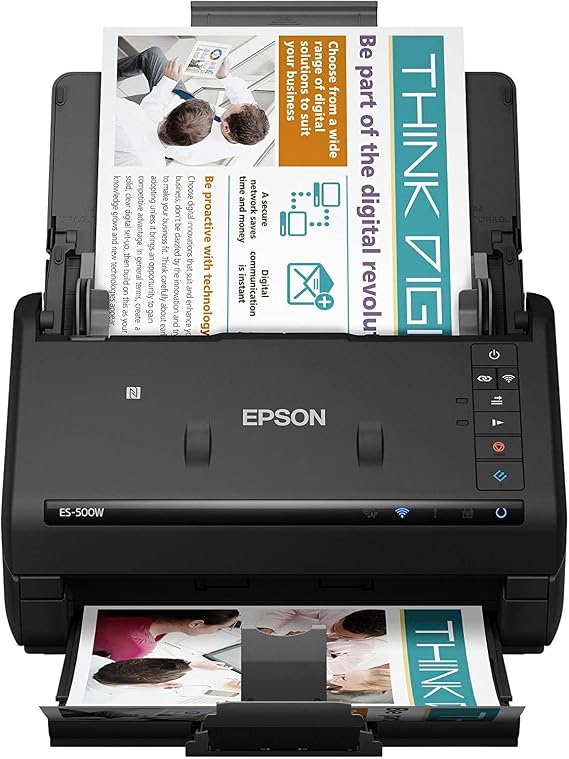
Epson Workforce ES-500W Wireless Color Duplex Document Scanner for PC and Mac, Auto Document Feeder (ADF)
Item #:
3366811
BHD 192
Price Details
Excluding Shipping & Custom charges ( Shipping and custom charges will be calculated on checkout )
*All items will import from US
0 ratings
Write a review
In stock
 Imported from USA store
QTY:
Order now and get it around Wednesday, August 19
Secured transaction
Ubuy works hard to protect your security and privacy. Our advanced payment security system ensures confidentiality by encrypting your information during transmission using AES (Advanced Encryption Standards) and SSL (Secure Socket Layer) protocols. Your payment details are 100% secure as we do not share your payment details with third party sellers.
Our Top Logistics Partners


The WorkForce ES-500WR duplex document scanner makes it easy to organize your life ― and your finances.

Fast
Shipping

Free
Return*

Secure Packaging

100% Original Products

PCI DSS Compliance

ISO 27001 Certified


Note: Step Down Voltage Transformer required for using electronics products of US store (110-120). Recommended power converters Buy Now.


What Stands Out
Wireless Scanning
Enjoy the convenience of wireless scanning, allowing users to easily connect to PCs and Macs without cumbersome cables, enhancing workspace organization and mobility.
Duplex Scanning
The ES-500W offers fast double-sided scanning, dramatically reducing time spent on document processing while ensuring both sides are captured simultaneously for efficiency.
Auto Document Feeder
Equipped with a robust Auto Document Feeder, this scanner handles large batches effortlessly, making it perfect for busy offices needing quick and reliable document management.
Product Details
- Wirelessly scan documents to your smartphone, tablet, or computer
- Scan up to 35 ppm/70 ipm with Single Step Technology
- 50-page Auto Document Feeder for easy scanning of stacks of paper
- Included Epson ScanSmart Software for easy scanning and file management
- Compatible with most document management software
- Create searchable PDFs and editable Word and Excel files with OCR
| Scanner Type | Document |
| Connection Type | Wi-Fi |
| Resolution | 1200 |
| Wattage | 500 watts |
| Color Depth | 24 bpp |
| Standard Sheet Capacity | 50 |
| Optical Sensor Technology | CCD |
| Media Type | Paper, Receipt |
| Light Source Type | LED |
| Item Dimensions D x W x H | 6.9"D x 6.6"W x 6.9"H (17.5 x 16.8 x 17.5 cm) |
| Item Weight | 3700 Grams |
| Minimum System Requirements | Windows 7 |
| Brand | Epson |
| Model Name | WorkForce ES-500W |
| UPC | 010343920330 |
| Global Trade Identification Number | 00010343920330 |
| Built-In Media | AC adapter and power cable, ES-500W Document Scanner, Start Here poster, SuperSpeed USB cable |
| Unit Count | 1.0 Count |
| Item Type Name | Epson WorkForce ES-500W Wireless Color Duplex Document Scanner for PC and Mac, Auto Document Feeder (ADF) |
| Manufacturer | Epson |
| Connectivity Technology | Wi-Fi |
| Product Dimensions (L x W x H) | 6.9"D x 6.6"W x 6.9"H (17.5 x 16.8 x 17.5 cm) |
Who Should Buy?

-
Small Business Owners
Ideal for small businesses needing efficient document scanning and easy wireless connectivity to save time and resources.
-
Home Office Users
Perfect for home offices looking to digitize documents quickly with robust features like duplex scanning and ADF.
-
Students and Researchers
Great for students who require scanning for notes and research papers, providing efficient organization and storage options.

-
Heavy Photo Users
Not suitable for users focusing on high-quality photo scanning, as it is designed primarily for documents.
Product Description
Epson Workforce ES-500W Wireless Color Duplex Document Scanner for PC and Mac, Auto Document Feeder (ADF)
Have any Query? Chat with us
Product Buying Guide
The Epson WorkForce ES-500W Wireless Color Duplex Document Scanner is a versatile and efficient scanner suitable for both PC and Mac users. With wireless scanning capabilities and a powerful software package, it offers a convenient and organized scanning experience. Whether you need to scan documents for business or personal use, the ES-500W is a reliable choice.
Product Specifications
- Wirelessly scan to your smartphone, tablet or computer
- Compatible with most software
- Scan up to 35 ppm/70 ipm
- Robust 50 page Auto Document Feeder
- Built-in Nuance Optical Character Recognition (OCR)
- Easy sharing and collaboration with cloud storage services
- Intelligent color and image adjustments
- Reliable paper feeding system with Ultrasonic Double Feed Detection
Key Features
- Wireless scanning to smartphones, tablets, and computers
- Compatible with a wide range of document management software
- Fast scanning speed of up to 35 pages per minute
- Convenient 50-page Auto Document Feeder for handling large stacks of paper
- Built-in OCR for creating searchable PDFs and editable Word and Excel files
- Easy sharing and collaboration with popular cloud storage services
- Automatic color and image adjustments for optimal scan quality
- Reliable paper feeding system with Double Feed Detection for preventing missing pages
Usage Scenarios
- Organizing personal documents and receipts
- Scanning business cards and ID cards
- Creating searchable PDFs for easy document retrieval
- Collaborating on projects by sharing scanned documents via cloud storage services
Some User Review
- I love how easy it is to scan documents wirelessly with this scanner. It saves me a lot of time and hassle.
- The OCR feature is a game-changer for me. I can now easily search for specific information within my scanned documents.
- The scan quality is excellent, and the automatic adjustments make sure the colors and images look great.
- The paper feeding system works flawlessly, and I haven't had any issues with missing pages.
- The included software is intuitive and user-friendly. It makes the scanning process much smoother.
Competitors
- The Epson WorkForce ES-500W Wireless Color Duplex Document Scanner is competitively priced compared to other similar scanners on the market.
- Considering its features and performance, the price is justified and offers good value for money.
- While there may be lower-priced options available, they often lack the wireless capabilities and advanced software features of the ES-500W.
Buying Considerations
- Consider your scanning needs: If you require wireless scanning and advanced software features, the ES-500W is a suitable choice.
- Think about the volume of documents you need to scan: The 50-page Auto Document Feeder is ideal for handling large stacks of paper.
- Check compatibility with your devices and software: Ensure that the scanner is compatible with your PC, Mac, and document management software.
- Evaluate the importance of OCR functionality: If you need to create searchable PDFs and editable files, the built-in OCR is a valuable feature.
- Consider your budget: While the ES-500W may be priced slightly higher than some alternatives, its wireless capabilities and advanced software make it a worthwhile investment.
Conclusion
The Epson WorkForce ES-500W Wireless Color Duplex Document Scanner is a reliable and efficient scanner that offers wireless scanning, advanced software features, and excellent scan quality. With its intuitive operation and reliable paper feeding system, it's a great choice for both personal and business use. Consider your scanning needs, budget, and compatibility requirements when deciding on a scanner, and the ES-500W is sure to meet your expectations.
View LessThe Epson WorkForce ES-500W Wireless Color Duplex Document Scanner is a versatile and efficient scanner suitable for both PC and Mac users. With wireless scanning capabilities and a powerful software package, it offers a convenient and organized scanning experience. Whether you need to scan documents for business or personal use, the ES-500W is a reliable choice. Continue Reading
Customer Questions & Answers
-
Question:
What are the key features of the Epson WorkForce ES-500W scanner?
Answer: The Epson WorkForce ES-500W offers wireless connectivity, allowing users to scan documents directly to mobile devices or cloud services. Its duplex scanning feature ensures both sides of the document are captured simultaneously, which significantly enhances productivity. The Auto Document Feeder (ADF) can handle up to 50 pages at a time, making it ideal for processing large volumes of paperwork efficiently. Additionally, this scanner is compatible with both PC and Mac systems, ensuring versatility across different platforms. -
Question:
Is the Epson ES-500W suitable for home office use?
Answer: Yes, the Epson WorkForce ES-500W is highly suited for home office environments. Its compact design and wireless capability make it a great fit for small spaces while facilitating ease of access from different devices. The ability to quickly scan, save, and share documents enhances workflow efficiency, making it an excellent choice for professionals who need to manage documents seamlessly. Common use cases include scanning contracts, receipts, or important business documents. -
Question:
How does the wireless scanning feature work?
Answer: The wireless scanning feature of the Epson WorkForce ES-500W allows users to connect via Wi-Fi to their computer or mobile devices. Once connected, you can initiate scans directly from your device without the need for physical connections. This is particularly beneficial for users engaging in multiple tasks, as you can scan documents remotely while continuing other work. Additionally, users can upload scanned files directly to cloud services like Google Drive or Dropbox for instant access and sharing. -
Question:
What types of documents can the ES-500W scan?
Answer: The Epson WorkForce ES-500W is versatile and can scan a variety of document types including contracts, receipts, business cards, photos, and more. The scanner handles different paper sizes effectively, making it suitable for both standard documents and intricate pieces such as ID cards or multi-page forms. Users can also scan double-sided documents efficiently with its duplex feature, which saves time in document handling, especially in a busy workplace. -
Question:
Is it possible to scan documents to PDF format?
Answer: Absolutely! The Epson WorkForce ES-500W allows users to scan documents directly to PDF format, which is ideal for creating easily shareable files. Users can select settings to customize PDF creation, such as adjusting file quality or adding security features. This capability is particularly useful for professionals needing to archive documents electronically or submit official documentation without printing them out, contributing to a more paperless workflow. -
Question:
What software is included with the EPS-500W scanner?
Answer: The Epson WorkForce ES-500W comes with a suite of software that enhances its functionality. This includes document management software and scanning utilities that help you organize your scanned files efficiently. It is designed to integrate seamlessly with both Windows and Mac operating systems, ensuring that users can easily manage scans and convert files into various formats. This software support is crucial for users needing effective document handling solutions to streamline their workflow. -
Question:
How fast is the scanning process with the ES-500W?
Answer: The Epson WorkForce ES-500W is designed for speed, capable of scanning up to 35 pages per minute. This high scanning speed is achieved through its duplex technology, allowing both sides of a document to be scanned simultaneously. This speed is beneficial in settings where time is a factor, such as busy offices requiring efficient processing of documents. Users will often find that they can complete document tasks quicker, making it a great tool for meeting tight deadlines. -
Question:
Can I scan photos with the Epson ES-500W?
Answer: Yes, the Epson WorkForce ES-500W can scan photos effectively, but users should note that it is primarily geared towards document scanning. It can accommodate photo sizes and produce high-quality scans, making it suitable for preserving personal memories or scanning images for business presentations. For optimal results, users are encouraged to configure the scanner settings according to their photo types, ensuring that colors and details are captured accurately. -
Question:
Does the scanner support mobile scanning?
Answer: Yes, the Epson WorkForce ES-500W supports mobile scanning, allowing users to scan documents using their smartphones or tablets. With the Epson DocumentScan app, you can quickly connect, scan, and save files directly onto your mobile devices. This feature enhances flexibility, enabling users to handle documents on-the-go, which is particularly useful for remote working or business travel. Users can conveniently manage paperwork from wherever they are, transforming their productivity. -
Question:
Where can I buy the Epson WorkForce ES-500W in Bahrain?
Answer: You can purchase the Epson WorkForce ES-500W Wireless Color Duplex Document Scanner for PC and Mac at Ubuy in Bahrain. Ubuy offers a user-friendly platform with a wide selection of products, ensuring a smooth buying experience. With a focus on customer satisfaction, Ubuy provides detailed product descriptions and reliable service.
Epson Document Scanners Editorial Review
The Epson ES-500WLL is a great scanner for home or small business use, allowing for automatic scanning and automatic file renaming. It is compatible with Windows 7, 8, and 10 and supports wireless scanning from up to four devices. It can be used to scan state-issued IDs and insurance cards, but it may not be suitable for scanning laminated cards or stiff photos. Some users have had trouble connecting the scanner to their devices or finding the folder they want to save their scanned documents to, which can be time-Consuming. However, others have found it easy to set up and use, and appreciate the ability to delete unwanted pages before saving or emailing.
Customer Reviews & Ratings
1 customers ratings
-
5 Star
0%
-
4 Star
100%
-
3 Star
0%
-
2 Star
0%
-
1 Star
0%
Review this product
Share your thoughts with other customers
Pros
- Allows for automatic scanning and automatic file renaming
- Compatible with Windows 7, 8, and 10
- Supports wireless scanning from up to four devices
- Can scan state-issued IDs and insurance cards
Cons
- May not be suitable for scanning laminated cards or stiff photos
Platform Trust & Buyer Confidence

MB
Maryam
Verified buyer
“The order arrived fast and in perfect condition”
2 June 2026 · via Trustpilot
T
trusttaker
Verified buyer
“I loved it. That was my second order, and I am already thinking of placing a third order.”
16-Jul-26 · via Trustpilot
HA
Haitham
Verified buyer
“Trusted merchant”
11 July 2026 · via Trustpilot
MA
Mohammad
Verified buyer
“Excellent quality and very fast delivery, I really appreciate your service, when you work good I will appreciate that, I am very satisfied , thank you”
13 June 2026 · via Trustpilot
LA
Lulwa
Verified buyer
“I like the package arrived safely”
17 June 2026 · via Trustpilot
Secure Checkout
Global Delivery
Easy Returns
Genuine Products
Product Price History
Important information
- Limitations : For products shipped internationally, please note that any manufacturer warranty may not be valid; manufacturer service options may not be available; product manuals, instructions, and safety warnings may not be in destination country languages; the products (and accompanying materials) may not be designed in accordance with destination country standards, specifications, and labeling requirements; and the products may not conform to destination country voltage and other electrical standards (requiring use of an adapter or converter if appropriate). The recipient is responsible for assuring that the product can be lawfully imported to the destination country. When ordering from Ubuy or its affiliates, the recipient is the importer of record and must comply with all laws and regulations of the destination country.
- Not all the products listed on Ubuy are for sale, as Ubuy is a global search engine. Products are subject to export/trade regulations.
BHD 192
Order now and get it around Wednesday, August 19
This item is not restrict in my country.(Please click on above link if this item is not restrict in your country, So our team will review and allow.)
QTY:
Secured transaction
PCI DSS compliant and ISO 27001:2022 certified, with encrypted payments and full buyer protection on every order.
Our Top Logistics Partners
Fastest cross-border delivery
Features & Benefits
- Premium accounting features
- Wireless scanning to PC, Mac, smartphone, tablet, or cloud storage
- Fast scanning speeds of up to 35 ppm/70 ipm
- 50-page Auto Document Feeder
- Included Epson ScanSmart Accounting Edition Software for searchable PDFs and editable Word and Excel files
- Versatile scanning for business cards, ID cards, single sheets, and more
Ubuy Assurance
Experience worry-free shopping with 100% original products, PCI DSS-compliant payment security, ISO 27001-certified data protection, the fastest cross-border delivery, free returns *, and secure packaging on every order.