- Home Page /
- Office Products /
- Office Electronics /
- Presentation Products /
- Presentation Remotes /
- Metallic Presentation Clicker Presenter Remot...
0 ratings






Item #:
55802328
Metallic Presentation Clicker Presenter Remote - Rechargeable Wireless Presenter with Green Laser Pointer, 2 in 1 USB Clicker for PowerPoint & Google
Item #:
55802328
BHD 15
Price Details
Excluding Shipping & Custom charges ( Shipping and custom charges will be calculated on checkout )
*All items will import from US
In stock
 Imported from USA store
QTY:
Order now and get it around Monday, July 06
Secured transaction
Ubuy works hard to protect your security and privacy. Our advanced payment security system ensures confidentiality by encrypting your information during transmission using AES (Advanced Encryption Standards) and SSL (Secure Socket Layer) protocols. Your payment details are 100% secure as we do not share your payment details with third party sellers.
Our Top Logistics Partners


The wireless presenter remote combines the functions of hyperlink, switch windows, page up/down, full/black screen, and volume control, making it a handy and reliable tool for presentations.

Fast
Shipping

Free
Return*

Secure Packaging

100% Original Products

PCI DSS Compliance

ISO 27001 Certified


Note: Step Down Voltage Transformer required for using electronics products of US store (110-120). Recommended power converters Buy Now.


What Stands Out
Wireless Convenience
Utilize the freedom of wireless technology to move around while presenting, enhancing your connection with the audience without being tethered to your device.
Built-in Laser Pointer
The integrated red laser pointer emphasizes key points during presentations, ensuring your audience stays engaged and focused on the material being discussed.
Volume Control
Easily adjust audio levels directly from the clicker, allowing for seamless integration of multimedia elements without the need to manage your computer during the presentation.
Product Details
- ✔️Sleek Aluminum Design: Elevate your presentations with a sleek aluminum body that adds a touch of style and durability to your presentation clicker.
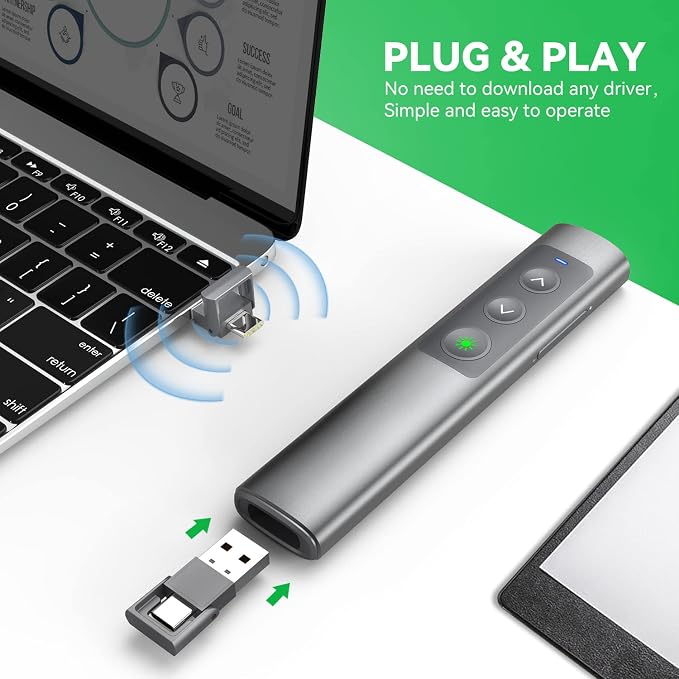
- ✔️Plug&Play: Our wireless presenter features a versatile 2-in-1 USB C/USB A receiver, offering seamless plug-and-play compatibility with both MacBooks and traditional PCs. No need to download any software or drivers; plug in and get started.
- ✔️Universal Compatibility: This powerpoint clicker is compatible with various operating systems, including Windows, Mac OS, Linux, and Android. It effortlessly integrates with popular presentation software like Google Slides, PowerPoint, Prezi, and iWork, making it the ideal choice for professionals across different platforms.
- ✔️Fast Type-C Charging: With the latest Type-C charging interface, enjoy rapid recharging for less downtime and more productivity.
- ✔️Multiple Functionality: Take control with features like page up/down, full screen/black screen toggles, and volume control. The vivid green laser pointer ensures your audience stays engaged. Enjoy a wireless control range of up to 100ft and a laser range of 656ft.
| Additional Features | 100ft Remote Control Range, 2 in 1 USB C Receiver, Bright Green Laser, Metallic Body, Multi-OS Compatible, Plug-and-Play, Rechargeable |
| Compatible Devices | Apple Macbook, Windows Computer, MacOS, Android, and Linux |
| Connectivity Technology | Radio Frequency |
| Button Quantity | 1 |
| Controller Type | Button Control |
| Maximum Range | 100 Feet |
| Number of Batteries | 1 Lithium Ion batteries required. (included) |
| Battery Type | Lithium-Ion |
| Color | Green light-Type c |
| Brand | PPTSLID |
| Model Name | BYJ76-G |
| Model Number | BYJ76-G |
| Mfr Part Number | BYJ76-G |
| Manufacturer | DONGGUAN BAIYEJIA ELECTRONIC CO.,LTD |
| Special Feature | 100ft Remote Control Range, 2 in 1 USB C Receiver, Bright Green Laser, Metallic Body, Multi-OS Compatible, Plug-and-Play, Rechargeable See more |
| Item Weight | 0.2 lbs (90 grams) |
Who Should Buy?

-
Business Professionals
Ideal for executives delivering presentations, allowing seamless slide control and enhanced audience engagement.
-
Educators and Teachers
Perfect for educators wanting to manage lessons effectively while interacting with students during presentations.
-
Public Speakers
Great for speakers at conferences and events who require reliable remote control for their presentations.

-
Casual Users
Not suitable for individuals making infrequent or informal presentations where sophisticated features aren't needed.
-
Tech Beginners
May be overwhelming for users unfamiliar with technology and presentation tools, requiring simple alternatives.
-
Limited Space Presenters
Not ideal for small settings where a remote clicker may be unnecessary due to physical proximity to the computer.
Product Description
Have any Query? Chat with us
Customer Questions & Answers
-
Question:
What is a Presentation Clicker, and how does it work?
Answer: A Presentation Clicker, also known as a wireless presenter remote, allows you to control your PowerPoint presentations from a distance. It typically features buttons to navigate slides, and many models including this one, have an integrated red laser pointer to highlight specific content. By connecting via USB receiver, your device recognizes the clicker, enabling seamless communication as you move around the room. This hands-free operation is ideal for maintaining audience engagement during presentations or lectures, allowing you to focus on delivering your message effectively. -
Question:
How far can I use the Wireless Presenter Remote from my computer?
Answer: Most wireless presenter remotes, including the one you’re considering, have a range of up to 100 feet, depending on environmental conditions. This distance allows you to move freely around larger rooms, making it suitable for seminars, lectures, or classrooms. The effective range helps you interact with your audience while controlling your presentation effortlessly. By maintaining visibility with the screen while engaging with your listeners, you enhance the overall presentation experience. -
Question:
Does the Presentation Clicker require batteries?
Answer: Yes, the Presentation Clicker typically runs on batteries, often AAA or built-in rechargeable options. It's crucial to check the specifications to ensure you have suitable backup batteries if needed. The longevity of the battery life can vary based on usage frequency and type of technology employed. Keeping an extra set of batteries handy ensures that your presentation goes smoothly without interruptions, providing peace of mind before important events. -
Question:
Can I use this clicker with devices other than a computer?
Answer: Absolutely! The Presentation Clicker is versatile and can be used with various devices, including laptops, tablets, or even some smart TVs, provided they support presentation software. It connects via USB or Bluetooth, granting you flexibility during your presentations. This versatility is helpful in educational and professional environments where presentations need to be shared across different platforms, allowing for a polished display irrespective of the device being used. -
Question:
Is the red laser pointer feature easy to use during presentations?
Answer: Yes, the red laser pointer feature is designed to be simple and intuitive. By pressing the designated button on the clicker, you activate the laser, which helps to highlight specific points on your slides. This functionality is particularly useful for guiding audience focus and enhancing understanding during complex topics. Utilizing the laser pointer effectively can elevate your presentation skills and helps maintain audience engagement. -
Question:
Is the clicker compatible with Mac devices?
Answer: Most Presentation Clickers, including this one, are compatible with both Windows and Mac operating systems. For Mac users, simply ensure that the necessary presentation software is installed. Compatibility expands your options, making this clicker ideal for varied professional or educational settings. You can easily switch between devices, enabling flexibility during workshops, meetings, or classroom settings without worrying about compatibility issues. -
Question:
What range of applications can I use with the Presentation Clicker?
Answer: The Presentation Clicker is compatible with a variety of applications, including Microsoft PowerPoint, Keynote, Google Slides, and Prezi. This compatibility allows you to create dynamic presentations across different platforms. The ability to use it with various software enables users to adapt to their specific presentation styles and environments, providing a more engaging experience for both presenters and their audiences. -
Question:
Is there a learning curve to using this Presentation Clicker?
Answer: Not at all! The Presentation Clicker is designed for immediate use with minimal setup. Simply plug in the USB receiver, and you’re ready to go. Most users find it intuitive, with straightforward button layouts for forward and backward navigation. Familiarizing yourself with the essential functions before your presentation can enhance confidence and ensure a smooth delivery. Practicing with the device can help perfect your timing and flow during presentations. -
Question:
Can I buy the Presentation Clicker in Bahrain?
Answer: Yes, you can purchase the Presentation Clicker Wireless Presenter Remote in Bahrain. For seamless shopping, Ubuy offers a reliable platform where you can find this product, along with various options and models to choose from. Ubuy provides detailed product descriptions, reviews, and customer support, ensuring that you choose the right presenter remote that suits your needs and enhances your presentation experience. -
Question:
How can I improve my presentation skills using this clicker?
Answer: Using a Presentation Clicker can significantly enhance your presentation skills by allowing you to maintain eye contact with your audience while smoothly advancing your slides. To improve your skills, practice using the clicker to create a natural flow in your delivery. Additionally, rehearse the timing of your points with slide transitions to engage your audience effectively. Engaging with your audience while controlling your presentation can make your information more accessible and memorable.
PPTSLID Presentation Remotes BYJ76-G Editorial Review
This wireless presenter remote is a recommended tool for PowerPoint presentations, with an easy plug-and-play setup and a bright red laser pointer. It comes with a contained battery and an on-off button slide, and can be used for volume control and to play music on a Windows computer. The hyperlink button can also be used to select the hyperlink and enter it with double-click.
Customer Reviews & Ratings
1 customers ratings
-
5 Star
100%
-
4 Star
0%
-
3 Star
0%
-
2 Star
0%
-
1 Star
0%
Review this product
Share your thoughts with other customers
Pros
- Easy plug-and-play setup
- Bright red laser pointer
- Can be used for volume control and to play music on Windows computer
- Hyperlink button can be used to select and enter the hyperlink
Cons
- Laser pointer needs to be held down to remain on
Product Price History
Important information
- Limitations : For products shipped internationally, please note that any manufacturer warranty may not be valid; manufacturer service options may not be available; product manuals, instructions, and safety warnings may not be in destination country languages; the products (and accompanying materials) may not be designed in accordance with destination country standards, specifications, and labeling requirements; and the products may not conform to destination country voltage and other electrical standards (requiring use of an adapter or converter if appropriate). The recipient is responsible for assuring that the product can be lawfully imported to the destination country. When ordering from Ubuy or its affiliates, the recipient is the importer of record and must comply with all laws and regulations of the destination country.
- Not all the products listed on Ubuy are for sale, as Ubuy is a global search engine. Products are subject to export/trade regulations.
BHD 15
Order now and get it around Monday, July 06
This item is not restrict in my country.(Please click on above link if this item is not restrict in your country, So our team will review and allow.)
QTY:
Secured transaction
Ubuy works hard to protect your security and privacy. Our advanced payment security system ensures confidentiality by encrypting your information during transmission using AES (Advanced Encryption Standards) and SSL (Secure Socket Layer) protocols. Your payment details are 100% secure as we do not share your payment details with third party sellers.
Our Top Logistics Partners
Fastest cross-border delivery
Features & Benefits
- Plug & Use, no software download required
- Bright red light dot for visibility
- Wireless control range up to 100 feet
- Comfortable, sensitive, and durable buttons
- Wide compatibility with various systems and software
- 2-year technical support guarantee