- Home Page /
- Electronics /
- Computer Accessories /
- Computer Components /
- Laptop Replacement Parts /
- Trackpad Touchpad Ribbon Flex Cable 821-00184...
0 ratings







Item #:
97963086
Trackpad Touchpad Ribbon Flex Cable 821-00184-A Replacement for MacBook Pro Retina 13 inch A1502 Early 2015
Item #:
97963086
BHD 6
Price Details
Excluding Shipping & Custom charges ( Shipping and custom charges will be calculated on checkout )
*All items will import from US
0 ratings
Write a review
In stock
 Imported from USA store
QTY:
Order now and get it around Friday, July 03
Secured transaction
Ubuy works hard to protect your security and privacy. Our advanced payment security system ensures confidentiality by encrypting your information during transmission using AES (Advanced Encryption Standards) and SSL (Secure Socket Layer) protocols. Your payment details are 100% secure as we do not share your payment details with third party sellers.
Our Top Logistics Partners


Please check the compatibility and ensure professional installation for optimal performance.

Fast
Shipping

Free
Return*

Secure Packaging

100% Original Products

PCI DSS Compliance

ISO 27001 Certified


Note: Step Down Voltage Transformer required for using electronics products of US store (110-120). Recommended power converters Buy Now.


What Stands Out
Precision Engineering
Designed specifically for MacBook Pro Retina 13 inch A1502, ensuring a precise fit and optimal performance that enhances the user experience.
Easy Installation
User-friendly design allows for quick and hassle-free installation, making it accessible for both professional technicians and DIY enthusiasts.
Durable Quality
Constructed with high-quality materials, this replacement cable offers longevity and reliability, effectively addressing common issues of wear and tear in MacBook trackpads.
Product Details
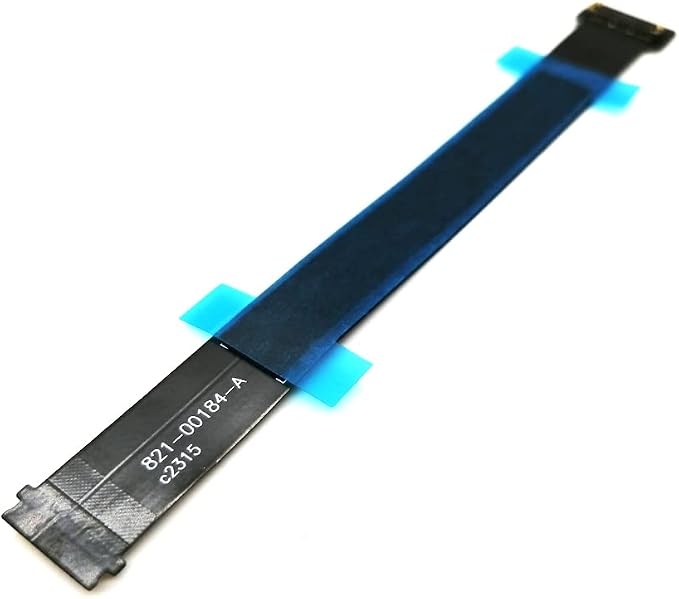
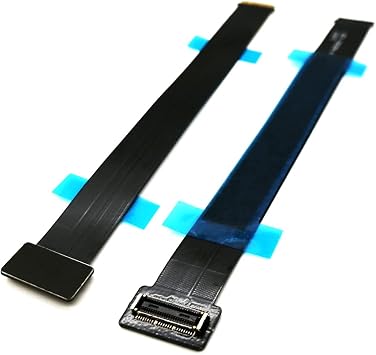
- New 821-00184-A trackpad flex cable.
- Trackpad flex cable connects the trackpad to the logic board.
- Compatible for MacBook Pro 13 Retina A1502 Early 2015.
- Before buying, please carefully review the description, pictures and check your computer model to make sure you are ordering the correct one. If you are not sure of your computer model, please confirm with us and send us your model and picture.
- This is NOT an easy job for someone who has no technical skills with Disassembling or Assembling laptop, So only purchase this item if you know how to install it.
| Connector Type | Micro USB |
| Cable Type | Proprietary |
| Compatible Devices | Laptop, PC |
| Other Special Features of the Product | Tangle Free |
| Compatible Phone Models | No Compatible Phone Models |
| Connector Gender | Male-to-Male |
| Number of Pins | 20 |
| Recommended Uses For Product | Replacement cable for connecting the trackpad to the logic board of MacBook Pro 13 inch Retina A1502 Early 2015 |
| Indoor Outdoor Usage | Indoor, Outdoor |
| Unit Count | 1.0 Count |
| Item Weight | 0.02 Kilograms |
| Number of Items | 1 |
| Outer Material | Plastic |
| Brand Name | Nockchawon |
| Model Name | 821-00184-A |
| Customer Package Type | Sealed bag |
| Model | 821-00184-A |
| Manufacturer | Nockchawon |
| Included Components | A1502 Trackpad flex cable |
| Color | Black |
| Item Shape | Flat |
| Brand | Nockchawon |
| Special Feature | Tangle Free |
What's in the box
A1502 Trackpad flex cable
Who Should Buy?

-
DIY Repair Enthusiasts
Ideal for individuals who enjoy repairing their own devices to save money and extend the life of their MacBook.
-
Professionals on Budget
Great choice for freelancers or students needing a functional MacBook without spending on major repairs or replacements.
-
Technology Students
Beneficial for tech students learning about laptop repairs and how to replace internal components effectively.

-
Non-Technical Users
Not suited for those who lack technical knowledge or experience with laptop repairs, risking further damage.
-
Users Seeking Warranty
Incompatible for users who wish to maintain original warranty, as self-repairs may void existing coverage.
-
Older MacBook Models
Not applicable for MacBook models outside the A1502 early 2015 range, as fit and functionality will be compromised.
Product Description
Have any Query? Chat with us
Customer Questions & Answers
-
Question:
What is the Trackpad Touchpad Ribbon Flex Cable 821-00184-A used for?
Answer: The Trackpad Touchpad Ribbon Flex Cable 821-00184-A is essential for connecting the trackpad to the motherboard in MacBook Pro Retina 13 inch A1502 models from early 2015. This cable enables communication between the trackpad and the laptop, allowing for seamless operations such as tapping, clicking, and multi-touch gestures. If your trackpad is unresponsive or shows erratic behavior, a replacement of this flex cable might be necessary to restore full functionality. -
Question:
How do I know if I need to replace the flex cable?
Answer: Indications that the Trackpad Touchpad Ribbon Flex Cable may need replacement include an unresponsive trackpad, intermittent issues with the cursor, or erratic cursor movements. If your trackpad stops working after a spill or physical impact, checking the cable for damage or wear is advisable. Many users facing these issues find that replacing the cable restores their trackpad functionality, resolving problems and enhancing their overall MacBook experience. -
Question:
Can I install the replacement cable myself?
Answer: Yes, you can install the Trackpad Touchpad Ribbon Flex Cable yourself if you have the required tools and technical skills. Typically, the process requires a screwdriver set to remove the bottom case, careful detachment of the old cable, and reattachment of the new one. There are numerous tutorials available online that guide users step-by-step through the installation, making it possible for those with some DIY background to accomplish this task successfully. -
Question:
What tools do I need to replace the flex cable?
Answer: To replace the Trackpad Touchpad Ribbon Flex Cable, you'll need specific tools like a P5 Pentalobe screwdriver, a T5 Torx screwdriver, and possibly a plastic spudger for safe disengagement of connectors. Having these tools ensures that you can access the internal components without causing damage. Adequate lighting and a clean workspace are also recommended to avoid dropping screws or losing parts during the process. -
Question:
Is this flex cable compatible with other MacBook models?
Answer: The Trackpad Touchpad Ribbon Flex Cable 821-00184-A is specifically designed for the MacBook Pro Retina 13 inch A1502 from early 2015. While other MacBook models may have similar connectors, they often require different cable specifications, shapes, or lengths. Using the correct cable is essential for optimal performance; otherwise, it may not fit properly or function correctly, leading to further issues. -
Question:
What should I do if my trackpad still doesn't work after replacing the cable?
Answer: If your trackpad remains unresponsive after replacing the Trackpad Touchpad Ribbon Flex Cable, it’s advisable to perform additional troubleshooting. Start by checking the physical connections to ensure they are secure. You could also run Apple Diagnostics to check for hardware issues or, if necessary, consult a professional technician to investigate potential motherboard or trackpad sensor problems. -
Question:
What are the signs of a faulty flex cable?
Answer: Signs of a faulty Trackpad Touchpad Ribbon Flex Cable include sporadic cursor movement, delayed response to touch commands, or the entire trackpad becoming non-functional. Physical damage such as visible wear, fraying, or kinks in the cable can also indicate that it needs replacement. Identifying these issues early on can prevent further complications and prolong the lifespan of your MacBook. -
Question:
Is there a guarantee on the replacement cable?
Answer: Most retailers do not provide explicit guarantees on replacement parts like the Trackpad Touchpad Ribbon Flex Cable. However, it is essential to choose a reputable supplier to ensure you receive a quality product. Always check customer reviews and feedback to gauge the reliability of the cable and its performance history. A good product often reflects positive user experiences and is less likely to fail soon after installation. -
Question:
Where can I buy Trackpad Touchpad Ribbon Flex Cable 821-00184-A Replacement for MacBook Pro Retina 13 inch A1502 Early 2015?
Answer: You can buy the Trackpad Touchpad Ribbon Flex Cable 821-00184-A replacement for your MacBook Pro Retina 13 inch A1502 Early 2015 from Ubuy. Ubuy is a reliable e-commerce platform that offers a wide range of electronic components, ensuring you can find the right replacement easily. Check their listings for stock availability and specific product details. -
Question:
How long does it take to replace the flex cable?
Answer: Replacing the Trackpad Touchpad Ribbon Flex Cable generally takes between 30 to 60 minutes, depending on your experience level with DIY repairs. This includes the time to carefully open your MacBook, remove the old cable, and install the new one. For first-timers, it can take longer as familiarity with the process increases over time. Patience and careful handling are key to successfully completing the replacement.
Nockchawon Laptop Replacement Parts Editorial Review


No editorial reviews found
Customer Reviews & Ratings
6 customers ratings
-
5 Star
61%
-
4 Star
0%
-
3 Star
19%
-
2 Star
0%
-
1 Star
20%
Review this product
Share your thoughts with other customers
Product Price History
Important information
- Limitations : For products shipped internationally, please note that any manufacturer warranty may not be valid; manufacturer service options may not be available; product manuals, instructions, and safety warnings may not be in destination country languages; the products (and accompanying materials) may not be designed in accordance with destination country standards, specifications, and labeling requirements; and the products may not conform to destination country voltage and other electrical standards (requiring use of an adapter or converter if appropriate). The recipient is responsible for assuring that the product can be lawfully imported to the destination country. When ordering from Ubuy or its affiliates, the recipient is the importer of record and must comply with all laws and regulations of the destination country.
- Not all the products listed on Ubuy are for sale, as Ubuy is a global search engine. Products are subject to export/trade regulations.
BHD 6
Order now and get it around Friday, July 03
This item is not restrict in my country.(Please click on above link if this item is not restrict in your country, So our team will review and allow.)
QTY:
Secured transaction
Ubuy works hard to protect your security and privacy. Our advanced payment security system ensures confidentiality by encrypting your information during transmission using AES (Advanced Encryption Standards) and SSL (Secure Socket Layer) protocols. Your payment details are 100% secure as we do not share your payment details with third party sellers.
Our Top Logistics Partners
Fastest cross-border delivery
Features & Benefits
- Compatible with MacBook Pro 13 inch Retina Display Early 2015 models.
- Includes a new trackpad flex cable (part number: 821-00184-A).
- Essentially connects the trackpad to the logic board for functionality.
- Installation requires professional skills; not suitable for beginners.
- Verify your computer model before purchasing to ensure compatibility.
- Reach out for confirmation if unsure about your model.