- Home Page /
- Office Products /
- Office Electronics /
- Printers & Accessories /
- Printer Parts & Accessories /
- Printer Ink & Toner /
- Inkjet Ink Cartridges /
- OFFICENTER T04D1 T04D100 Maintenance Box for ...
0 ratings

Item #:
223335737
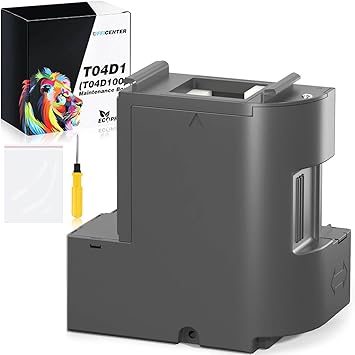
OFFICENTER T04D1 T04D100 Maintenance Box for EcoTank ET-3850 ET-3830 ET-15000 ET-3760 ET-4850 ST-4000 ST-C4100 ET-M2170 ET-5170 ET-3710 ET-4760
Item #:
223335737
BHD 10
Price Details
Excluding Shipping & Custom charges ( Shipping and custom charges will be calculated on checkout )
*All items will import from US
0 ratings
Write a review
In stock
 Imported from USA store
QTY:
This product is not Fulfilled by Ubuy and can take minimum 10 days in delivery. We might cancel the product from the order and refund you if any issue arise with the delivery of this product.
Secured transaction
Ubuy works hard to protect your security and privacy. Our advanced payment security system ensures confidentiality by encrypting your information during transmission using AES (Advanced Encryption Standards) and SSL (Secure Socket Layer) protocols. Your payment details are 100% secure as we do not share your payment details with third party sellers.
Our Top Logistics Partners


Keep your EcoTank printer have a fluent, stable and superb printing performance.

Fast
Shipping

Free
Return*

Secure Packaging

100% Original Products

PCI DSS Compliance

ISO 27001 Certified


Note: Step Down Voltage Transformer required for using electronics products of US store (110-120). Recommended power converters Buy Now.


What Stands Out
Compatibility
Designed specifically for a range of EcoTank and XP printer models, ensuring seamless integration and hassle-free maintenance without compatibility issues.
Cost Efficiency
Maximizes printer performance by extending the life expectancy of the machine, ultimately reducing long-term maintenance costs and improving productivity.
Easy Installation
User-friendly design allows for quick and straightforward installation, making it accessible for all users, whether they are tech-savvy or not.
Product Details
| Item Weight | 1 lbs (450 grams) |
Who Should Buy?

-
Frequent Users
Ideal for users who regularly print large volumes, ensuring maintenance is timely and hassle-free.
-
Home Offices
Perfect for home office settings where EcoTank printers are used, maintaining optimal performance and print quality.
-
Business Professionals
Recommended for business professionals requiring dependable printing solutions with minimal interruptions for maintenance.

-
Occasional Users
Not suitable for users who print infrequently, as they may not need a maintenance box at all.
-
Budget-Conscious Buyers
Might be viewed as an unnecessary expense for those with limited printing needs or financial constraints.
-
Low-Tech Users
May not be ideal for individuals who prefer simple, low-maintenance printing solutions without additional components.
Product Description
OFFICENTER T04D1 T04D100 Maintenance Box for EcoTank ET-3850 ET-3830 ET-15000 ET-3760 ET-4850 ST-4000 ST-C4100 ET-M2170 ET-5170 ET-3710 ET-4760 XP-5100 Printers
Have any Query? Chat with us
Customer Questions & Answers
-
Question:
What is a maintenance box for EcoTank printers?
Answer: A maintenance box is an essential component for select EcoTank printers that collects waste ink during printing and maintenance processes. This keeps your printer operating smoothly and prevents ink spills or blockages. Regularly checking and replacing the maintenance box ensures optimal performance and print quality over time. For users with high-volume printing needs, maintaining this component is crucial, as it allows uninterrupted printing without the concern of ink overflow. -
Question:
How do I know when to replace the maintenance box?
Answer: Your EcoTank printer will typically display a notification or error code when the maintenance box is full or requires replacement. It's important to monitor these alerts closely, as ignoring them can lead to printing issues or damage to your printer. Refer to your printer's user manual for specific signals related to your model. Keeping lookout for these indicators ensures you maintain print quality and avoid mishaps during important printing tasks. -
Question:
Is the T04D1 T04D100 maintenance box compatible with all EcoTank printers?
Answer: No, the T04D1 T04D100 maintenance box is specifically designed for select EcoTank models, including ET-3850, ET-3830, ET-15000, and others in that range. To ensure compatibility, always consult the product specifications or your printer's manual before purchase. Using the correct maintenance box enhances the longevity of your printer and ensures it operates efficiently, preventing any potential issues caused by incompatible components. -
Question:
What happens if I use a third-party maintenance box?
Answer: Using a third-party maintenance box may lead to compatibility issues, affecting your printer's performance and could potentially void any manufacturer support. It's advisable to stick with original parts, like the T04D1 T04D100, to ensure reliable functioning. Original products are designed specifically for your printing system, ensuring optimal waste ink management and avoiding problems with print quality or operational errors. -
Question:
Can I install the maintenance box myself?
Answer: Yes, replacing the maintenance box is a straightforward process that you can handle without professional assistance. Simply refer to the user manual for step-by-step instructions. Generally, it involves opening the printer's access panel, removing the old maintenance box, and inserting the new one. This quick self-service helps maintain your printer and avoids downtime, particularly for homes or offices with significant printing activities. -
Question:
What other maintenance is needed for EcoTank printers?
Answer: In addition to replacing the maintenance box, keep your EcoTank printer in good shape by regularly checking and cleaning the print heads and ensuring ink tanks are filled. Running periodic maintenance cycles as prompted by your printer can also optimize print quality. Following this routine will enhance image clarity and color saturation, facilitating an overall better printing experience, especially for graphic-rich documents and photos. -
Question:
How do I properly dispose of the old maintenance box?
Answer: When disposing of the old maintenance box, it's important to follow local waste disposal regulations, particularly those related to electronic waste. Some regions may have specific recycling programs for printer cartridges and parts. You may also inquire at your local electronic stores for proper disposal methods. Ensuring responsible disposal not only helps the environment but may also open recycling opportunities for ink and plastic components, promoting sustainability. -
Question:
Does the maintenance box affect print quality?
Answer: Yes, the maintenance box plays a vital role in maintaining print quality by collecting excess ink, which prevents clogs and streaks in your prints. A full or malfunctioning maintenance box can affect print performance, leading to unsatisfactory results. For consistent and high-quality prints, routinely check the status of your maintenance box and replace it as needed. This is especially important for professionals who rely on high-quality documents for presentations or client needs. -
Question:
Are there any warnings to be aware of when using the maintenance box?
Answer: While using the maintenance box, be cautious of leaks if the box is not changed in a timely manner. This can occur if waste ink overflows, potentially damaging your printer. Make sure to follow manufacturer guidelines for replacement intervals and monitor alerts from your printer. Staying proactive in maintenance helps avoid these issues, ensuring a reliable and efficient printing solution, especially in busy work environments. -
Question:
Where can I buy T04D1 T04D100 Maintenance Box for EcoTank printers in Bahrain?
Answer: You can purchase the T04D1 T04D100 Maintenance Box for your EcoTank printers on Ubuy, which offers a reliable platform for buying genuine printer accessories. Ubuy provides a convenient service that ensures you get the right products specifically designed for your printer model, helping maintain optimal performance and print quality. Utilizing Ubuy simplifies your shopping experience, ensuring you receive the necessary components to support your printing needs.
OFFICENTER Inkjet Ink Cartridges Editorial Review
The OFFICENTER T04D1 T04D100 Maintenance Box has received overwhelmingly positive feedback from customers who appreciate its ease of installation and effectiveness. Users have highlighted that the maintenance box fits perfectly in various EcoTank models, such as the ET-5170 and ET-3850, and many have praised the print quality improvement experienced immediately after installation. Customers particularly value the thoughtful inclusion of a screwdriver, which eliminates the hassle of searching for one, making the replacement process straightforward. Additionally, users commend the maintenance box for incorporating a disposal bag that prevents ink dust from causing mess during the replacement process. Overall, the product performs exactly as advertised, with users noting that it allows for essential tasks like power head cleaning to be conducted seamlessly. The great price point adds to its appeal, making it a worthwhile investment for routine printer maintenance. **
Customer Reviews & Ratings
1 customers ratings
-
5 Star
100%
-
4 Star
0%
-
3 Star
0%
-
2 Star
0%
-
1 Star
0%
Review this product
Share your thoughts with other customers
Pros
- Easy to install
- Included screwdriver for installation
- Improved print quality after installation
- Perfect fit for various EcoTank models
- Disposal bag prevents mess during replacement
- Good price point
Product Price History
Important information
- Limitations : For products shipped internationally, please note that any manufacturer warranty may not be valid; manufacturer service options may not be available; product manuals, instructions, and safety warnings may not be in destination country languages; the products (and accompanying materials) may not be designed in accordance with destination country standards, specifications, and labeling requirements; and the products may not conform to destination country voltage and other electrical standards (requiring use of an adapter or converter if appropriate). The recipient is responsible for assuring that the product can be lawfully imported to the destination country. When ordering from Ubuy or its affiliates, the recipient is the importer of record and must comply with all laws and regulations of the destination country.
- Not all the products listed on Ubuy are for sale, as Ubuy is a global search engine. Products are subject to export/trade regulations.
BHD 10
This product is not Fulfilled by Ubuy and can take minimum 10 days in delivery. We might cancel the product from the order and refund you if any issue arise with the delivery of this product.
This item is not restrict in my country.(Please click on above link if this item is not restrict in your country, So our team will review and allow.)
QTY:
Secured transaction
Ubuy works hard to protect your security and privacy. Our advanced payment security system ensures confidentiality by encrypting your information during transmission using AES (Advanced Encryption Standards) and SSL (Secure Socket Layer) protocols. Your payment details are 100% secure as we do not share your payment details with third party sellers.
Our Top Logistics Partners
Fastest cross-border delivery
Features & Benefits
- Maintains high-quality printing performance
- Strong absorption for efficient maintenance
- ISO-9001 certified for quality assurance
- 24-hour professional customer service
- Fluent, stable, and superb printing