0 ratings


Item #:
76613737
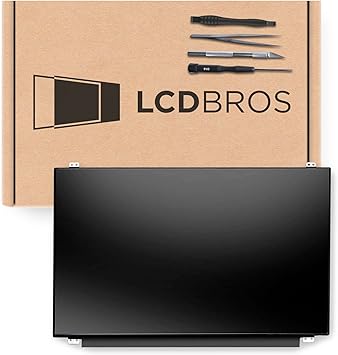
SCREENARAMA New Screen Replacement for Dell Inspiron 7559 P57F002, FHD 1920x1080, Matte, LCD LED Display with Tools
Item #:
76613737
BHD 30
Price Details
Excluding Shipping & Custom charges ( Shipping and custom charges will be calculated on checkout )
*All items will import from US
0 ratings
Write a review
In stock
 Imported from USA store
QTY:
Order now and get it around Wednesday, July 08
Secured transaction
Ubuy works hard to protect your security and privacy. Our advanced payment security system ensures confidentiality by encrypting your information during transmission using AES (Advanced Encryption Standards) and SSL (Secure Socket Layer) protocols. Your payment details are 100% secure as we do not share your payment details with third party sellers.
Our Top Logistics Partners


Guaranteed compatibility for your Dell Inspiron 7559 laptop

Fast
Shipping

Free
Return*

Secure Packaging

100% Original Products

PCI DSS Compliance

ISO 27001 Certified


Note: Step Down Voltage Transformer required for using electronics products of US store (110-120). Recommended power converters Buy Now.


What Stands Out
High-Resolution Display
Experience vibrant visuals with Full HD 1920x1080 resolution, ensuring sharp detail for all your tasks, from gaming to productivity.
Matte Finish
Enjoy reduced glare with a matte display that enhances viewing comfort, making it ideal for various lighting conditions.
Easy Installation Kit
Includes essential tools for a hassle-free installation, allowing users to replace their laptop screen quickly and efficiently without professional help.
Product Details
| Item Weight | 1 lbs (450 grams) |
Who Should Buy?

-
DIY Enthusiasts
Users who enjoy repairing their own devices will appreciate the included tools for easy installation.
-
Gamers
Gamers using the Dell Inspiron 7559 will benefit from the high-resolution 1920x1080 display for better visual experiences.
-
Budget-Conscious Users
Those looking to save money on repairs can opt for this cost-effective screen replacement rather than professional services.

-
Non-Technical Users
Individuals unfamiliar with hardware repair may struggle to install the screen effectively without professional assistance.
-
High-End Users
Users seeking the latest technology or advanced features might find this basic screen insufficient for their needs.
-
Urgent Repairs
Those needing immediate repairs may not find this product suitable due to potential shipping delays or installation times.
Product Description
SCREENARAMA New Screen Replacement for Dell Inspiron 7559 P57F002, FHD 1920x1080, Matte, LCD LED Display with Tools
Have any Query? Chat with us
Customer Questions & Answers
-
Question:
What specifications does the SCREENARAMA New Screen Replacement for Dell Inspiron 7559 have?
Answer: The SCREENARAMA replacement screen for the Dell Inspiron 7559 features a Full HD resolution of 1920x1080 pixels, providing sharp and vibrant visuals. It has a matte finish, which reduces glare from ambient light, making it ideal for various environments, especially bright ones. This LCD LED display is designed as a direct replacement, ensuring compatibility with your existing setup for seamless integration. The screen comes with tools needed for installation, making it a comprehensive kit for hassle-free replacement. -
Question:
Is the SCREENARAMA screen replacement compatible with other Dell models?
Answer: While the SCREENARAMA replacement screen is specifically designed for the Dell Inspiron 7559 (P57F002), it may not be compatible with other Dell models. It's essential to verify the part number and dimensions to ensure a proper fit. If you're considering replacing screens for different models, check the specifications or consult technical support for alternatives that might work. Using the right display prevents issues associated with mismatched parts. -
Question:
How can I install the SCREENARAMA screen replacement?
Answer: Installing the SCREENARAMA screen replacement involves a straightforward process. First, ensure you have all the provided tools. Begin by powering off the laptop and carefully removing the bezel surrounding the existing screen. Then, unscrew and disconnect the old screen before installing the new one by reversing the steps. Detailed instructions are often included and can be beneficial for a first-time installer. This DIY approach can save costs** and provide a sense of personal achievement. -
Question:
What are the benefits of having a matte finish on the screen?
Answer: A matte finish on the SCREENARAMA replacement screen minimizes reflections and glare, making it easier to view in bright environments. This feature is particularly advantageous for users who work outdoors or in well-lit offices, as it aids concentration and reduces eye strain. The matte surface also helps maintain color accuracy, yielding a more comfortable viewing experience. Overall, it’s an ideal choice for professionals and students alike. -
Question:
What tools are included with the SCREENARAMA replacement screen?
Answer: The SCREENARAMA replacement screen comes with various tools necessary for installation, typically including a screwdriver set, spudger, and adhesive strips. These tools are specifically selected to facilitate the screen replacement without requiring any additional purchases. Having all the essential tools at hand makes it convenient and ensures that you can complete the task efficiently without delays, appealing to DIY enthusiasts and those who prefer to handle repairs personally. -
Question:
Is the screen display suitable for gaming or graphic design?
Answer: Yes, the SCREENARAMA replacement screen offers a Full HD resolution that delivers clear visuals, making it suitable for gaming and graphic design. The matte finish helps reduce distracting reflections, while the color accuracy supports a better visual experience while gaming or editing. Professionals working in design or gaming will appreciate the precision and clarity the screen provides, ensuring that color grading and detail work are represented accurately. -
Question:
How can I tell if my screen needs replacement?
Answer: Indicators that your screen may need replacement include visible cracks, severe discoloration, flickering images, or dead pixels. If your display becomes unresponsive to touch or fails to power on at all, these are also significant signs. Regular maintenance checks can help identify issues before they escalate. It's wise to act promptly if you notice any of these symptoms to avoid further damage, as a functional screen is crucial for optimal laptop performance. -
Question:
What should I do if I encounter issues after installation?
Answer: If you face any challenges post-installation, such as the screen not displaying properly or flickering, first double-check all connections to ensure everything is seated correctly. It might also help to restart the laptop and ensure video drivers are up-to-date. If problems persist, consult online forums and troubleshooting guides specific to your model. Given that technical support is often available with suppliers, don't hesitate to reach out for assistance with more complex issues. -
Question:
What is the display type of the SCREENARAMA replacement?
Answer: The SCREENARAMA replacement features a Full HD LCD LED display. This technology is known for offering excellent brightness levels and contrast. The LED backlighting enhances visual clarity, resulting in vibrant details and colors across various media. The combination of LCD and LED ensures energy efficiency without compromising the display's performance, making it an excellent choice for everyday use, whether for work, gaming, or media consumption. -
Question:
Where can I buy SCREENARAMA New Screen Replacement for Dell Inspiron 7559 in Bahrain?
Answer: You can conveniently purchase the SCREENARAMA New Screen Replacement for Dell Inspiron 7559 through Ubuy. Ubuy offers a wide selection of components, making it easier to find the right replacement for your needs. Additionally, their user-friendly platform and customer service can assist you through your buying journey, ensuring you receive the correct product for an efficient installation experience.
SCREENARAMA Replacement Screens Editorial Review
No editorial reviews found
Customer Reviews & Ratings
1 customers ratings
-
5 Star
100%
-
4 Star
0%
-
3 Star
0%
-
2 Star
0%
-
1 Star
0%
Review this product
Share your thoughts with other customers
Top selling Dell Inspiron 7559 screen replacement in Bahrain





Last Updated on June 29, 2026
Product Price History
Important information
- Limitations : For products shipped internationally, please note that any manufacturer warranty may not be valid; manufacturer service options may not be available; product manuals, instructions, and safety warnings may not be in destination country languages; the products (and accompanying materials) may not be designed in accordance with destination country standards, specifications, and labeling requirements; and the products may not conform to destination country voltage and other electrical standards (requiring use of an adapter or converter if appropriate). The recipient is responsible for assuring that the product can be lawfully imported to the destination country. When ordering from Ubuy or its affiliates, the recipient is the importer of record and must comply with all laws and regulations of the destination country.
- Not all the products listed on Ubuy are for sale, as Ubuy is a global search engine. Products are subject to export/trade regulations.
BHD 30
Order now and get it around Wednesday, July 08
This item is not restrict in my country.(Please click on above link if this item is not restrict in your country, So our team will review and allow.)
QTY:
Secured transaction
Ubuy works hard to protect your security and privacy. Our advanced payment security system ensures confidentiality by encrypting your information during transmission using AES (Advanced Encryption Standards) and SSL (Secure Socket Layer) protocols. Your payment details are 100% secure as we do not share your payment details with third party sellers.
Our Top Logistics Partners
Fastest cross-border delivery
Features & Benefits
- Tested screen for Dell Inspiron 7559 laptop
- FHD 1920x1080 resolution for sharp and clear visuals
- 30 pin connector for easy installation
- 15.6 inch matte IPS screen for wide viewing angles
- Comes with necessary tools for screen replacement
- Ensures compatibility with your laptop's specifications