0 ratings


Item #:
100837222
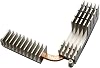
BestParts Voltage Regulator Thermal Module Replacement for DELL Precision 3640 T3640 250W 2FM4C VRM HeatSink
Item #:
100837222
BHD 11
Price Details
Excluding Shipping & Custom charges ( Shipping and custom charges will be calculated on checkout )
*All items will import from US
0 ratings
Write a review
In stock
 Imported from USA store
QTY:
Order now and get it around Wednesday, June 24
Secured transaction
Ubuy works hard to protect your security and privacy. Our advanced payment security system ensures confidentiality by encrypting your information during transmission using AES (Advanced Encryption Standards) and SSL (Secure Socket Layer) protocols. Your payment details are 100% secure as we do not share your payment details with third party sellers.
Our Top Logistics Partners


New and high quality Voltage Regulator Thermal Module replacement for DELL Precision 3640 T3640.

Fast
Shipping

Free
Return*

Secure Packaging

100% Original Products

PCI DSS Compliance

ISO 27001 Certified


Note: Step Down Voltage Transformer required for using electronics products of US store (110-120). Recommended power converters Buy Now.


What Stands Out
Enhanced Cooling
The BestParts Voltage Regulator Thermal Module features advanced heat dissipation technology, ensuring optimal thermal performance and longevity for your DELL Precision 3640, preventing overheating during demanding tasks.
Precision Fit
Designed specifically for the DELL Precision 3640, this thermal module guarantees a perfect fit and compatibility, simplifying installation and ensuring seamless operation without any modifications or additional adjustments.
Durable Construction
Built with high-quality materials, this VRM heat sink not only offers exceptional reliability but also withstands the rigors of high-performance computing, providing long-lasting support for your workstation’s power management.
Product Details
| Item Weight | 1 lbs (450 grams) |
Who Should Buy?

-
Dell Precision Users
Ideal for users of Dell Precision 3640 requiring an efficient and reliable voltage regulator thermal module replacement.
-
Computer Enthusiasts
Perfect for tech-savvy users who upgrade and maintain their systems for optimal performance and stability.
-
DIY Repair Technicians
Suitable for technicians looking to replace faulty components in Dell systems to restore operational efficiency.

-
Non-Dell Systems
Not suitable for users with computers that do not belong to the Dell Precision series or similar brand.
-
Budget Conscious Users
Individuals looking for low-cost alternatives may find this product priced higher than other generic options.
-
Casual Users
Not recommended for everyday users who do not engage in intensive computing or have specialized needs.
Product Description
BestParts Voltage Regulator Thermal Module Replacement for DELL Precision 3640 T3640 250W 2FM4C VRM HeatSink
Have any Query? Chat with us
Customer Questions & Answers
-
Question:
What is the BestParts Voltage Regulator Thermal Module Replacement used for?
Answer: The BestParts Voltage Regulator Thermal Module Replacement is specifically designed for the Dell Precision 3640 T3640 model. Its primary purpose is to regulate voltage and dissipate heat efficiently, ensuring that your computer's power supply operates smoothly and effectively. This module is essential for maintaining the reliability and performance of your workstation, especially during demanding tasks. If you're experiencing overheating issues or system instability, replacing the voltage regulator thermal module can significantly enhance your system's performance. -
Question:
How do I install the BestParts Voltage Regulator Thermal Module?
Answer: Installing the BestParts Voltage Regulator Thermal Module involves a few straightforward steps. First, ensure your computer is turned off and unplugged. Next, open the case of your Dell Precision 3640 T3640. Locate the existing voltage regulator module, typically near the power supply. Carefully remove it and then install the new thermal module by aligning it properly with the connectors. Finally, secure everything back in place, close the case, and power on your device. Proper installation can lead to improved cooling efficiency and better overall performance. -
Question:
Is the BestParts Voltage Regulator Thermal Module compatible with other Dell models?
Answer: The BestParts Voltage Regulator Thermal Module is specifically designed for the Dell Precision 3640 T3640 model and may not be compatible with other Dell systems. To ensure optimal performance and avoid any potential damage, it is recommended to use components that are specifically designed for your particular PC model. If you're considering upgrades or replacements for other Dell models, consult the product specifications or your user manual beforehand to ensure compatibility. -
Question:
What signs indicate that I need to replace the voltage regulator thermal module?
Answer: Signs that may indicate the need for a replacement of the voltage regulator thermal module include frequent system crashes, unexpected shutdowns, overheating components, or failure to boot. During demanding tasks, if you notice that your workstation becomes unusually hot or noisy, it could mean that the thermal module is not functioning correctly. Regular monitoring of your system's temperature and stability can help you identify when it’s time to consider a replacement to maintain optimal performance. -
Question:
What makes the BestParts thermal module a reliable choice?
Answer: The BestParts Voltage Regulator Thermal Module is known for its high-quality construction and compatibility with the Dell Precision 3640 T3640. It is designed to provide efficient voltage regulation and effective thermal dissipation, which are crucial for the longevity of your workstation. The module undergoes rigorous testing to ensure it meets performance standards, making it a reliable choice for users looking to maintain or enhance their system's performance. Choosing quality components can prevent future failures and enhance overall productivity. -
Question:
How does this thermal module impact system performance?
Answer: A properly functioning voltage regulator thermal module is essential for stable system performance. It ensures that the CPU and other components receive a steady voltage and helps dissipate heat effectively. By maintaining optimal operating conditions, it prevents thermal throttling, which can occur when components overheat. Users engaged in intensive tasks like 3D rendering, video editing, or gaming will benefit from a reliable thermal module, as it directly influences processing speed and reliability under load. -
Question:
What is the warranty policy for the BestParts thermal module?
Answer: The warranty policy for the BestParts Voltage Regulator Thermal Module typically includes a limited warranty period, covering defects in materials and workmanship. It's advisable to check the manufacturer's website or the product packaging for specific warranty details. A reliable warranty can provide peace of mind, ensuring you have coverage in case of any issues post-purchase. Always keep your receipt and warranty documentation in a safe place as proof of purchase. -
Question:
Can I clean the thermal module to prolong its lifespan?
Answer: Yes, cleaning the thermal module periodically can help prolong its lifespan and maintain performance. Dust and debris can accumulate, hindering heat dissipation. To clean it, first, power down your workstation and open the case. Use compressed air to blow out dust without directly touching the module. It’s recommended to clean your system every few months, especially if you work in a dusty environment. Proper maintenance can ensure your thermal module functions optimally and helps avoid overheating. -
Question:
What tools do I need for installation?
Answer: To install the BestParts Voltage Regulator Thermal Module, you will typically need a few basic tools. A Phillips screwdriver is essential for removing the case screws and securing the module. Additionally, an anti-static wrist strap can be useful to prevent static discharge from damaging your components. Having a clean workspace and adequate lighting will assist in the installation process. These tools make the installation straightforward, even for DIY users. -
Question:
Where can I buy the BestParts Voltage Regulator Thermal Module in Bahrain?
Answer: You can purchase the BestParts Voltage Regulator Thermal Module Replacement for your Dell Precision 3640 T3640 at Ubuy. Ubuy offers a variety of electronic components and ensures delivery to Bahrain, making it a convenient option for acquiring quality parts. By shopping at Ubuy, you can enjoy a seamless online shopping experience with reliable service and potential promotions.
BestParts Heatsinks Editorial Review
No editorial reviews found
Customer Reviews & Ratings
1 customers ratings
-
5 Star
100%
-
4 Star
0%
-
3 Star
0%
-
2 Star
0%
-
1 Star
0%
Review this product
Share your thoughts with other customers
Pros
- Easy installation process
- Highly efficient performance
- Durable and reliable materials
- Excellent thermal management
- Great compatibility with Dell models
Cons
- Requires basic tools for setup
Related Categories
Related Brands
Product Price History
Important information
- Limitations : For products shipped internationally, please note that any manufacturer warranty may not be valid; manufacturer service options may not be available; product manuals, instructions, and safety warnings may not be in destination country languages; the products (and accompanying materials) may not be designed in accordance with destination country standards, specifications, and labeling requirements; and the products may not conform to destination country voltage and other electrical standards (requiring use of an adapter or converter if appropriate). The recipient is responsible for assuring that the product can be lawfully imported to the destination country. When ordering from Ubuy or its affiliates, the recipient is the importer of record and must comply with all laws and regulations of the destination country.
- Not all the products listed on Ubuy are for sale, as Ubuy is a global search engine. Products are subject to export/trade regulations.
BHD 11
Order now and get it around Wednesday, June 24
This item is not restrict in my country.(Please click on above link if this item is not restrict in your country, So our team will review and allow.)
QTY:
Secured transaction
Ubuy works hard to protect your security and privacy. Our advanced payment security system ensures confidentiality by encrypting your information during transmission using AES (Advanced Encryption Standards) and SSL (Secure Socket Layer) protocols. Your payment details are 100% secure as we do not share your payment details with third party sellers.
Our Top Logistics Partners
Fastest cross-border delivery
Features & Benefits
- High-quality replacement module for DELL Precision 3640.
- Specifically designed for T3640 Tower Desktop Workstation series.
- Efficiently converts 12V to necessary CPU voltage.
- Compatible with part numbers 2FM4C / 02FM4C.
- Includes one Voltage Regulator Thermal Module in the package.
- Enhance your workstation's performance with this reliable component.