- Home Page /
- Electronics /
- Camera /
- Lighting & Studio /
- Photo Studio /
- Storage & Presentation Materials /
- Loupedeck Creative Tool - Professional Custom...
0 ratings


Item #:
19518119
Loupedeck Creative Tool - Professional Custom Editing Console for Photo, Video, Music and Design
Item #:
19518119
BHD 727872
Price Details
Excluding Shipping & Custom charges ( Shipping and custom charges will be calculated on checkout )
*All items will import from US
0 ratings
Write a review
Out of stock
 Imported from USA store
Secured transaction
Ubuy works hard to protect your security and privacy. Our advanced payment security system ensures confidentiality by encrypting your information during transmission using AES (Advanced Encryption Standards) and SSL (Secure Socket Layer) protocols. Your payment details are 100% secure as we do not share your payment details with third party sellers.
Our Top Logistics Partners


Unlock the full potential of your favorite programs with the Loupedeck Creative Tool, designed for the ultimate creative experience.

Fast
Shipping

Free
Return*

Secure Packaging

100% Original Products

PCI DSS Compliance

ISO 27001 Certified


Note: Step Down Voltage Transformer required for using electronics products of US store (110-120). Recommended power converters Buy Now.


What Stands Out
Versatile Functionality
The Loupedeck Creative Tool supports photo, video, music, and design editing, making it an all-in-one solution for creative professionals seeking efficiency across multiple media formats.
Customizable Controls
Featuring customizable buttons and dials, users can create personalized workflows that streamline their editing processes, enhancing productivity and allowing for intuitive operation tailored to individual preferences.
High-Quality Build
Crafted with premium materials, the Loupedeck offers durability and a professional finish, ensuring it withstands the demands of intensive use while providing an aesthetically pleasing addition to any workspace.
Product Details
- Native integrations with Adobe Lightroom Classic, Photoshop, Capture One Pro, Premiere Pro, After Effects, Illustrator, Final Cut Pro, Ableton Live, and more
- Ready to use out of the box with predefined tools and workspaces to boost productivity
- Powerful customizable software for assigning tools and functions to buttons, touchscreen, wheel, or dial
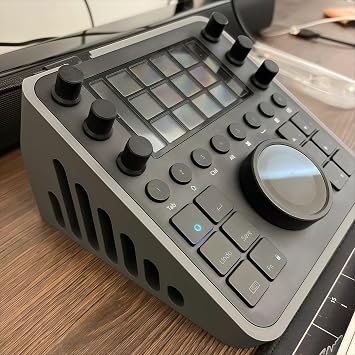
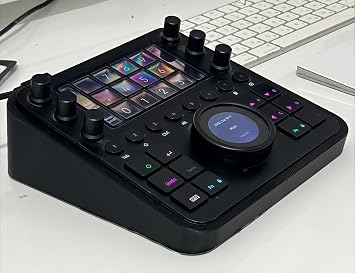
- Premium grade console with high-quality aluminum cover, touchscreens, LED backlighting, and machine-quality ball bearings
- Ability to create custom profiles using shortcuts and macros for any application, with provided profiles for DaVinci Resolve, Cubase, and more
- Designed to address the complexities of creative workflows with deep integrations, seamless controls, and intuitively designed interfaces
| Package Weight | 4.34 Pound |
Who Should Buy?

-
Professional Editors
Ideal for photo and video editors seeking customizable tools for enhanced workflow and creativity.
-
Content Creators
Great for vloggers and musicians wanting precise control over editing software for producing high-quality content.
-
Designers
Suited for designers using software like Adobe creative suite, requiring efficient manipulation of tools and effects.

-
Casual Users
Not ideal for occasional users who require basic functionality without the complexity of custom settings.
-
Budget-Conscious Buyers
Might be too expensive for those looking for entry-level solutions without professional editing demands.
-
Non-Tech Savvy
Complex interface may overwhelm users who are not familiar with advanced editing tools and software.
Product Description
Loupedeck Creative Tool - Professional Custom Editing Console for Photo, Video, Music and Design
Have any Query? Chat with us
Related Searches
Customer Questions & Answers
-
Question:
What is the Loupedeck Creative Tool used for?
Answer: The Loupedeck Creative Tool is a professional custom editing console designed for streamlined editing in photo, video, music, and design. It offers customizable buttons, sliders, and dials that allow users to control software such as Adobe Lightroom, Premiere Pro, Final Cut Pro, and various music applications. This flexibility significantly enhances workflow efficiency by enabling users to perform complex tasks with intuitive physical controls, reducing the time spent navigating through menus and sliders on a screen. -
Question:
Is the Loupedeck Creative Tool compatible with Mac and Windows?
Answer: Yes, the Loupedeck Creative Tool is compatible with both Mac and Windows operating systems. This universal compatibility ensures that creative professionals can seamlessly integrate the console into their setups, regardless of their preferred platform. Additionally, users can enjoy a similar experience with editing software across both operating systems, making it a versatile tool for anyone in the creative industry. -
Question:
Can I customize the controls on the Loupedeck Creative Tool?
Answer: Absolutely! The Loupedeck Creative Tool offers extensive customization options. Users can remap buttons, sliders, and dials to perform specific functions that best suit their workflow. This capability allows photographers, videographers, and music producers to create personalized setups tailored to their unique editing style and preferences, enabling faster and more efficient creative processes. -
Question:
What software applications are supported by the Loupedeck Creative Tool?
Answer: The Loupedeck Creative Tool supports a wide range of popular software applications, including Adobe Lightroom, Photoshop, Premiere Pro, and Final Cut Pro. Additionally, it is compatible with various music production software such as Ableton Live and Logic Pro, among others. This broad support means it can cater to professionals in various creative fields, making it an essential tool for enhancing productivity and creativity across different platforms. -
Question:
Is the Loupedeck Creative Tool suitable for beginners?
Answer: Yes, the Loupedeck Creative Tool is suitable for beginners. While it provides advanced features for professional users, its intuitive layout and customizable controls can help newcomers to photo and video editing quickly adapt. Tutorials and community support are readily available, making it easier for beginners to learn the ropes and enhance their creative projects without feeling overwhelmed. -
Question:
What makes the Loupedeck Creative Tool different from a standard keyboard?
Answer: The key distinction between the Loupedeck Creative Tool and a standard keyboard lies in its specialized design. Unlike traditional keyboards, this console features tactile buttons and sliders specifically arranged for creative tasks. This ergonomic layout improves comfort during long editing sessions and allows for quicker adjustments, enabling users to focus on their creativity rather than navigating software controls, ultimately leading to a more fluid editing experience. -
Question:
Can I use the Loupedeck Creative Tool for live performances?
Answer: Yes, the Loupedeck Creative Tool can be used for live performances, especially in music production. Its customizable controls allow musicians to adjust effects, mix tracks, and manipulate audio in real-time during a performance. This makes it a valuable asset for DJs and live performers looking to enhance their setups and engage their audiences more effectively with dynamic edits and sound changes. -
Question:
What is the build quality of the Loupedeck Creative Tool?
Answer: The Loupedeck Creative Tool is built with high-quality materials, designed to withstand the rigors of daily use. The console features durable buttons and sliders that provide a premium tactile feel, making it a reliable long-term investment for creatives. A solid build quality not only enhances usability but also ensures that the tool maintains its performance and appearance over time, vital for professionals who demand consistency in their equipment. -
Question:
Can I use multiple Loupedeck Creative Tools simultaneously?
Answer: Yes, multiple Loupedeck Creative Tools can be used in tandem, particularly in complex editing environments where seamless control over numerous software applications is required. Users can set up the consoles to control different aspects of their projects simultaneously, such as audio mixing on one console while managing video color grading on another. This setup can enhance productivity significantly, especially in multi-layered projects. -
Question:
Where can I buy the Loupedeck Creative Tool in Bahrain?
Answer: You can purchase the Loupedeck Creative Tool - Professional Custom Editing Console conveniently online at Ubuy. They offer a streamlined purchasing experience along with detailed product descriptions, ensuring that you have all the information you need before making a decision. Ubuy also provides support for customers in a variety of countries, making it accessible for users looking to enhance their editing capabilities.
Loupedeck Storage & Presentation Materials Editorial Review
The Loupedeck CT is a customizable control deck that can be used with any software that uses keyboard shortcuts. While it may require some programming or plugins to work with certain programs, it has received positive reviews overall. Users have praised its ability to save time and increase workflow speed in tasks like video and photo editing, graphic design, and music composition. The ability to customize keys to work with different applications is also a highlight. However, some users have reported issues with the software and driver, including frequent crashes and problems transferring presets to different computers. Overall, the Loupedeck CT is a powerful tool that may require a learning curve but can enhance creativity and productivity for those willing to dive in.
Customer Reviews & Ratings
1 customers ratings
-
5 Star
100%
-
4 Star
0%
-
3 Star
0%
-
2 Star
0%
-
1 Star
0%
Review this product
Share your thoughts with other customers
Pros
- Customizable keys for any software that uses keyboard shortcuts
- Saves time and increases workflow speed
- Can be used for video and photo editing, graphic design, and music composition
- Ability to create custom workspaces
- Shortcuts can be programmed through the console software
Cons
- Issues with software and driver, including frequent crashes
Top selling Loupedeck Console in Malaysia




Last Updated on June 16, 2026
Product Price History
Important information
- Limitations : For products shipped internationally, please note that any manufacturer warranty may not be valid; manufacturer service options may not be available; product manuals, instructions, and safety warnings may not be in destination country languages; the products (and accompanying materials) may not be designed in accordance with destination country standards, specifications, and labeling requirements; and the products may not conform to destination country voltage and other electrical standards (requiring use of an adapter or converter if appropriate). The recipient is responsible for assuring that the product can be lawfully imported to the destination country. When ordering from Ubuy or its affiliates, the recipient is the importer of record and must comply with all laws and regulations of the destination country.
- Not all the products listed on Ubuy are for sale, as Ubuy is a global search engine. Products are subject to export/trade regulations.
BHD 727872
Currently unavailable.
We don't know when or if this item will be back in stock.
This item is not restrict in my country.(Please click on above link if this item is not restrict in your country, So our team will review and allow.)
Secured transaction
Ubuy works hard to protect your security and privacy. Our advanced payment security system ensures confidentiality by encrypting your information during transmission using AES (Advanced Encryption Standards) and SSL (Secure Socket Layer) protocols. Your payment details are 100% secure as we do not share your payment details with third party sellers.
Our Top Logistics Partners
Fastest cross-border delivery
Features & Benefits
- Versatile console tailored for photo, video, music, and design.
- Compatible with major software such as Adobe Lightroom, Premiere Pro, and Final Cut Pro.
- Customizable profiles that let you assign functions to buttons and dials.
- Innovative features including macros and full-screen editing.
- Elegant Scandinavian design with premium materials and haptic feedback.
- German software configuration for seamless integration.