- Home Page /
- Electronics /
- Computer Accessories /
- Computer Components /
- Laptop Replacement Parts /
- HP Envy 17-1000 and -2000 Series, 2nd Hard Dr...
0 ratings

Item #:
21066043
HP Envy 17-1000 and -2000 Series, 2nd Hard DriveSSD Caddy CompatibleReplacement Part
Item #:
21066043
BHD 15
Price Details
Excluding Shipping & Custom charges ( Shipping and custom charges will be calculated on checkout )
*All items will import from US
0 ratings
Write a review
Out of stock
 Imported from USA store
Secured transaction
Ubuy works hard to protect your security and privacy. Our advanced payment security system ensures confidentiality by encrypting your information during transmission using AES (Advanced Encryption Standards) and SSL (Secure Socket Layer) protocols. Your payment details are 100% secure as we do not share your payment details with third party sellers.
Our Top Logistics Partners


Fast
Shipping

Free
Return*

Secure Packaging

100% Original Products

PCI DSS Compliance

ISO 27001 Certified


Note: Step Down Voltage Transformer required for using electronics products of US store (110-120). Recommended power converters Buy Now.


What Stands Out
Enhanced Storage
Allows easy installation of a second hard drive or SSD, significantly boosting storage capacity for users needing more space for files, applications, and multimedia.
Compatibility
Designed specifically for HP Envy 17-1000 and -2000 Series, ensuring seamless integration and optimal performance as a replacement part for enhanced laptop functionality.
Durable Design
Constructed from high-quality materials, this caddy offers long-lasting durability, ensuring reliability during operation and protecting your data investment.
Product Details
| Item Weight | 0.5 lbs (230 grams) |
Who Should Buy?

-
Storage Expanders
Users needing additional storage for large files or applications will benefit from the extra drive capability.
-
Performance Seekers
Gamers or professionals requiring faster data access will appreciate the improved speed with an SSD installation.
-
DIY Enthusiasts
Tech-savvy individuals looking to customize their laptop hardware will enjoy the straightforward installation process.

-
Casual Users
Individuals who use their laptop minimally may not benefit from additional storage or performance enhancements.
-
Non-HP Owners
Users with laptops other than HP Envy 17-1000 or -2000 series will find this part incompatible with their devices.
-
Budget Shoppers
Those on a tight budget may find this upgrade unnecessary when their current storage meets their needs.
Product Description
HP Envy 17-1000 and -2000 Series, 2nd Hard DriveSSD Caddy CompatibleReplacement Part
Have any Query? Chat with us
Product Buying Guide
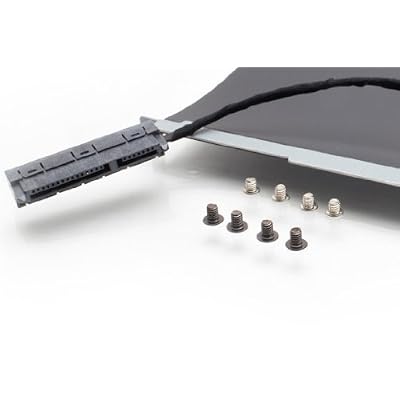
Enhance the storage capacity of your HP Envy 17-1000 and -2000 series laptops with the Hard Drive Caddy and Cable Kit (603772-001). This kit is designed to enable you to add a 2nd hard drive, offering increased storage and flexibility. Whether you are a professional requiring additional storage for work files, a student needing space for projects, or an entertainment enthusiast with a large media library, this upgrade can cater to your needs.
Product Specifications
- Compatible with HP ENVY 17-1000 and -2000 series laptops (-1xxx and -2xxx series)
- Works with 2.5" SATA drives up to 12.5mm in height
- Compatible with both 9.5mm and 12.5mm drives
- Includes caddy, cable, and screws (4 bracket screws, 4 drive screws)
- For 2nd Drive Bay only
Key Features
- Enables addition of a 2nd hard drive to HP Envy 17-1000 and -2000 series laptops
- Compatible with 2.5" SATA drives and SSDs up to 12.5mm in height
- Includes all necessary components for installation
Usage Scenarios
- Professionals needing extra storage for work files and documents
- Students requiring additional space for their projects and assignments
- Content creators, photographers, and videographers needing more storage for their media files
- Gamers and entertainment enthusiasts looking to expand their game or media libraries
Usage Scenarios
This caddy+cable kit is compatible with HP Envy 17 series laptops before November 2011 (-1000, -2000 series) and is not compatible with Envy 17 laptops manufactured after this date (-3000 series). There are other similar caddy and cable kits available from various brands that may cater to users of later Envy 17 series models.
Some User Review
- Users appreciate the ease of installation and the solid build quality of the caddy and cable kit.
- Many users have reported significant increases in storage capacity and improved system performance after adding a 2nd hard drive or SSD using this kit.
- The kit has been praised for its compatibility with a range of SATA drives and SSDs, making it versatile for different user requirements.
Competitors
- The pricing for this caddy and cable kit varies across different retailers. It's recommended to compare prices and ensure that the kit includes all the necessary components for installation.
Buying Considerations
- Ensure that you have the correct model number of your HP Envy 17 laptop as this kit is compatible with specific series and models.
- Review the specifications of your laptop's hard drive to ensure compatibility with the caddy and cable kit for a seamless installation.
- Check for the availability of customer support and resources provided by the seller to assist with any installation queries or issues.
Conclusion
With the Hard Drive Caddy and Cable Kit, you can expand the storage capabilities of your HP Envy 17-1000 and -2000 series laptops, catering to various user needs from professional to entertainment use. The ease of installation and compatibility with a range of drives make it a valuable upgrade for enhancing productivity and storage capacity.
View LessEnhance the storage capacity of your HP Envy 17-1000 and -2000 series laptops with the Hard Drive Caddy and Cable Kit (603772-001). This kit is designed to enable you to add a 2nd hard drive, offering increased storage and flexibility. Whether you are a professional requiring additional storage for work files, a student needing space for projects, or an entertainment enthusiast with a large media library, this upgrade can cater to your needs. Continue Reading
Customer Questions & Answers
-
Question:
What is a hard drive SSD caddy?
Answer: A hard drive SSD caddy is a bracket designed to hold an additional hard drive or SSD securely inside a laptop. It enables the expansion of storage capacity, allowing users to increase their device's performance by installing a second drive. This is especially beneficial for tasks that require large amounts of storage, such as video editing or gaming. Installing a caddy in compatible HP Envy 17-1000 and -2000 series models transforms the laptop into a more powerful machine. -
Question:
Is the caddy compatible with both the HP Envy 17-1000 and -2000 series?
Answer: Yes, the caddy is specifically designed to be compatible with both HP Envy 17-1000 and -2000 series laptops. This compatibility ensures that users can enhance their laptop's storage without worrying about fitting issues. Each model in the series has specific internal dimensions, and the caddy is engineered to accommodate these measurements, ensuring a flawless installation. -
Question:
What type of hard drives can I install with this caddy?
Answer: You can install both traditional hard drives (HDDs) and SSDs with this caddy. This flexibility allows users to choose between higher capacities from HDDs or faster speeds with SSDs, based on their specific needs. For users engaged in high-performance tasks, such as gaming or video editing, an SSD can significantly enhance the system's responsiveness and load times. -
Question:
How do I install the hard drive SSD caddy?
Answer: Installing the hard drive SSD caddy involves a few simple steps. First, you need to open the back panel of your HP Envy laptop. Then, insert your second hard drive or SSD into the caddy and secure it in place. Finally, attach the caddy to the motherboard connectors within the laptop. Be sure to power down and unplug your device before installation for safety. This straightforward process empowers users to improve their laptop's storage capabilities. -
Question:
Will adding a second drive affect my laptop's performance?
Answer: Adding a second drive using the caddy can enhance your laptop's overall performance by providing additional storage space. This allows you to offload large files or run multiple applications simultaneously without slowing down your system. For instance, you can run your operating system on a fast SSD while storing files and applications on a traditional HDD, optimizing speed and utility. -
Question:
Do I need any special tools for installation?
Answer: For the installation of the caddy, you typically only need a small Phillips screwdriver. Some models may come with installation tools or an easy-to-follow guide, helping you complete the process efficiently. Having the right tools ready will streamline installation, ensuring a hassle-free experience while working on your HP Envy laptop. -
Question:
What benefits do I get from using an SSD over an HDD?
Answer: Using an SSD offers numerous advantages over traditional HDDs, including significantly faster data access speeds, improved system boot times, and greater overall responsiveness. This makes SSDs ideal for tasks that demand speed, such as gaming or accessing large files. Additionally, SSDs are more durable because they contain no moving parts, thus reducing the risk of mechanical failure. -
Question:
Can I use the caddy with external drives?
Answer: No, the hard drive SSD caddy is intended for internal installation within the HP Envy laptop. It is specifically designed to integrate with internal components, ensuring a seamless and secure connection with the motherboard and power supply. For external storage options, utilizing external hard drives or SSDs connected via USB is recommended. -
Question:
How do I ensure my laptop recognizes the new drive?
Answer: After installing the hard drive or SSD in the caddy, you may need to format it through your operating system for it to be recognized. This can be done through disk management settings. Ensuring the drive is properly formatted will allow your laptop to read and write to it efficiently, providing you with expanded storage capabilities. -
Question:
Where can I buy the HP Envy 17-1000 and -2000 Series, 2nd Hard DriveSSD Caddy?
Answer: You can purchase the HP Envy 17-1000 and -2000 Series, 2nd Hard DriveSSD Caddy from Ubuy. Ubuy offers a wide selection of compatible replacement parts for various devices, providing customers with the convenience of online shopping and swift access to high-quality products.
Newmodeus Laptop Replacement Parts Editorial Review
No editorial reviews found
Customer Reviews & Ratings
1 customers ratings
-
5 Star
100%
-
4 Star
0%
-
3 Star
0%
-
2 Star
0%
-
1 Star
0%
Review this product
Share your thoughts with other customers
Product Price History
Important information
- Limitations : For products shipped internationally, please note that any manufacturer warranty may not be valid; manufacturer service options may not be available; product manuals, instructions, and safety warnings may not be in destination country languages; the products (and accompanying materials) may not be designed in accordance with destination country standards, specifications, and labeling requirements; and the products may not conform to destination country voltage and other electrical standards (requiring use of an adapter or converter if appropriate). The recipient is responsible for assuring that the product can be lawfully imported to the destination country. When ordering from Ubuy or its affiliates, the recipient is the importer of record and must comply with all laws and regulations of the destination country.
- Not all the products listed on Ubuy are for sale, as Ubuy is a global search engine. Products are subject to export/trade regulations.
BHD 15
Currently unavailable.
We don't know when or if this item will be back in stock.
This item is not restrict in my country.(Please click on above link if this item is not restrict in your country, So our team will review and allow.)
Secured transaction
Ubuy works hard to protect your security and privacy. Our advanced payment security system ensures confidentiality by encrypting your information during transmission using AES (Advanced Encryption Standards) and SSL (Secure Socket Layer) protocols. Your payment details are 100% secure as we do not share your payment details with third party sellers.
Our Top Logistics Partners
Fastest cross-border delivery