- Home Page /
- Software /
- Lifestyle & Hobbies /
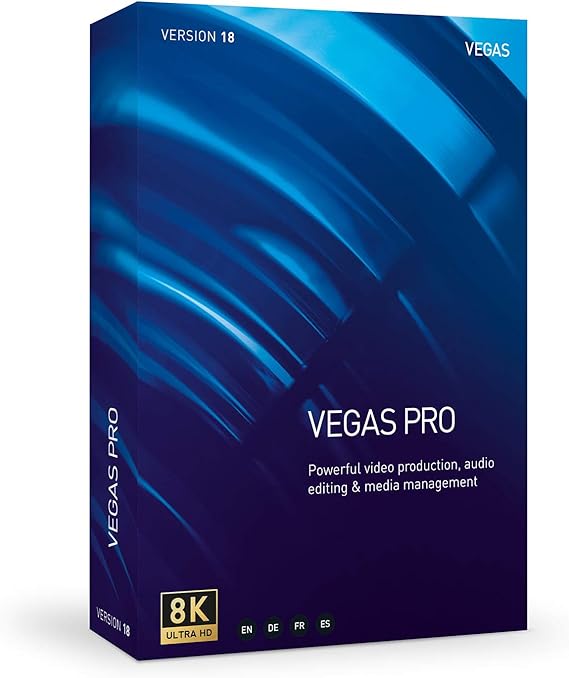
- VEGAS Pro 18 - Video Production, Audio Editing and Media Management
0 ratings



Item #:
26826182
VEGAS Pro 18 - Video Production, Audio Editing and Media Management
Item #:
26826182
BHD 287
Price Details
Excluding Shipping & Custom charges ( Shipping and custom charges will be calculated on checkout )
*All items will import from US
0 ratings
Write a review
In stock
 Imported from USA store
QTY:
Only 1 item left in stock.
Order now and get it around Wednesday, July 01
Secured transaction
Ubuy works hard to protect your security and privacy. Our advanced payment security system ensures confidentiality by encrypting your information during transmission using AES (Advanced Encryption Standards) and SSL (Secure Socket Layer) protocols. Your payment details are 100% secure as we do not share your payment details with third party sellers.
Our Top Logistics Partners


Experience endless creative adventures in video production with the powerful AI-powered tools of VEGAS Pro 18.

Fast
Shipping

Free
Return*

Secure Packaging

100% Original Products

PCI DSS Compliance

ISO 27001 Certified


Note: Step Down Voltage Transformer required for using electronics products of US store (110-120). Recommended power converters Buy Now.


What Stands Out
Comprehensive Editing
Vegas Pro 18 offers an all-in-one video production suite that integrates advanced editing, audio manipulation, and seamless media management, catering to professional creators and enthusiasts alike.
AI-Powered Tools
Utilizing cutting-edge AI technology, Vegas Pro 18 enhances editing efficiency with features like smart frame rendering and automatic audio leveling, saving time while delivering high-quality results.
Diverse Formats
Support for an extensive range of video and audio formats allows users to import, edit, and export projects effortlessly, ensuring compatibility and flexibility in any production workflow.
Product Details
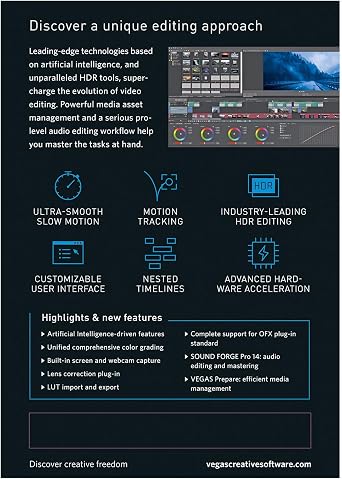
- Industry-leading hardware acceleration
- Sophisticated color grading options
- Planar motion tracking
- Industry-leading HDR support
- Powerful plugin management
| Language | English, French, German, Spanish |
| Product Dimensions | 7.4 x 1.3 x 5.3 inches (18.8 x 3.3 x 13.5 cm); 1.6 ounces (45.36 grams) |
| Our Recommended age | 5 - 20 years |
| Manufacturer recommended age | 0 months and up |
| Item model number | 639191250224 |
| Date First Available | August 3, 2020 |
| Manufacturer | Us Magix Entertainment |
Who Should Buy?

-
Professional Videographers
Ideal for professionals needing advanced video editing tools and effects for high-quality projects and client presentations.
-
Content Creators
Great for YouTubers and streamers seeking robust features for editing, audio management, and media organization.
-
Post-Production Teams
Perfect for teams involved in film or television production that require collaborative tools and versatile editing capabilities.

-
Casual Users
Not suitable for beginners or casual users looking for basic, user-friendly editing software without complex features.
-
Mobile Editors
Inconvenient for those who edit primarily on mobile devices, as it's designed for desktop use with high demands.
-
Budget-Conscious Users
Not the best choice for users on a tight budget, as the cost may exceed what casual or hobby editors want.
Product Description
About This Item
Introducing VEGAS Pro 18 - The Ultimate Video Production and Editing Software Are you ready to take your video production and editing skills to the next level? Look no further than VEGAS Pro 18, the comprehensive video editing solution designed to meet the needs of professionals like you. With advanced features and powerful tools, this software is your ticket to creating stunning videos with ease. One of the standout features of VEGAS Pro 18 is its seamless integration with VEGAS Prepare and Sound Forge Pro. This powerful trio ensures a smooth editing experience from start to finish.
With VEGAS Prepare, you can manage your media files effortlessly, organizing them in a logical and intuitive manner. And with Sound Forge Pro, you have access to impressive audio editing capabilities that will enhance the quality of your videos. But what truly sets VEGAS Pro 18 apart is its use of artificial intelligence. Powered by AI, this software brings new creative opportunities to your video production adventures.
Imagine having access to a range of intelligent tools that make your editing tasks faster and more efficient. From video effects to color grading, VEGAS Pro 18 has got you covered. Not only does VEGAS Pro 18 excel in video editing, but it also offers top-notch audio editing features. With its audio effects and precise audio editing capabilities, you can ensure that every sound in your videos is crystal clear.
From removing background noise to adding audio enhancements, the possibilities are endless. In addition to its video and audio editing prowess, VEGAS Pro 18 also offers comprehensive media management features. You can easily organize, archive, and backup your media assets, ensuring that no file or footage gets lost in the chaos. With VEGAS Pro 18, your media workflow becomes seamless and efficient. Don't settle for mediocre video editing software when you can have the best.
Take advantage of VEGAS Pro 18's video codecs, rendering options, and support for various video formats. Whether you're creating videos for personal use, professional projects, or even marketing purposes, VEGAS Pro 18 will deliver exceptional results. So why wait? Unlock your creativity and bring your video production dreams to life with VEGAS Pro 18. Experience the power of professional video editing software and revolutionize the way you create and edit videos.
Get your hands on VEGAS Pro 18 today and let your imagination run wild.
Have any Query? Chat with us
Customer Questions & Answers
-
Question:
What are the main features of VEGAS Pro 18?
Answer: VEGAS Pro 18 offers advanced video production capabilities, including multi-camera editing, powerful color grading tools, and seamless audio editing features. Users can take advantage of AI-driven enhancements like Scene Detection and Intelligent Upscaling for improved workflows. These features make it an ideal choice for filmmakers, content creators, and professionals seeking to elevate their editing productivity while enjoying a user-friendly interface. -
Question:
Is VEGAS Pro 18 suitable for beginners?
Answer: Yes, VEGAS Pro 18 is suitable for beginners due to its intuitive layout and extensive tutorial resources. The program matches the needs of novices with features like drag-and-drop functionality and customizable workspace options. Beginners can build their skills progressively, starting with basic projects before advancing to more complex video editing tasks. This makes VEGAS Pro 18 accessible for users at all experience levels. -
Question:
Can I use VEGAS Pro 18 for audio editing?
Answer: Absolutely! VEGAS Pro 18 includes powerful audio editing capabilities that allow users to create professional-quality soundtracks. With features like multi-track editing, noise reduction, and a vast library of audio effects, users can fully control the audio aspect of their projects. This versatility enables video producers to effectively sync, mix, and enhance the audio alongside visuals, ensuring a polished final product. -
Question:
What file formats can VEGAS Pro 18 export to?
Answer: VEGAS Pro 18 supports a wide range of export formats including MP4, MOV, AVI, and high-quality 4K options. This flexibility allows users to cater their final outputs for different platforms, from social media to broadcasting standards. Whether you're sharing quick clips online or preparing cinematic releases, VEGAS Pro 18 is designed to meet various format requirements effectively. -
Question:
Can VEGAS Pro 18 handle 4K video editing?
Answer: Yes, VEGAS Pro 18 is equipped to handle 4K video editing with ease. Its optimized workflows and high-performance rendering capabilities allow users to edit and export high-resolution videos efficiently. Content creators focused on producing cinematic-quality projects will find this feature particularly beneficial as it ensures that even the most demanding footage can be processed smoothly, resulting in stunning visual presentations. -
Question:
Does VEGAS Pro 18 offer collaboration features?
Answer: VEGAS Pro 18 includes tools that facilitate collaboration among team members, such as project file sharing and an integrated commenting system. These features enable multiple users to work on projects simultaneously while tracking changes, making it easier to incorporate feedback and edits. This is particularly useful for teams in video production who need to collaborate closely without any disruptions. -
Question:
What is the system requirement for VEGAS Pro 18?
Answer: To run VEGAS Pro 18 effectively, your system should ideally have a multi-core processor, at least 8GB of RAM, and a dedicated GPU that supports DirectX 12. Recommended specifications provide better performance for complex projects. Meeting these requirements ensures smoother playback and faster rendering, which significantly enhances the editing experience and productivity for users working on high-resolution content. -
Question:
Is there a trial version of VEGAS Pro 18 available?
Answer: Yes, VEGAS Pro 18 offers a trial version that lets users explore its features before committing to a purchase. The trial typically provides full access to all functionalities for a limited time, enabling potential users to test the software's capabilities, interface, and performance. This is a perfect opportunity for those unsure about investing in the software while allowing them to assess how it meets their editing needs. -
Question:
Can VEGAS Pro 18 integrate with other software?
Answer: VEGAS Pro 18 offers integration capabilities with a variety of popular software tools like Adobe Photoshop and After Effects, enhancing the workflow for users. This interoperability allows seamless import and export of files, which is essential for professionals working across different platforms. Integration helps streamline projects, enabling users to utilize the strengths of various applications in their editing processes. -
Question:
Where can I buy VEGAS Pro 18 in Bahrain?
Answer: You can buy VEGAS Pro 18 in Bahrain through Ubuy. Ubuy provides a convenient platform for purchasing software, ensuring you have access to the latest versions and updates. Their user-friendly experience and reliable service make it a preferred choice for acquiring VEGAS Pro 18.
VEGAS Lifestyle & Hobbies 639191250224 Editorial Review
VEGAS Pro 18 offers a range of features for video production, audio editing, and media management. However, customer reviews have highlighted several issues with the software, including frequent crashes and lack of support. Some users have even gone back to using older versions of the software. It is important to note that VEGAS Pro 18 is not compatible with Windows 7 and may have limited functionality on that operating system. On the positive side, VEGAS Pro 18 is compatible with Windows 11 and does not require a monthly subscription.
Customer Reviews & Ratings
19 customers ratings
-
5 Star
42%
-
4 Star
41%
-
3 Star
0%
-
2 Star
0%
-
1 Star
17%
Review this product
Share your thoughts with other customers
Pros
- Offers a range of features for video production, audio editing, and media management
- Compatible with Windows 11
- No monthly subscription required
Cons
- Frequent crashes reported
Product Price History
Important information
- Limitations : For products shipped internationally, please note that any manufacturer warranty may not be valid; manufacturer service options may not be available; product manuals, instructions, and safety warnings may not be in destination country languages; the products (and accompanying materials) may not be designed in accordance with destination country standards, specifications, and labeling requirements; and the products may not conform to destination country voltage and other electrical standards (requiring use of an adapter or converter if appropriate). The recipient is responsible for assuring that the product can be lawfully imported to the destination country. When ordering from Ubuy or its affiliates, the recipient is the importer of record and must comply with all laws and regulations of the destination country.
- Not all the products listed on Ubuy are for sale, as Ubuy is a global search engine. Products are subject to export/trade regulations.
BHD 287
Order now and get it around Wednesday, July 01
This item is not restrict in my country.(Please click on above link if this item is not restrict in your country, So our team will review and allow.)
QTY:
Only 1 item left in stock.
Secured transaction
Ubuy works hard to protect your security and privacy. Our advanced payment security system ensures confidentiality by encrypting your information during transmission using AES (Advanced Encryption Standards) and SSL (Secure Socket Layer) protocols. Your payment details are 100% secure as we do not share your payment details with third party sellers.
Our Top Logistics Partners
Fastest cross-border delivery