- Home Page /
- Software /
- Accounting & Finance /
- Business Accounting /
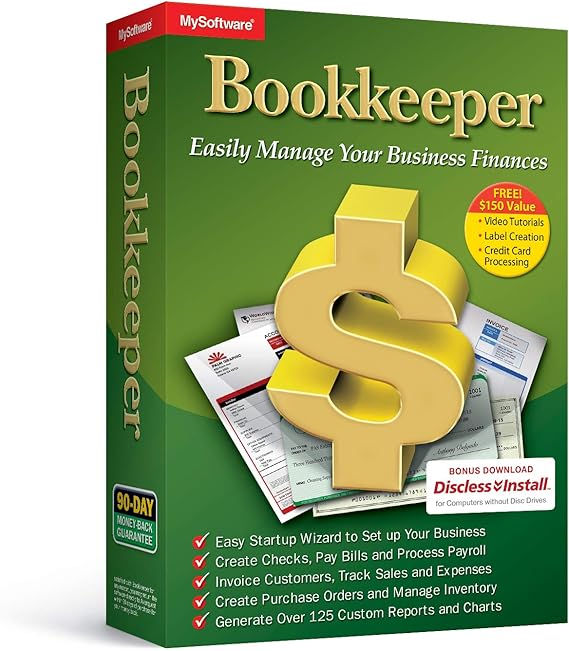
- Bookkeeper: Easily Manage Your Business Finances
0 ratings

Item #:
7858865
Bookkeeper: Easily Manage Your Business Finances
Item #:
7858865
BHD 21
Price Details
Excluding Shipping & Custom charges ( Shipping and custom charges will be calculated on checkout )
*All items will import from US
0 ratings
Write a review
In stock
 Imported from USA store
QTY:
Order now and get it around Monday, June 29
Secured transaction
Ubuy works hard to protect your security and privacy. Our advanced payment security system ensures confidentiality by encrypting your information during transmission using AES (Advanced Encryption Standards) and SSL (Secure Socket Layer) protocols. Your payment details are 100% secure as we do not share your payment details with third party sellers.
Our Top Logistics Partners


Easily Manage your Small Business with Bookkeeping and Payroll Software

Fast
Shipping

Free
Return*

Secure Packaging

100% Original Products

PCI DSS Compliance

ISO 27001 Certified


Note: Step Down Voltage Transformer required for using electronics products of US store (110-120). Recommended power converters Buy Now.


Product Details
| Item Weight | 1.5 lbs (680 grams) |
Product Description
Bookkeeper: Easily Manage Your Business Finances
About This Item
Introducing the Bookkeeper: Easily Manage Your Business Finances! Are you tired of dealing with the complexities of business finances? Look no further! With our Bookkeeper, you can easily manage your business finances without any hassle. Whether you are a small business owner or an entrepreneur, efficient financial management is crucial for your success. Our Bookkeeper offers a comprehensive set of features to simplify your business finance management and streamline your operations. Keep track of your income, expenses, and cash flow with ease. The Bookkeeper allows you to categorize your transactions, so you always have a clear understanding of your financial health.
Say goodbye to tedious manual entry and let our software automate the process for you. With our Bookkeeper, you can also generate detailed financial reports to gain insights into your business performance. Analyze your profit and loss statements, balance sheets, and cash flow statements effortlessly. Make informed decisions and stay ahead of the competition. Worried about staying compliant with tax regulations? Our Bookkeeper has got you covered! It provides a seamless solution for business tax management, ensuring accurate record-keeping and effortless tax filing. Simplify your financial organization with our Bookkeeper.
No more messy spreadsheets or scattered receipts. Everything is neatly organized in one place, making it easy for you to stay on top of your finances. Our Bookkeeper is not just limited to software. We also offer online bookkeeping services by our team of experts.
Let us handle your financial tasks while you focus on growing your business. Don't let financial management become a burden. Invest in our Bookkeeper and experience the ease of managing your business finances. Take control of your finances today!.
Have any Query? Chat with us
Customer Questions & Answers
-
Question:
What features does Bookkeeper offer for managing finances?
Answer: Bookkeeper offers a range of features designed for efficient financial management, including expense tracking, invoicing, and financial reporting. These tools allow business owners to monitor cash flow, manage expenses in real-time, and generate reports that summarize financial health. By using Bookkeeper, you can streamline your accounting processes, saving time and reducing the risk of errors. Whether you run a small startup or a larger enterprise, the software adapts to various business models, enhancing your financial oversight. -
Question:
Is Bookkeeper suitable for small businesses?
Answer: Yes, Bookkeeper is particularly well-suited for small businesses. Its intuitive interface and straightforward features cater to entrepreneurs who may not have extensive accounting experience. Small business owners can manage invoices and track expenses without the complexities found in larger accounting software. This makes it ideal for freelancers, consultants, and small teams looking to maintain organized financial records, simplify audits, and improve their budgeting processes. -
Question:
Can I use Bookkeeper on multiple devices?
Answer: Bookkeeper is designed to be accessible across multiple devices. You can use the platform on your computer, tablet, or smartphone, providing flexibility for users on the go. This cross-platform availability ensures that you can manage your finances wherever you are, whether attending meetings, working from home, or traveling. This accessibility is essential for entrepreneurs who need to stay updated on their business finances in real-time, improving decision-making and responsiveness. -
Question:
How does Bookkeeper handle tax preparation?
Answer: Bookkeeper simplifies tax preparation by organizing all financial information in one place. It allows users to categorize expenses, generate financial reports, and track income throughout the year. This comprehensive data collection makes it easier to prepare for tax season and reduces the likelihood of missing deductions. Users can export necessary financial documents easily, ensuring they have everything needed for tax filings, which helps to streamline communications with tax professionals. -
Question:
Does Bookkeeper support invoicing and payments?
Answer: Absolutely, Bookkeeper supports invoicing and payment processing. You can create and send professional invoices directly through the software, making it easy to request payments from clients. Moreover, it allows you to accept various payment methods, providing flexibility for your customers. This feature streamlines your revenue collection process, ensuring timely payments and improving cash flow management, which is crucial for maintaining business operations. -
Question:
Are there integration options available with Bookkeeper?
Answer: Yes, Bookkeeper integrates seamlessly with a variety of other software tools, including popular payment processors, e-commerce platforms, and accounting systems. This integration capability enhances the functionality of Bookkeeper, allowing you to synchronize data across platforms and avoid repetitive data entry. By using these integrations, you can enhance your overall efficiency in managing finances and maintain an organized financial ecosystem. -
Question:
Is Bookkeeper user-friendly for non-accountants?
Answer: Bookkeeper is designed with non-accountants in mind, featuring a user-friendly interface that simplifies financial tasks. The software provides clear navigational paths and logical workflows, allowing users to perform financial activities without needing advanced accounting knowledge. This ease of use empowers individuals from various backgrounds to take charge of their business finances confidently, making it perfect for entrepreneurs and freelancers alike. -
Question:
What kind of customer support does Bookkeeper offer?
Answer: Bookkeeper offers comprehensive customer support to ensure users can effectively utilize the software. Support channels may include live chat, email, and a knowledge base full of tutorials and FAQs. Their team is dedicated to helping users troubleshoot any issues or understand features better. This commitment to customer support allows you to get the most out of your financial management tool, enhancing your overall experience and ensuring your business runs smoothly. -
Question:
Can I track expenses with Bookkeeper?
Answer: Yes, tracking expenses is one of the core functionalities of Bookkeeper. The software allows users to log expenses in real time, categorize them, and view trends over time. This helps identify where money is being spent, allowing for better budgeting and cost-cutting decisions. Particularly useful for business owners, tracking expenses accurately can lead to better financial insights and informed strategic planning for future endeavors. -
Question:
Can I customize reports in Bookkeeper?
Answer: Definitely, Bookkeeper allows users to customize financial reports. You can select specific metrics and time periods, enabling you to generate reports that meet your specific needs. Custom reports can help you analyze performance, track growth, and make informed financial decisions. This feature is particularly valuable for stakeholders needing precise information for planning and budget discussions, ensuring everyone stays aligned with the financial goals of the business. -
Question:
Where can I buy Bookkeeper: Easily Manage Your Business Finances in Bahrain?
Answer: You can buy Bookkeeper: Easily Manage Your Business Finances on Ubuy. Ubuy provides a reliable platform for purchasing this software, ensuring you have access to the product along with detailed descriptions and support for your inquiries. By choosing Ubuy, you can have confidence in your purchase and begin managing your business finances effectively.
Avanquest Business Accounting Editorial Review
No editorial reviews found
Customer Reviews & Ratings
1 customers ratings
-
5 Star
100%
-
4 Star
0%
-
3 Star
0%
-
2 Star
0%
-
1 Star
0%
Review this product
Share your thoughts with other customers
Product Price History
Important information
- Limitations : For products shipped internationally, please note that any manufacturer warranty may not be valid; manufacturer service options may not be available; product manuals, instructions, and safety warnings may not be in destination country languages; the products (and accompanying materials) may not be designed in accordance with destination country standards, specifications, and labeling requirements; and the products may not conform to destination country voltage and other electrical standards (requiring use of an adapter or converter if appropriate). The recipient is responsible for assuring that the product can be lawfully imported to the destination country. When ordering from Ubuy or its affiliates, the recipient is the importer of record and must comply with all laws and regulations of the destination country.
- Not all the products listed on Ubuy are for sale, as Ubuy is a global search engine. Products are subject to export/trade regulations.
BHD 21
Order now and get it around Monday, June 29
This item is not restrict in my country.(Please click on above link if this item is not restrict in your country, So our team will review and allow.)
QTY:
Secured transaction
Ubuy works hard to protect your security and privacy. Our advanced payment security system ensures confidentiality by encrypting your information during transmission using AES (Advanced Encryption Standards) and SSL (Secure Socket Layer) protocols. Your payment details are 100% secure as we do not share your payment details with third party sellers.
Our Top Logistics Partners
Fastest cross-border delivery
Features & Benefits
- Print to blank check stock.
- Electronic form filing for W-2, 1099-NEC, and 1099-MISC.
- Tax forms for 2022.
- Tax tables for 2023.
- Support for new 1099-NEC form.