- الصفحة الرئيسية /
- إلكترونيات /
- إكسسوارات الكمبيوتر /
- Computer Accessories & Peripherals /
- Input Devices /
- Trackballs /
- Logitech MX Ergo Plus Wireless Trackball | Ex...







منتج #:
7235538
Logitech MX Ergo Plus Wireless Trackball | Extra 10-degree wedge, PC and Mac compatibility
86% من المشترين سيوصون بهذا المنتج لصديق
منتج #:
7235538
BHD 49
تفاصيل السعر
باستثناء رسوم الشحن والجمارك ( سيتم احتساب رسوم الشحن والجمارك عند إتمام الشراء )
*سيتم استيراد جميع العناصر من أمريكا
متوفر فى المخزون
 مستورد من متجر USA
كمية:
بقي 5 فقط من المنتج في المخزن.
اطلب الآن واحصل عليه حول السبت, سبتمبر 12
معاملة آمنة
تعمل يوباي جاهدة لحماية أمنك وخصوصيتك. يضمن نظام أمان الدفع المتقدم لدينا السرية من خلال تشفير معلوماتك أثناء النقل باستخدام بروتوكولات AES (معايير التشفير المتقدمة) وSSL (طبقة المنافذ الآمنة). تفاصيل الدفع الخاصة بك آمنة بنسبة %100 لأننا لا نشارك تفاصيل الدفع الخاصة بك مع بائعين تابعين لجهات خارجية
أفضل شركائنا اللوجستيين


Logitech's most advanced trackball for trackball enthusiasts and consumers searching for alternatives to mice and touchpads.

شحن
سريع

استرجاع
مجاني*

تغليف آمن

منتجات أصلية %100

الامتثال لمعيار PCI DSS

حاصل على شهادة ISO 27001




Note: Step Down Voltage Transformer required for using electronics products of أمريكا store (110-120). Recommended power converters اشتري الآن.


مايفيد
Ergonomic Design
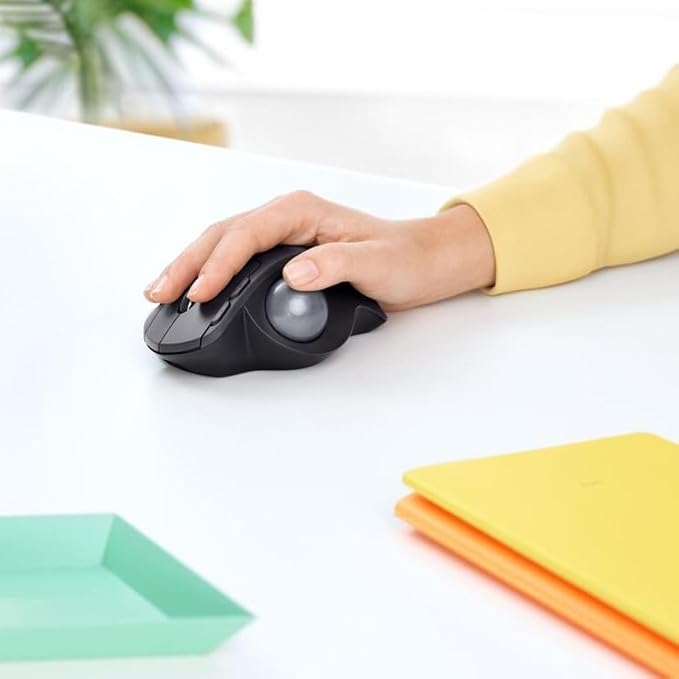
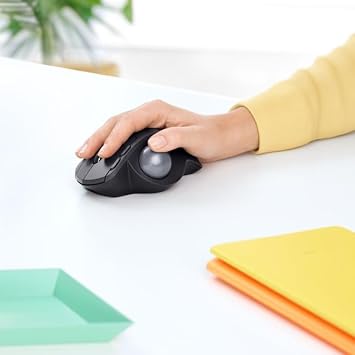
The Logitech MX Ergo Plus features an adjustable 10° angle, promoting natural hand posture and reducing wrist strain for increased comfort during prolonged use.
Customizable Controls
Benefit from customizable buttons and easy-shift technology, allowing users to personalize their workflow for enhanced productivity and efficiency tailored to individual preferences.
Dual Connectivity
Seamlessly switch between PC and Mac with Bluetooth or USB receiver options, providing versatile connectivity and flexibility for users across multiple devices.
تفاصيل المنتج
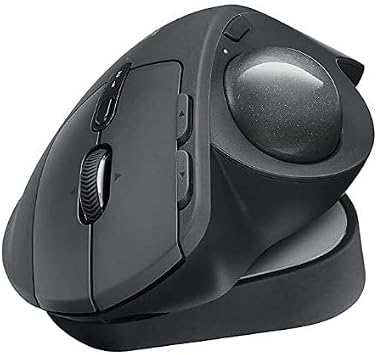
- Smart adjustable hinge plus extra 10° wedge for customized hand position and greater comfort
- Choose the best angle for you 0°, 20° or 30°
- Advanced tracking with Precision mode button for instant switch between speed and high precision tracking
- Precision scroll-wheel with tilt and middle click for precise scrolling and convenient controls
- Easy-Switch™ and FLOW-enabled for effortless multi-computer workflow, allowing pairing with up to 2 computers and easy switching between them
- Fast rechargeable battery with up to 4 months of power on a full charge and quick charge feature: 1 minute gives up to a day of use
| Connectivity Technology | Bluetooth, Radio Frequency, USB |
| Additional Features | Wireless |
| Movement Detection | Trackball |
| Button Quantity | 8 |
| Hand Orientation | Right |
| Compatible Devices | Personal Computer |
| Operating System | Windows 7, Windows 8 |
| Battery Average Life | 4 months |
| Number of Batteries | 1 AAA batteries required. |
| Hardware Platform | PC |
| Power Source | Battery Powered |
| Minimum Required Operating System Version | Windows 7 |
| Range | 10.0 meters |
| Color | Graphite |
| Style Name | Ergonomic |
| Enclosure Material | Plastic |
| Brand | Logitech |
| Model Name | MX ERGO Wireless Trackball |
| Antenna Location | Office |
| Model Number | MX Ergo Plus |
| Included Components | Logitech Unifying USB Receiver, Logitech 'AAA' Lithium-Ion battery, User Manual |
| Manufacturer | Logitech |
| UPC | 097855133922 |
| Item Type Name | Mouse |
| Mfr Part Number | 910-005178 |
| Item Dimensions L x W | 4.19"L x 2.01"W (10.6 cm) |
| Unit Count | 1 Count |
| Special Feature | Wireless |
| Movement Detection Technology | Trackball |
| Package Weight | 2.53 Pound |
ما بداخل الصندوق
Logitech Unifying USB Receiver, Logitech 'AAA' Lithium-Ion battery, User Manual
من يجب أن يشتري؟

-
Wrist Pain Sufferers
Ideal for users with repetitive strain injuries, as it minimizes wrist movement and supports ergonomic positioning.
-
Precision Tasks
Great for graphic designers and video editors who require precision control over their cursor for detailed work.
-
Limited Desk Space
Suitable for users with small work areas since trackballs require less horizontal movement compared to traditional mice.

-
Gamer Enthusiasts
Not suitable for serious gamers who typically prefer the swift movement and responsiveness of traditional gaming mice.
وصف المنتج
هل لديك أي استفسار؟ تحدث معنا
أسئلة العملاء & الإجابات
-
سؤال:
What is the Logitech MX Ergo Plus Advanced Wireless Trackball?
إجابه: The Logitech MX Ergo Plus Advanced Wireless Trackball is a high-performance input device designed for PC and Mac users. It features a unique trackball design that allows you to control the cursor by rolling the ball instead of moving the mouse. This design promotes a more ergonomic hand position, reducing strain during prolonged usage. Ideal for graphic designers, gamers, and office workers, the MX Ergo Plus offers customizable buttons and dual connectivity options, ensuring it adapts to your workflow seamlessly. -
سؤال:
How does the ergonomic design of the MX Ergo Plus improve comfort?
إجابه: The ergonomic design of the MX Ergo Plus incorporates a 10° wedge that positions your hand more naturally. This angle reduces wrist strain and promotes a more relaxed hand posture. Users who spend numerous hours at their computers—such as programmers and writers—will find that this design significantly enhances comfort, allowing for longer, more productive working sessions without discomfort. -
سؤال:
Can the MX Ergo Plus be connected to multiple devices?
إجابه: Yes, the Logitech MX Ergo Plus can be connected to up to three devices simultaneously via Bluetooth or the USB receiver. This feature allows you to switch between devices effortlessly, making it perfect for users who frequently toggle between a laptop, desktop, or tablet. Simply press a button to switch connections, streamlining your workflow and enhancing productivity. -
سؤال:
What type of tracking technology does the MX Ergo Plus use?
إجابه: The MX Ergo Plus features precision tracking technology that provides accurate cursor movement from the trackball. This allows for precise control, making it especially advantageous for graphic design work and detailed editing tasks. The adjustable DPI settings allow users to customize the sensitivity according to their preferences, ensuring optimal performance for various applications. -
سؤال:
Is the MX Ergo Plus suitable for gaming?
إجابه: While the MX Ergo Plus is primarily designed for productivity and ergonomic benefits, it can also serve well for casual gaming. Its precise tracking and customizable buttons enable gamers to have a responsive experience. For those who prefer less mainstream gaming peripherals, the MX Ergo Plus can be a unique choice, especially for strategy and simulation games where fine control is essential. -
سؤال:
How do I clean the Logitech MX Ergo Plus Trackball?
إجابه: Cleaning the MX Ergo Plus Trackball involves removing the ball and cleaning both the ball and the socket with a soft, lint-free cloth. The trackball is designed for easy maintenance; simply lift off the top cover, and you can access the interior for a thorough clean. Regular cleaning ensures consistent performance and longevity of the device, especially for users in dusty environments or those who frequently snack while working. -
سؤال:
What software can I use with the MX Ergo Plus?
إجابه: The Logitech MX Ergo Plus is compatible with Logitech Options software, which allows you to customize buttons, adjust settings, and perform firmware updates. With the software, you can create specific profiles for different applications, enhancing productivity by offering one-click shortcuts for frequently used functions. This added versatility makes the MX Ergo Plus a powerful tool for both work and play. -
سؤال:
What are the benefits of using a trackball instead of a traditional mouse?
إجابه: Using a trackball like the MX Ergo Plus can lead to improved ergonomics, as it confines hand movement and reduces strain on the wrist. Additionally, a trackball can save desk space because it doesn’t require a wide range of movement like a mouse. Users engaged in graphic design work or those performing extensive data entry will find a trackball to provide better precision and greater control over cursor movements, enhancing overall efficiency. -
سؤال:
What is the battery life of the MX Ergo Plus?
إجابه: The Logitech MX Ergo Plus boasts an impressive battery life that can last up to four months on a full charge. Its power-saving features, including automatic sleep mode when inactive, extend usability even further. Users will appreciate the long-lasting performance, which suits both casual and intensive use, ensuring that interruptions for recharging are kept to a minimum. -
سؤال:
Where can I buy the Logitech MX Ergo Plus Advanced Wireless Trackball for PC and MAC with Extra 10° Wedge?
إجابه: You can buy the Logitech MX Ergo Plus Advanced Wireless Trackball for PC and MAC with Extra 10° Wedge at Ubuy in Bahrain. Ubuy offers an extensive selection of Logitech products, ensuring you have access to this advanced trackball along with great service and delivery options tailored to your needs.
Logitech Trackballs MX Ergo Plus Editorial Review


The Logitech MX Ergo Wireless Trackball Mouse is reviewed positively by customers with only a few minor complaints about the double-click issue and cheap materials. The product is highly attractive to users who are suffering from carpal tunnel, arthritis, or trigger fingers. The Bluetooth connectivity and optional tilt of the mouse make it easy to use and help to get the user’s wrist at the right angle. Customers love the precision and great software integration of the mouse but wished there was more customization, including horizontal scrolling. Customers who received the mouse without the larger base or plastic wedge felt a little bit disappointed because they felt it made the experience more comfortable. Users highly recommend this mouse and noted that this was great for heavy users who are looking for a high-quality trackball mouse.
مراجعات العملاء وتقييماتهم
763 تقييمات العملاء
-
5 نجمة
75%
-
4 نجمة
11%
-
3 نجمة
5%
-
2 نجمة
2%
-
1 نجمة
7%
أضف تقييم لهذا المنتج
شارك أفكارك مع عملاء آخرين
إيجابيات
- Optional tilt is highly attractive to customers to get their wrist at the right angle
- Precise ball movement and great software integration
- Great for heavy users who are looking for a high-quality trackball mouse
- Ideal for folks that have carpal tunnel, arthritis or trigger fingers
سلبيات
- Some customers faced double-click issues and cheap materials, which are a common issue
منصة موثوقة وثقة كاملة للمشتري

MB
Maryam
مشتري موثّق
“The order arrived fast and in perfect condition”
2 June 2026 · عبر Trustpilot
T
trusttaker
مشتري موثّق
“I loved it. That was my second order, and I am already thinking of placing a third order.”
16-Jul-26 · عبر Trustpilot
HA
Haitham
مشتري موثّق
“Trusted merchant”
11 July 2026 · عبر Trustpilot
MA
Mohammad
مشتري موثّق
“Excellent quality and very fast delivery, I really appreciate your service, when you work good I will appreciate that, I am very satisfied , thank you”
13 June 2026 · عبر Trustpilot
LA
Lulwa
مشتري موثّق
“I like the package arrived safely”
17 June 2026 · عبر Trustpilot
الخروج الآمن
شحن عالمي
إسترجاع سهل
منتجات أصلية
تاريخ سعر المنتج
معلومات مهمة
- القيود: بالنسبة للمنتجات التي يتم شحنها دولياً، يُرجى ملاحظة أن أي ضمان من الشركة المصنعة قد لا يكون صالحاً؛ قد لا تتوفر خيارات خدمة الشركة المصنعة؛ قد لا تكون أدلة المنتج والتعليمات وتحذيرات السلامة مكتوبة بلغة بلد المقصد؛ قد لا يتم تصميم المنتجات (والمواد المصاحبة لها) وفقاً لمعايير بلد الوجهة والمواصفات ومتطلبات الملصقات؛ وقد لا تتوافق المنتجات مع الجهد الكهربي المستخدم في بلد الوجهة والمعايير الكهربائية الأخرى (تتطلب استخدام محوّل كهربي أو جهاز تحويل إذا كان ذلك مناسباً). المستلم مسؤول عن ضمان إمكانية استيراد المنتج بشكل قانوني إلى بلد الوجهة. عند الطلب من يوباي أو الشركات التابعة لها، يكون المستلم هو المستورد المسجل ويجب أن يلتزم بجميع القوانين واللوائح الخاصة ببلد الوجهة.
- ليست كل المنتجات المدرجة على يوباي معروضة للبيع، لأن يوباي هو محرك بحث عالمي. المنتجات تخضع للوائح التصدير / التجارة.
BHD 49
اطلب الآن واحصل عليه حول السبت, سبتمبر 12
هذا المنتج غير ممنوع في بلدي. (الرجاء الضغط على الرابط أعلاه إذا لم يكن هذا المنتج ممنوعاً في بلدك ، لذلك سيقوم فريقنا بمراجعته والسماح به.)
كمية:
بقي 5 فقط من المنتج في المخزن.
معاملة آمنة
نوفر لك مدفوعات مشفّرة، وحماية متكاملة للمشتري، مع الالتزام بمعايير PCI DSS وشهادة ISO 27001:2022 لضمان أعلى مستويات الأمان في كل عملية شراء.
أفضل شركائنا اللوجستيين
أسرع توصيل عبر الحدود
المميزات والفوائد
- Delivers 20% less muscular strain compared to a regular mouse
- Precision mode button allows to instantly switch between speed and precise tracking
- Easy-Switch™ and FLOW-enabled for effortless multi-computer workflow
- Smart adjustable hinge plus extra 10? wedge for customized hand position and greater comfort
- Fast rechargeable battery. Holds power for up to 4 months on a full charge. Quick charge: 1 minute of charge gives up to a day of use.
ضمان Ubuy
تسوّق بثقة مع منتجات أصلية %100، ومدفوعات آمنة متوافقة مع معيار PCI DSS، وحماية بيانات معتمدة وفق ISO 27001، وشحن دولي سريع، وإرجاع مجاني*، وتغليف آمن لكل طلب.